1.5 Zoo Learning Activity

Overview
1.Prepare for Zoo 1.5
A Returning Values from Methods

In Zoo 1.5, move the portion and price calculations into the objects that own their data. Return the amount actually removed from a wallet, pass that payment to the vending machine, and use Boolean and string return values to answer questions about the zoo.

B Getting Started
1 Copy your completed Zoo 1.4 solution, then rename the copied folder and solution file for Zoo 1.5. Open the copied solution in Visual Studio.
2 Build your starting solution before making the following changes.
C Starting Point — End of Zoo 1.4

The feeding handlers already calculate a portion from Weight and PortionSizePercentage, calculate its price, and call RemoveMoney, AddMoney, RemoveFood, and Eat. Pregnancy is already represented by the Baby reference. The starting-state reference below uses the members present in the supplied Zoo 1.4 end project.
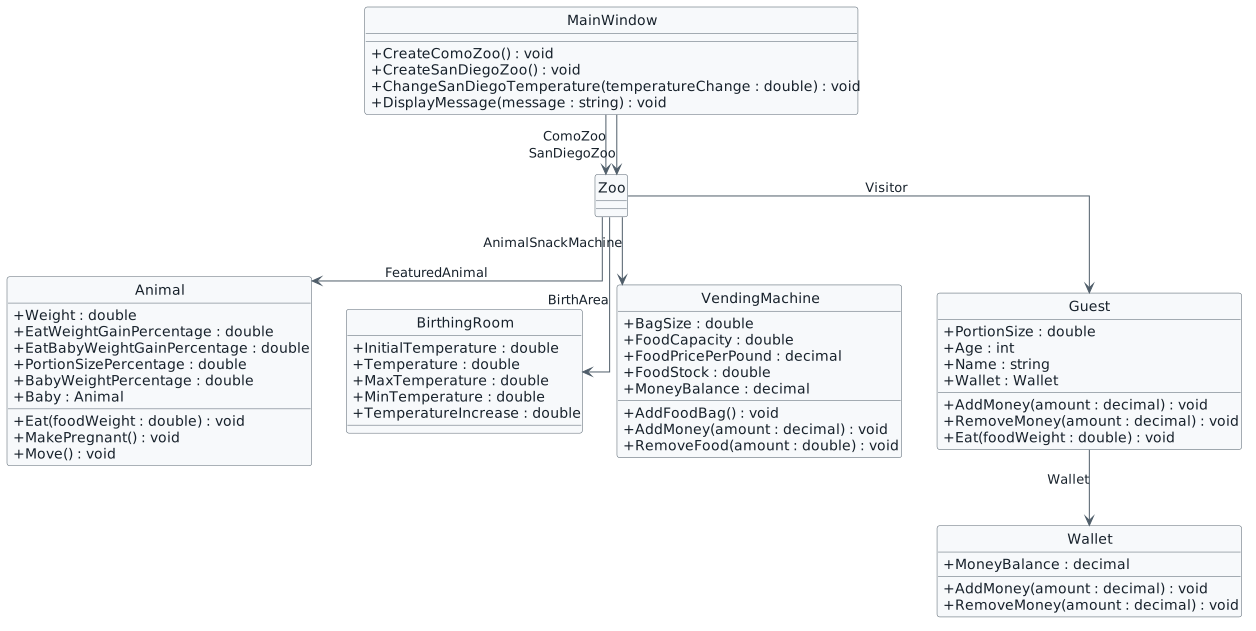
Starting Zoo 1.5 class diagram carried forward from Zoo 1.4. Animal has Baby and percentage fields; feeding and money methods accept parameters.
Starting structure — supplied Zoo 1.4 End
  • New
  • Changed
  • Removed
1 In MainWindow.xaml.cs, confirm these calls already appear in the matching creation methods after the FeaturedAnimal fields, including Weight and Type, have been assigned. Add a missing call once so the starting state matches the completed Zoo 1.4 project.

In CreateComoZoo():

this.ComoZoo.FeaturedAnimal.MakePregnant();

In CreateSanDiegoZoo():

this.SanDiegoZoo.FeaturedAnimal.MakePregnant();
2 Create each zoo and inspect its FeaturedAnimal. Dolly and Patti are both Female. Confirm their Baby references are non-null, with starting Baby weights of approximately 3.53 and 0.327 respectively.
Use Returned Values Throughout the Feeding Transaction
Acceptance Criteria
  • The animal returns its portion size using its existing percentage field.
  • The vending machine returns a price rounded to cents.
  • The wallet returns zero, the requested amount, or its remaining balance as appropriate.
  • Guest returns the wallet’s result to MainWindow.
  • Both feeding handlers deposit the returned payment and use the calculated portion for food removal and eating.
2.Return the Food Portion Size
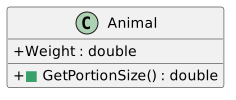
Animal class with a new public GetPortionSize method that returns double.
Animal returns its portion size
  • New
  • Changed
  • Removed
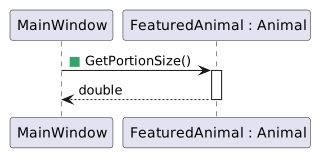
MainWindow calls GetPortionSize on FeaturedAnimal and receives a double.
GetPortionSize call and return
  • New
  • Changed
  • Removed

Class change: add public double GetPortionSize() to Animal. Keep Weight and PortionSizePercentage. Call flow: MainWindow calls FeaturedAnimal.GetPortionSize(); Animal returns its calculated portion; MainWindow stores the result in foodWeight.

Problem

Both feeding handlers reach into the animal to calculate its portion. The animal can provide that answer itself.

Solution

Add Animal.GetPortionSize() and use its returned value in both feeding handlers.

A Make the Changes
1 In Animal.cs, add GetPortionSize() inside the Animal class, after the fields and before Eat. Use the existing PortionSizePercentage field so the calculation stays with the animal.
public double GetPortionSize()
{
    return this.Weight * this.PortionSizePercentage;
}
2 In MainWindow.xaml.cs, replace the first statement in darlaFeedDingoButton_Click with this call. Keep the local variable named foodWeight.
double foodWeight = this.ComoZoo.FeaturedAnimal.GetPortionSize();
3 Replace the first statement in daveFeedPlatypusButton_Click with the corresponding San Diego call.
double foodWeight = this.SanDiegoZoo.FeaturedAnimal.GetPortionSize();
B Check Your Work
1 Create each zoo, then break on its feeding handler’s first statement. Step into GetPortionSize(), inspect the animal’s fields, and step out. After the assignment runs, foodWeight should be approximately 0.706 for Dolly and 0.0654 for Patti.
3.Return the Food Price
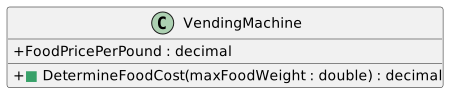
VendingMachine class with a new DetermineFoodCost method receiving maxFoodWeight as double and returning decimal.
VendingMachine returns a rounded price
  • New
  • Changed
  • Removed
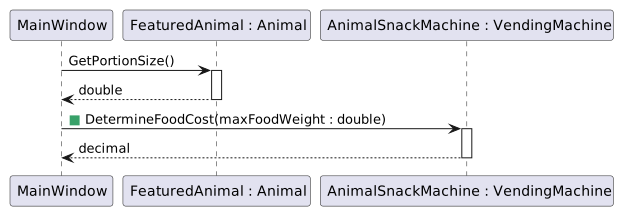
MainWindow gets the portion size from FeaturedAnimal, then passes it to DetermineFoodCost on AnimalSnackMachine and receives a decimal.
DetermineFoodCost call and return
  • New
  • Changed
  • Removed

Class change: add public decimal DetermineFoodCost(double maxFoodWeight) to VendingMachine. Call flow: MainWindow passes foodWeight to AnimalSnackMachine.DetermineFoodCost; the vending machine calculates and rounds the price; MainWindow stores the returned value in foodCost.

Problem

The handler also reaches into the vending machine to calculate food cost. Move that calculation into the vending machine and round the returned price once.

Solution

Add VendingMachine.DetermineFoodCost(double maxFoodWeight) and use its rounded return value in both feeding handlers.

A Make the Changes
1 In VendingMachine.cs, add DetermineFoodCost(double maxFoodWeight) after AddFoodBag. The existing using System; makes Math.Round available.
public decimal DetermineFoodCost(double maxFoodWeight)
{
    decimal maxFoodCost = (decimal)maxFoodWeight * this.FoodPricePerPound;

    decimal foodCost = Math.Round(maxFoodCost, 2);

    return foodCost;
}
2 In darlaFeedDingoButton_Click, replace the foodCost calculation with the following statement immediately after the foodWeight assignment.
decimal foodCost = this.ComoZoo.AnimalSnackMachine.DetermineFoodCost(foodWeight);
3 In daveFeedPlatypusButton_Click, make the same replacement using SanDiegoZoo.
decimal foodCost = this.SanDiegoZoo.AnimalSnackMachine.DetermineFoodCost(foodWeight);
B Check Your Work
1 From newly created zoos, step through DetermineFoodCost. Como’s unrounded cost is 0.5295m and its returned cost is 0.53m. San Diego’s unrounded cost is 0.07848m and its returned cost is 0.08m.
4.Return the Amount Actually Removed
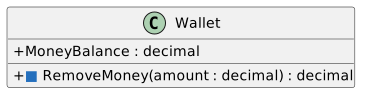
Wallet RemoveMoney changes from returning void to returning decimal.
Guest and Wallet return the actual payment
  • New
  • Changed
  • Removed
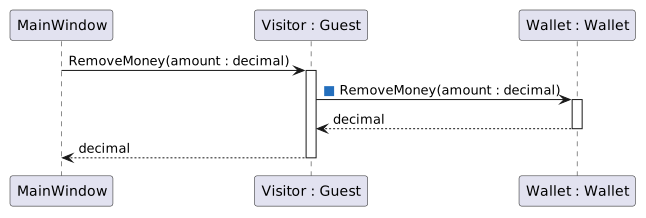
MainWindow calls RemoveMoney on Visitor. Visitor calls RemoveMoney on Wallet, receives a decimal, and returns that decimal to MainWindow.
Payment returned through Guest
  • New
  • Changed
  • Removed

Class changes: change RemoveMoney(decimal amount) from void to decimal in both Wallet and Guest. Call flow: MainWindow calls Visitor.RemoveMoney(foodCost); Guest calls Wallet.RemoveMoney(amount); Wallet returns the amount removed; Guest returns that same value to MainWindow.

Problem

A requested payment may exceed the wallet’s balance. The caller needs to know how much money was actually removed.

A Make the Changes
1 In Wallet.cs, replace RemoveMoney(decimal amount) with the following version. Change the return type from void to decimal. Each branch assigns amountRemoved; the method then subtracts and returns that amount.
public decimal RemoveMoney(decimal amount)
{
    decimal amountRemoved;

    if (amount <= 0.00m)
    {
        amountRemoved = 0.00m;
    }
    else if (this.MoneyBalance >= amount)
    {
        amountRemoved = amount;
    }
    else
    {
        amountRemoved = this.MoneyBalance;
    }

    this.MoneyBalance -= amountRemoved;

    return amountRemoved;
}
2 In Guest.cs, replace RemoveMoney(decimal amount) with this version. Store the wallet’s returned value, then return it to Guest’s caller.
public decimal RemoveMoney(decimal amount)
{
    decimal amountRemoved = this.Wallet.RemoveMoney(amount);

    return amountRemoved;
}

The first branch rejects zero or negative requests. The second branch pays the full request when funds are sufficient. The final branch pays the remaining balance when funds are insufficient.

B Check Your Work

Use a breakpoint in Wallet.RemoveMoney. Test each case independently with a fresh balance; inspect amountRemoved before the return statement.

  • Start with MoneyBalance = 5.25m and request amount = 0.53m. Confirm amountRemoved = 0.53m and the ending MoneyBalance = 4.72m.
  • Start with MoneyBalance = 0.20m and request amount = 0.53m. Confirm amountRemoved = 0.20m and the ending MoneyBalance = 0.00m.
  • Start with MoneyBalance = 5.25m and request amount = 0.00m. Confirm amountRemoved = 0.00m and the ending MoneyBalance = 5.25m.
  • Start with MoneyBalance = 5.25m and request amount = -1.00m. Confirm amountRemoved = 0.00m and the ending MoneyBalance = 5.25m.
1 Confirm all payment branches return the expected value and that Guest.RemoveMoney returns the same value as Wallet.RemoveMoney.
5.Use the Returned Payment in Both Feeding Handlers
A Make the Changes
1 In each feeding handler in MainWindow.xaml.cs, replace the standalone Visitor.RemoveMoney(foodCost) call with a decimal payment assignment. Pass payment to AddMoney so the machine receives only the money the wallet removed.
2 Complete darlaFeedDingoButton_Click as shown. The last two calls continue using foodWeight.
public void darlaFeedDingoButton_Click(object sender, RoutedEventArgs e)
{
    double foodWeight = this.ComoZoo.FeaturedAnimal.GetPortionSize();
    decimal foodCost = this.ComoZoo.AnimalSnackMachine.DetermineFoodCost(foodWeight);
    decimal payment = this.ComoZoo.Visitor.RemoveMoney(foodCost);

    this.ComoZoo.AnimalSnackMachine.AddMoney(payment);
    this.ComoZoo.AnimalSnackMachine.RemoveFood(foodWeight);
    this.ComoZoo.FeaturedAnimal.Eat(foodWeight);
}
3 Complete daveFeedPlatypusButton_Click as shown, using SanDiegoZoo throughout.
public void daveFeedPlatypusButton_Click(object sender, RoutedEventArgs e)
{
    double foodWeight = this.SanDiegoZoo.FeaturedAnimal.GetPortionSize();
    decimal foodCost = this.SanDiegoZoo.AnimalSnackMachine.DetermineFoodCost(foodWeight);
    decimal payment = this.SanDiegoZoo.Visitor.RemoveMoney(foodCost);

    this.SanDiegoZoo.AnimalSnackMachine.AddMoney(payment);
    this.SanDiegoZoo.AnimalSnackMachine.RemoveFood(foodWeight);
    this.SanDiegoZoo.FeaturedAnimal.Eat(foodWeight);
}
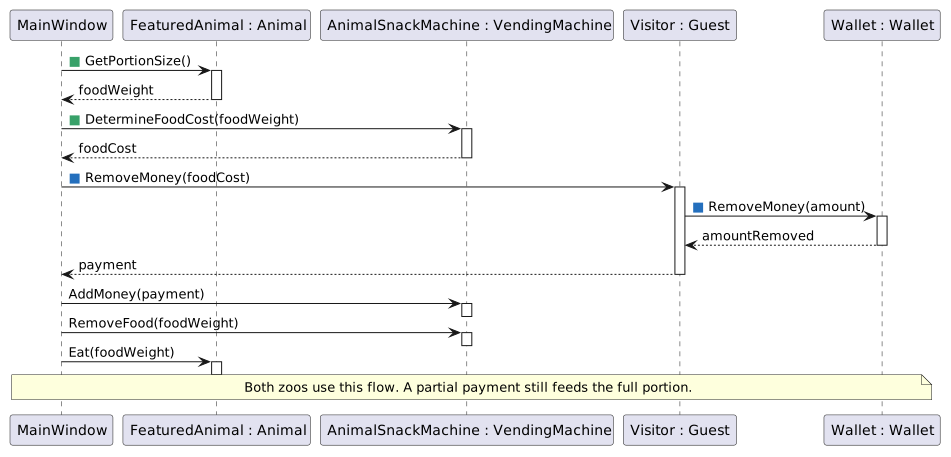
For either zoo, MainWindow obtains the portion and rounded cost, requests money through Guest and Wallet, deposits the actual payment, removes food, and feeds the animal. Partial payment does not reduce the portion.
Complete feeding transaction for either zoo
  • New
  • Changed
  • Removed

Follow the complete feeding call flow for either zoo:

  • MainWindow asks the featured Animal for foodWeight.
  • MainWindow asks the VendingMachine for foodCost using that weight.
  • MainWindow asks Guest to remove the cost; Guest asks Wallet and returns the actual payment.
  • MainWindow passes payment to the VendingMachine’s AddMoney.
  • MainWindow passes foodWeight to the VendingMachine’s RemoveFood.
  • MainWindow passes that same foodWeight to the Animal’s Eat.
B Check Your Work

Restart the application, create both zoos, and click each feeding button once. The initial vending-machine MoneyBalance is 0.00m. Both featured animals begin with a Baby. Compare floating-point values approximately.

C Check Your Work — Como Zoo — Dolly
  • foodWeight: 0.706.
  • foodCost / payment: 0.53m / 0.53m.
  • Visitor.Wallet.MoneyBalance: 4.72m.
  • AnimalSnackMachine.MoneyBalance: 0.53m.
  • AnimalSnackMachine.FoodStock: 249.294.
  • Animal.Eat weightGain: 0.5648.
  • FeaturedAnimal.Weight: 35.8648.
  • Animal.Eat babyWeightGain: 0.0706.
  • FeaturedAnimal.Baby.Weight: 3.6006.
D Check Your Work — San Diego Zoo — Patti
  • foodWeight: 0.0654.
  • foodCost / payment: 0.08m / 0.08m.
  • Visitor.Wallet.MoneyBalance: 3.67m.
  • AnimalSnackMachine.MoneyBalance: 0.08m.
  • AnimalSnackMachine.FoodStock: 249.9346.
  • Animal.Eat weightGain: 0.05232.
  • FeaturedAnimal.Weight: 3.32232.
  • Animal.Eat babyWeightGain: 0.00654.
  • FeaturedAnimal.Baby.Weight: 0.33354.
1 Set breakpoints in both handlers. Step through the calls and confirm the values listed for each zoo. Eat already updates the animal and its Baby; use its existing implementation.
6.Return Pregnancy Status and Exit Early
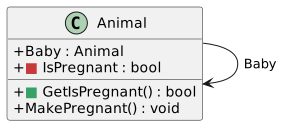
Animal removes the IsPregnant field and adds GetIsPregnant returning bool.
Pregnancy status and the early return
  • New
  • Changed
  • Removed
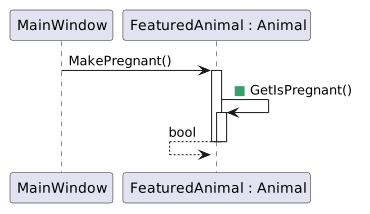
MainWindow calls MakePregnant on FeaturedAnimal, and the Animal calls GetIsPregnant on itself and receives a bool.
MakePregnant checks the existing Baby
  • New
  • Changed
  • Removed

Class change: add public bool GetIsPregnant() to Animal and use it in the existing void MakePregnant() method.

Zoo 1.4 already uses Baby == null in MakePregnant. Give that test a named method, then return early when pregnancy already exists.

A Make the Changes
1 In Animal.cs, add GetIsPregnant() after the fields and before GetPortionSize(). It returns true when Baby references an Animal.
public bool GetIsPregnant()
{
    return this.Baby != null;
}
2 Replace MakePregnant() with the following version. Put the early-return condition at the beginning, then move the existing Baby creation statements outside the old if block.
public void MakePregnant()
{
    if (this.GetIsPregnant())
    {
        return;
    }

    this.Baby = new Animal();
    this.Baby.Sex = "Male";
    this.Baby.Name = string.Empty;
    this.Baby.Age = 0;
    this.Baby.Weight = this.Weight * this.BabyWeightPercentage;
    this.Baby.Type = this.Type;
}

Call flow from MainWindow:

  • CreateComoZoo() or CreateSanDiegoZoo() calls the featured animal’s MakePregnant().
  • MakePregnant() calls GetIsPregnant() on that same Animal.
  • If Baby != null, the returned value is true and MakePregnant() ends immediately.
  • If Baby == null, the returned value is false and the existing Baby creation and field assignments run.
B Check Your Work
1 Break in MakePregnant while creating each zoo. With Baby initially null, confirm GetIsPregnant() returns false, allowing creation. Dolly’s Baby starts at approximately 3.53 pounds; Patti’s starts at 0.327 pounds.
2 While paused after creation, call MakePregnant() again on that same animal in the debugger. Confirm GetIsPregnant() returns true and the existing Baby reference and values are preserved.
7.Return Machine Status and Formatted Temperature
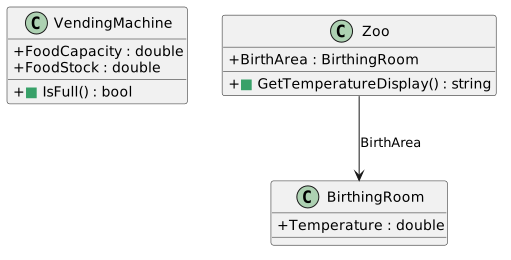
VendingMachine.IsFull returns a bool. Zoo.GetTemperatureDisplay returns its birthing-room temperature formatted to one decimal place. These methods are not called by MainWindow in the supplied end code.
Boolean and string return values
  • New
  • Changed
  • Removed

Class changes: VendingMachine.IsFull returns bool and Zoo.GetTemperatureDisplay returns string.

Add two more methods from the completed Zoo 1.5 design. One answers a Boolean question; the other returns text formatted for display.

A Make the Changes
1 In VendingMachine.cs, add IsFull() after DetermineFoodCost and before RemoveFood. The comparison reports whether the stock has reached or exceeded capacity.
public bool IsFull()
{
    return this.FoodStock >= this.FoodCapacity;
}
2 In Zoo.cs, add GetTemperatureDisplay() after the Visitor field and before the class’s closing brace. It returns the birthing-room temperature with one decimal place.
public string GetTemperatureDisplay()
{
    return this.BirthArea.Temperature.ToString("0.0");
}
B Check Your Work
1 With execution paused after creating a zoo, evaluate this.ComoZoo.AnimalSnackMachine.IsFull() or its San Diego equivalent: it returns true. After one feeding it returns false; after the matching fill button it returns true.
2 After creating San Diego Zoo, evaluate this.SanDiegoZoo.GetTemperatureDisplay(): the result is "77.0" with a period-decimal culture. Increase the temperature once and check for "77.5". The decimal separator follows the application’s current culture.
8.Review the Completed Design
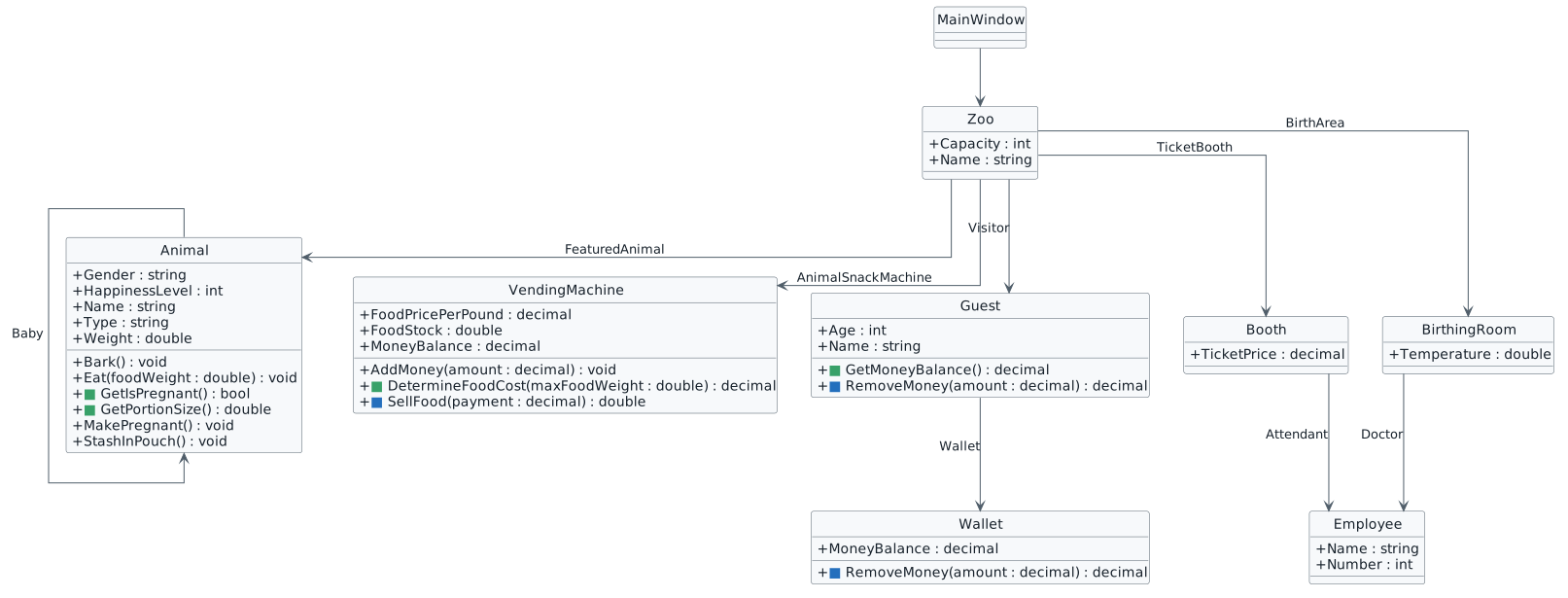
Ending Zoo 1.5 class diagram. Animal adds GetPortionSize and GetIsPregnant and removes IsPregnant. Guest adds GetMoneyBalance and RemoveMoney returns decimal. Wallet RemoveMoney returns decimal. VendingMachine adds DetermineFoodCost and SellFood returns double.
Ending structure — supplied Zoo 1.5 End
  • New
  • Changed
  • Removed

The completed Zoo 1.5 structure retains the starting fields and relationships. Confirm these additions and changes:

  • Animal adds double GetPortionSize() and bool GetIsPregnant().
  • Animal.MakePregnant() remains void and now returns early when GetIsPregnant() is true.
  • Wallet.RemoveMoney(decimal amount) returns decimal and handles nonpositive requests, full payment, and partial payment.
  • Guest.RemoveMoney(decimal amount) returns the wallet’s decimal result.
  • VendingMachine adds decimal DetermineFoodCost(double maxFoodWeight) and bool IsFull().
  • Zoo adds string GetTemperatureDisplay().
  • Both feeding handlers use GetPortionSize(), DetermineFoodCost(foodWeight), and the returned payment.
  • Animal.Eat, VendingMachine.AddMoney, VendingMachine.RemoveFood, and VendingMachine.AddFoodBag retain their Zoo 1.4 implementations.
  • BirthingRoom.Animal retains its existing name. XAML controls and their Click handlers retain their existing names.
  • IsFull() and GetTemperatureDisplay() are available but are not called by the supplied MainWindow code.
A Check Your Work
1 Build the solution and resolve errors or warnings. Include XML return-value documentation on every added or changed value-returning method.
2 Run from a fresh start. Create each zoo before using its feeding, filling, or temperature controls. Confirm both feeding paths and all existing buttons work.
3 Check exact casing: GetPortionSize, DetermineFoodCost, RemoveMoney, GetIsPregnant, IsFull, GetTemperatureDisplay, Sex, and PortionSizePercentage. The existing XAML names, button Content, and Click handlers need no changes.
9.Submit Zoo 1.5
A Confirm all modified C# files pass the project’s StyleCop checks with no warnings.
B Close Visual Studio and create a ZIP file containing the complete Zoo 1.5 solution folder.
C Submit the ZIP file through the Feedback System.
D Submit the Feedback System URL in Canvas.