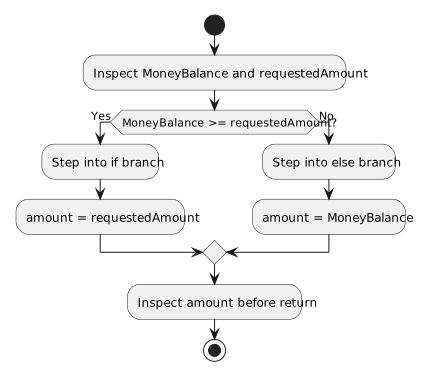
The debugger lets you pause before an if condition and observe which branch actually runs. In the Zoo wallet example below, a balance and a requested amount determine the selected payment:
Use a breakpoint on the if line. When Visual Studio stops there, inspect this.MoneyBalance and requestedAmount before stepping. The current values, rather than the values you expected to pass, determine the route.
Trace Both Wallet Branches
NNew
CChanged
RRemoved
Trace Both Outcomes
Start with a wallet balance of 2.00m and a request of 0.53m. The comparison 2.00m >= 0.53m is true. Step over the condition and observe execution move into the first set of braces. Step over the assignment and inspect amount: it should be 0.53m. The debugger then moves past the else body to the return statement.
Run the method again with a fresh balance of 0.20m and the same 0.53m request. This time the condition is false. Step over it and observe execution enter else. After the assignment, amount should be 0.20m. The true branch does not run during this call.
Expected paths
Balance
Request
Branch reached
Value before return
2.00m
0.53m
if
0.53m
0.20m
0.53m
else
0.20m
Set the balance to exactly 0.53m. Because the condition uses >=, equality is enough to enter the true branch. If the code used > instead, the false branch would run for this value. Boundary tests are useful when a condition contains >, <, >=, or <=.
In Date Night, pause before a two-way decision and record the values used by its condition. Run it once for each outcome, then check where execution rejoins. This shows whether the program's behavior matches the rule you intended to write.