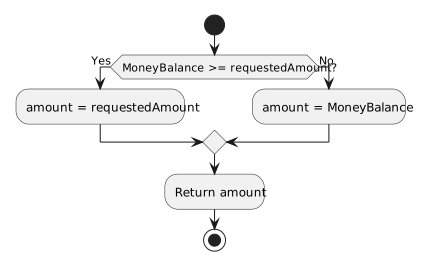
If a Zoo wallet receives a valid, nonnegative payment request, it can select either the whole requested amount or its remaining balance:
public decimal GetAffordableAmount(decimal requestedAmount)
{
    decimal amount;

    if (this.MoneyBalance >= requestedAmount)
    {
        amount = requestedAmount;
    }
    else
    {
        amount = this.MoneyBalance;
    }

    return amount;
}
This example assumes requestedAmount >= 0 and MoneyBalance >= 0. For a balance of 0.20m, a request for 0.53m selects 0.20m. A request for 0.10m selects 0.10m. This method reports what is affordable; it does not subtract money from the wallet.
- New
- Changed
- Removed
If both outcomes must perform the same next action, put that action after the closing brace of the if/else. For example, after choosing amount, the method returns it once. The variable is declared before the decision so both branches can assign it and the later return can use it.
In this.MoneyBalance >= requestedAmount, >= compares two numbers. In amount = requestedAmount;, = assigns a value to a variable. The condition must produce a Boolean answer; the branch body performs the assignment.
| Balance | Request | Condition | Selected amount |
|---|---|---|---|
0.20m |
0.53m |
False | 0.20m |
2.00m |
0.53m |
True | 0.53m |
0.53m |
0.53m |
True | 0.53m |
Before building, trace a value that makes the condition true and another that makes it false. Verify that exactly the intended branch runs and that any shared code afterward has the value it needs. Zoo's complete payment method also guards invalid requests; that adds another decision beyond this two-path example.