1.5.5 Making Decisions with if and if/else Statements

Programs Can Choose What Happens Next

A program does not always execute the same statements every time.

Sometimes the next action depends on a condition.

For example, a soccer program might need to decide:

or:

C# can use an if statement or an if/else statement to represent that kind of decision.

An if Statement Has One Conditional Path

Consider:

if (player1.isAvailable)
{
    System.Console.WriteLine("Player is available.");
}

The Boolean expression is:

player1.isAvailable

The program evaluates that expression.

If it is:

true

the statement inside the braces runs.

If it is:

false

the block is skipped.

Conceptually:

evaluate condition
      ↓
   true?
  /     \
yes      no
 |        |
run      skip
block    block
Read the Condition Before the Action

A useful reading order is:

condition
    ↓
decision
    ↓
action

For:

if (player1.isAvailable)
{
    System.Console.WriteLine("Player is available.");
}

read:

The condition controls whether the action occurs.

An if/else Statement Provides Two Paths

Now consider:

if (player1.isAvailable)
{
    System.Console.WriteLine("Player is available.");
}
else
{
    System.Console.WriteLine("Player is unavailable.");
}

This decision has two possible outcomes.

If the condition is true
Player is available.

is displayed.

If the condition is false
Player is unavailable.

is displayed.

Only one of the two blocks runs for that evaluation.

The else Path Does Not Need Its Own Condition

The first condition is:

player1.isAvailable

The else block means:

There is no second Boolean expression after:

else

in a basic if/else structure.

Compare if with if/else
if
if (player1.isAvailable)
{
    System.Console.WriteLine("Player is available.");
}

Question answered:

Possible result:

  • run the block;
  • or skip it.
if/else
if (player1.isAvailable)
{
    System.Console.WriteLine("Player is available.");
}
else
{
    System.Console.WriteLine("Player is unavailable.");
}

Question answered:

One path runs or the other path runs.

Equality Can Drive the Decision

Suppose:

player1.position = "Goalkeeper";

A condition can compare that field:

if (player1.position == "Goalkeeper")
{
    System.Console.WriteLine("Use goalkeeper instructions.");
}
else
{
    System.Console.WriteLine("Use field-player instructions.");
}

If the current position is exactly:

Goalkeeper

the first block runs.

Otherwise, the else block runs.

Relational Operators Can Drive the Decision

Suppose:

team1.score = 3

and:

if (team1.score >= 3)
{
    System.Console.WriteLine("Three or more goals.");
}
else
{
    System.Console.WriteLine("Fewer than three goals.");
}

The comparison:

team1.score >= 3

produces the Boolean result used by the decision.

The if/else structure then chooses one of the two paths.

A Null Check Can Drive the Decision

Suppose a Player may or may not have a Team reference.

A decision can ask:

if (player1.team == null)
{
    System.Console.WriteLine("No team assigned.");
}
else
{
    System.Console.WriteLine("Team assigned.");
}

The condition does not create or remove a Team object.

It only inspects the current reference state.

Predict the Path from the Current Values

Suppose:

player1.isAvailable = false

and the code is:

if (player1.isAvailable)
{
    System.Console.WriteLine("Available");
}
else
{
    System.Console.WriteLine("Unavailable");
}

Reason through it:

player1.isAvailable
        ↓
      false
        ↓
skip if block
        ↓
run else block

Expected output:

Unavailable
The Decision Does Not Change the Condition by Itself

This code:

if (player1.isAvailable)

reads the current Boolean value.

It does not automatically change:

isAvailable

A separate assignment would be needed to change the field.

The condition observes state.

The statements inside a branch may change state only if they contain assignments or other state-changing behavior.

Statements After the Decision Continue Normally

Consider:

if (player1.isAvailable)
{
    System.Console.WriteLine("Available");
}
else
{
    System.Console.WriteLine("Unavailable");
}

System.Console.WriteLine("Roster reviewed.");

Exactly one decision branch runs.

Afterward:

Roster reviewed.

is displayed regardless of which branch was selected.

The program continues after the complete if/else structure.

Keep the Two-Path Model Clear

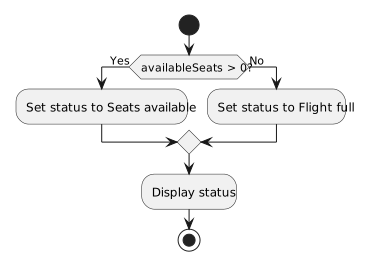
For a basic if/else, the mental model is:

         condition
            |
     +------+------+
     |             |
   true          false
     |             |
if block       else block
     |             |
     +------+------+
            |
       continue

That two-path model prepares you to represent the same decision visually in a UML activity diagram.