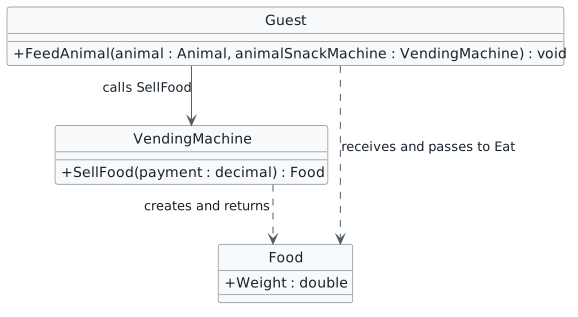
Currently when the guest feed's the animal they are "creating" food themselves. While that might be okay if they were a wizard, it really should be the vending machine that is handling the food creation and the guest that accepts that food.
This page is currently being built. Please check back soon.
Work through the user stories in order. Each story states the goal and acceptance criteria; its nested tasks retain the detailed implementation and verification steps.
Check the result against this instruction: Copy your 2.1 ending code, renaming both the folder and the Visual Studio solution file
Check the result against this instruction: Build your solution. Ensure it compiles without warnings or errors.
Currently when the guest feed's the animal they are "creating" food themselves. While that might be okay if they were a wizard, it really should be the vending machine that is handling the food creation and the guest that accepts that food.
You will be returning a food object with values of its own that can be used in other places.
This focused design shows the members or flow relevant to this feature. Keep unchanged members from your preceding checkpoint; follow the tasks below for the order of intermediate edits.
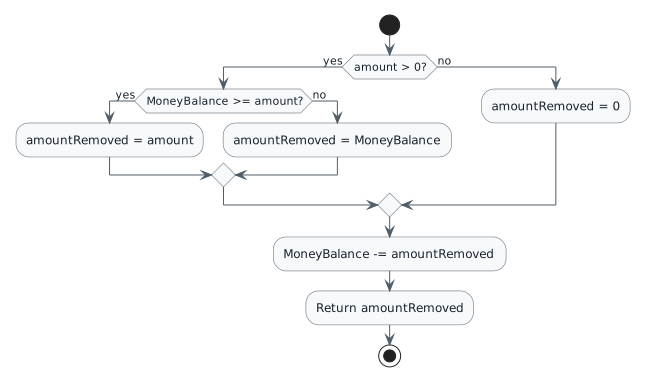
public Food SellFood(decimal payment)food.Weight = foodWeight;return food;Food food = animalSnackMachine.SellFood(foodPayment);if (this.GetMoneyBalance() >= foodCost)Currently if the guest's wallet's money balance is less than the 0, it returns nothing. This is fine except that the guest could return less than the amount that is being requested of them.
You will add another level of logic that checks if the guest has enough money to pay and if they don't, will return whatever money they currently possess.
This focused design shows the members or flow relevant to this feature. Keep unchanged members from your preceding checkpoint; follow the tasks below for the order of intermediate edits.
| Request with starting balance 3.75m | Amount returned | Ending balance |
|---|---|---|
| 0.00m | 0.00m | 3.75m |
| -1.00m | 0.00m | 3.75m |
| 1.00m | 1.00m | 2.75m |
| 3.75m | 3.75m | 0.00m |
| 5.00m | 3.75m | 0.00m |
Check the result against this instruction: In the Wallet class, in the RemoveMoney method, inside the current 'if' statement, add an additional 'if' statement that checks if the MoneyBalance is greater than or equal to the amount parameter.
if (amount > 0.00m)
{
if (this.MoneyBalance >= amount)
{
amountRemoved = amount;
}
}
else
{
amountRemoved = 0.00m;
}Check the result against this instruction: Move the assigning of the amountRemoved to inside the nested if statement.
if (this.MoneyBalance >= amount)
{
amountRemoved = amount;
}
else
{
amountRemoved = this.MoneyBalance;
}Check the result against this instruction: After the nested if statement add an else statement. Inside the else statement, assign the amountRemoved variable to the wallet's MoneyBalance.
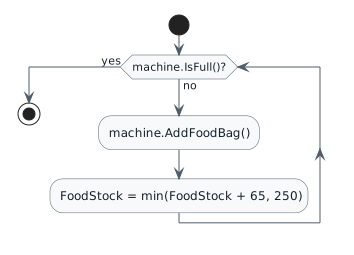
Now that the guest can purchase physical food from the snack machine, there needs to be someone who can fill it back up.
You will set up a sequence using new methods and event handlers to have employees in the zoo refill the snack machine.
This focused design shows the members or flow relevant to this feature. Keep unchanged members from your preceding checkpoint; follow the tasks below for the order of intermediate edits.
| Bag added | FoodStock |
|---|---|
| Start | 3.5 |
| 1 | 68.5 |
| 2 | 133.5 |
| 3 | 198.5 |
| 4 | 250.0 |
this.FoodStock = Math.Min(this.FoodStock + 65.0, 250.0);<Button x:Name="newComoZooButton" Content="New Como Zoo" Click="newComoZooButton_Click" /> <Button x:Name="darlaFeedDingoButton" Content="Darla, feed dingo" Click="darlaFeedDingoButton_Click" /> <Button x:Name="birthDingoButton" Content="Birth dingo" Click="birthDingoButton_Click" />
<Button x:Name="floraFillVendingMachineButton" Content="Flora, fill vending machine" Click="floraFillVendingMachineButton_Click" />
<Button x:Name="newSanDiegoZooButton" Content="New San Diego Zoo" Click="newSanDiegoZooButton_Click" /> <Button x:Name="daveFeedPlatypusButton" Content="Dave, feed platypus" Click="daveFeedPlatypusButton_Click" /> <Button x:Name="birthPlatypusButton" Content="Birth platypus" Click="birthPlatypusButton_Click" />
<Button x:Name="bettyFillVendingMachineButton" Content="Betty, fill vending machine" Click="bettyFillVendingMachineButton_Click" />
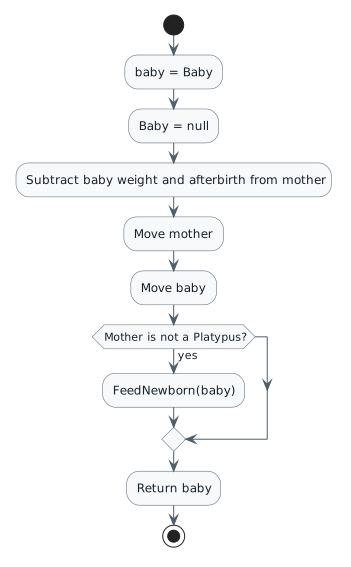
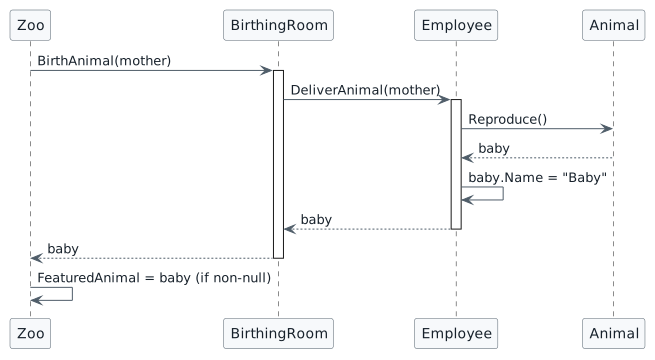
while (!machine.IsFull())Currently the newborn is not returned to the caller before the mother clears her Baby reference. Instead the zoo would like the baby animal to continue living.
You will return the Baby object to other method calls so it can be used.
This focused design shows the members or flow relevant to this feature. Keep unchanged members from your preceding checkpoint; follow the tasks below for the order of intermediate edits.
Animal baby = this.Baby;Since the Baby is born and no longer "inside" the mother there should not be an additional place it is referenced.
Check the result against this instruction: In the Employee class, in the DeliverAnimal method, define a variable of type Animal named baby and assign the existing call to Reproduce to it.
Expand 'this' in the Autos window. Ensure that the value of this.Baby is null.
The baby is now being returned to the Employee class but nothing is happening to it. Additionally, the zoo itself would like the capability of modifying the baby object.
You will modify the baby object in the Employee class and change the birthing sequence to return the baby to the zoo.
This focused design shows the members or flow relevant to this feature. Keep unchanged members from your preceding checkpoint; follow the tasks below for the order of intermediate edits.
Check the result against this instruction: Ensure that all code is StyleCop compliant.
Check the result against this instruction: Zip the solution and submit to the Feedback System.
Check the result against this instruction: Submit the Feedback System url to the correct assignment in Canvas.
Return to each user story and confirm that you can demonstrate its acceptance criteria. Use the task checkboxes to track completion; a checked box is not a substitute for testing or inspecting the required evidence.
Receive food from the vending machine Withdraw only available money Refill a snack machine to capacity Keep a reference to the newborn Make the newborn the featured animalRemove temporary lines used only to demonstrate compile-time errors. Build without errors or warnings, check StyleCop compliance, and rerun the required scenario paths.
Use the submission or attendance instructions in this page. For a Feedback System submission, upload the requested ZIP, review and resolve the feedback, and submit the resulting URL to the matching Canvas activity. For a Canvas quiz, enter only the requested answers; for an oral final, complete the scheduling and attendance steps.