2.2.5 Representing for Loops in Activity Diagrams

Representing for Loops in Activity Diagrams

A for loop writes initialization, test, and update in one header, but they happen at different points in the flow.

Read the Code Before Drawing

This excerpt runs inside a method and models three completed Wildcats training rounds. The assignment records a completion; it does not perform the physical drill.

If the underlying C# feature is unfamiliar, use the lesson below while reading this example.

Source to translate
int completedRounds = 0;

for (int round = 1; round <= 3; round = round + 1)
{
    completedRounds = completedRounds + 1;
}
Rewrite the Meaning in Ordinary Words
Pseudocode for the same behavior
Set the completed-round count to 0
Initialize the round label to 1 once
Before each pass, test whether round is at most 3
When true, record one completion
After that body, increase round by 1 and test again
When false, leave without running body or update

Use these words to follow one execution before drawing it. Keep the same order and the same alternatives as the source; simplify the wording without adding work that the code does not perform.

Map the Source to Nodes and Arrows
Build the Diagram in Violet
  1. Create an activity diagram with start followed by actions completedRounds = 0 and round = 1.
  2. Add the condition diamond round <= 3?. Its true route reaches completedRounds = completedRounds + 1.
  3. After the body action, add round = round + 1. Draw the return arrow from this update back to the condition, bypassing both starting assignments.
  4. Connect the diamond's false route directly to the activity final. It must not visit the body or header update.
  5. Save and follow round 1, 2, and 3 through the repeated route, then round 4 through the exit.
Compare the Completed Soccer Diagram

Compare this reference with the diagram you built in Violet. Layout may differ; the source meaning, labels, and relevant connections should agree.
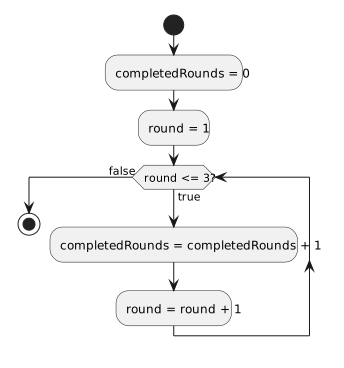
Initialize once, test round up to three, increase the completion count, then advance round and retest. The false route skips both updates.
Separate the three parts of the for header
  • New
  • Changed
  • Removed
Trace One Route at a Time

Trace round values 1, 2, and 3 through the body. The next update produces 4; the check at 4 is false. There are three body executions and four checks. The flow diagram shows a conceptual counter even though the C# for variable is scoped to its loop.

Verify the Drawing Against the Source
Predict and Check a Small Change