public string GetPurchaseMessage(decimal payment, int portionsAvailable)
{
    string message;
    if (portionsAvailable <= 0)
    {
        message = "No food available";
    }
    else if (payment < 2.00m)
    {
        message = "More payment needed";
    }
    else
    {
        message = "Ready to purchase";
    }

    return message;
}
Start with the first rejection and its message. Add the next rejection as an else if rather than an independent if. Finish with else, because everything that reaches it already passed the earlier checks. All branches assign message, so the return has a result to use.
The method belongs with the object that owns the vending rule. It is a small response example rather than a replacement for the project's full purchase operation. A real successful purchase would also perform the required money and food changes.
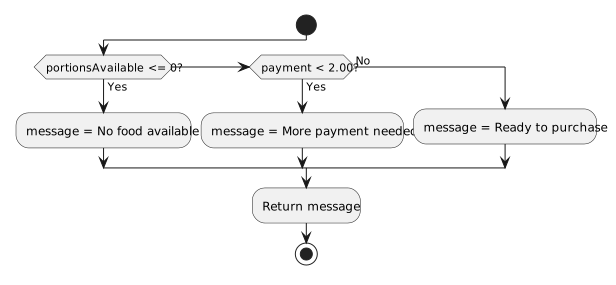
- New
- Changed
- Removed
Compare each code condition with the corresponding decision. The messages are actions; the expressions are questions. A selected message goes directly to the shared return rather than continuing through the remaining checks.
| Payment | Available portions | Expected message | What it checks |
|---|---|---|---|
| 2.00 | 0 | No food available | Inventory rejection |
| 1.99 | 1 | More payment needed | Just below the price |
| 2.00 | 1 | Ready to purchase | Exact price succeeds |
| 1.00 | 0 | No food available | First rule takes priority |
Call the method separately for each row. Predict the result first, compare the returned text, and change only the condition or order responsible for a mismatch. Do not change the expected result merely to agree with faulty code.
An else if chain chooses among alternatives at the same decision level. A nested if inside a selected branch would ask another question after that branch had already been entered. Use that additional nesting only when the requirement actually asks for a decision within a decision.