2.1.9 Debugging if/else if Statements

Find the First Incorrect Choice

A Zoo purchase rule says that a payment equal to the price is sufficient when food is available. The code below compiles, but a guest offering exactly 2.00 receives the wrong response. A debugger can show which comparison causes that result.

Read the Faulty Method
A boundary defect that still compiles
public string GetPurchaseMessage(decimal payment, int portionsAvailable)
{
    string message;
    if (portionsAvailable <= 0)
    {
        message = "No food available";
    }
    else if (payment <= 2.00m) // Defect: exact payment is rejected.
    {
        message = "More payment needed";
    }
    else
    {
        message = "Ready to purchase";
    }

    return message;
}

Use a call with payment 2.00 and portionsAvailable 1. Before running, state the expected message: Ready to purchase. The observed More payment needed result is evidence of a logic defect, even though the compiler accepts the statement.

Collect Evidence at Each Decision
Pause Before the First Check

Set a breakpoint on the first if line and start debugging through an existing caller. When execution pauses, inspect payment and portionsAvailable in Locals or by hovering over the parameters. Confirm that the call actually supplied 2.00 and 1 before blaming the comparisons.

Use Step Over to follow this method's statements. At the first condition, the count of 1 makes portionsAvailable <= 0 false. Execution should reach the else if rather than enter the unavailable-food branch.

Record the Branch That Runs
Evidence for the failing call
Observation Value or outcome Conclusion
payment at entry 2.00 The caller supplied exact payment
portionsAvailable at entry 1 Food is available
First condition False The inventory branch is skipped
Second condition using <= True The insufficient-payment branch runs
Returned message More payment needed The comparison conflicts with the requirement

The exact highlighted line varies with the current debugger position: a yellow execution pointer marks the next statement, so step over an assignment before expecting its new value. Inspect message after the selected assignment or at the return.
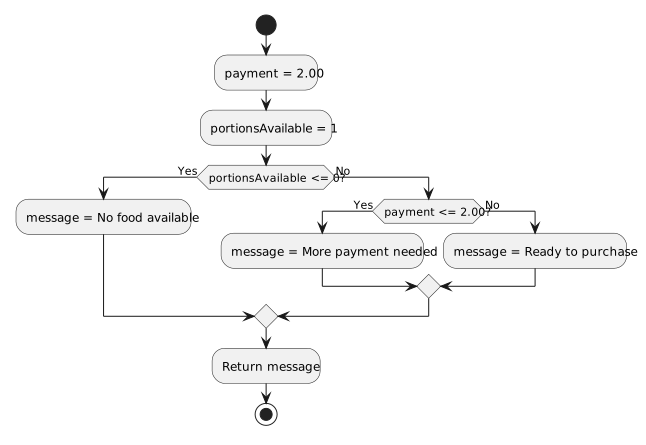
With payment 2.00 and available portions 1, the availability condition is false and the faulty payment less-than-or-equal-to-2.00 condition is true. The method chooses More payment needed.
Why exact payment enters the wrong branch
  • New
  • Changed
  • Removed

The diagram intentionally includes the faulty comparison. It identifies the edge taken by the failing call; it is not the corrected purchase model.

Repair and Retest
Change the Comparison That Caused the Failure
Corrected condition only
else if (payment < 2.00m)

Replace the corresponding header in the full method with this line. Keep the branch body and the other checks. Exact payment now makes this condition false, allowing the fallback readiness response.

Retest 1.99, 2.00, and 2.01 with one available portion. Then retest zero portions with sufficient payment and with insufficient payment. That verifies both the corrected boundary and the original inventory priority.

Explain the Fix with Evidence

Write a brief explanation naming the expected result, the observed parameter values, the condition that incorrectly became true, and why the revised operator produces the right branch. If a later condition seems to be skipped, first check whether an earlier branch was already selected.