The File Receives a Text Representation
After the write, the file contains:
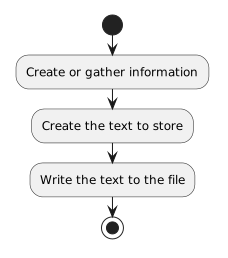
- New
- Changed
- Removed
Suppose a soccer application contains a lineup note:
string lineupNote = "Jordan starts at forward.";At this moment, the value belongs to the running program.
To preserve it after the program closes, the application can write the text to a file.
A simple C# API for this purpose is:
System.IO.File.WriteAllTextAn instructional example is:
string lineupNote = "Jordan starts at forward.";

System.IO.File.WriteAllText("lineup.txt", lineupNote);
Read the second statement as:
The first argument identifies the file.
The second argument provides the text to write.
After the write, the file contains:
After writing:
System.IO.File.WriteAllText("lineup.txt", lineupNote);the file does not remain automatically synchronized with the variable.
If the program later changes:
lineupNote = "Casey starts at goalkeeper.";the file still contains the earlier text until another write occurs.
A write captures the text supplied at the time of the operation.
Conceptually:
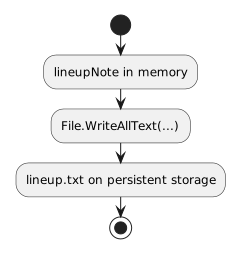
The code implements the write action you previously modeled with an activity diagram.
A program can display:
Jordan starts at forward.without writing a file.
It can also write that text to a file without showing the text on screen.
Display and persistence are different responsibilities.
Do not assume visible output has automatically been saved.
For this module, focus on one simple idea:
System.IO.File.WriteAllText(path, text);The program has text in memory.
The method writes that text to persistent storage.
Later courses can add:
Those are not needed to understand the basic movement of information from memory to a text file.