Writing moves information from the running application into a file.
Reading moves information in the opposite direction.
Suppose lineup.txt already contains:
Jordan starts at forward.
A simple C# API for reading all text from the file is:
System.IO.File.ReadAllText
An instructional example is:
string lineupNote = System.IO.File.ReadAllText("lineup.txt");
Read the statement as:
Read all of the text from
lineup.txtand store that text in the string variablelineupNote.
The file existed before this statement.
After the statement runs, the text is also available in the current program.
Suppose the file contains:
Jordan starts at forward.
After:
string lineupNote = System.IO.File.ReadAllText("lineup.txt");
the variable now contains the same text.
There are still two distinct locations:
The read operation copied the information into the running program.
Once the text is in memory, the program can work with it like other string data.
For example:
string lineupNote = System.IO.File.ReadAllText("lineup.txt");
System.Console.WriteLine(lineupNote);
The first statement reads the persistent information.
The second displays the runtime value.
The file itself is not being displayed directly.
The program first reads the contents into memory.
ReadAllText reads the file's contents.
It does not normally delete the file.
The persistent copy remains available unless another operation later changes or removes it.
This means the same saved information can be read during more than one program run.
A simple persistence story is:
string lineupNote = "Jordan starts at forward.";
System.IO.File.WriteAllText("lineup.txt", lineupNote);
The program writes the text.
Then the application closes.
string lineupNote = System.IO.File.ReadAllText("lineup.txt");
The program reads the previously saved text.
The information survived between the two runs because it was stored in the file.
A real course project may specify where the file is located.
Use that location.
If you change the path without understanding the project, the program may read from a different file or fail to find the intended one.
File location is part of the storage context.
If the code attempts to read a file that does not exist, the operation cannot return the expected text.
Robust software should handle that situation appropriately.
Detailed exception handling comes later.
In this introductory module, use the supplied project and storage sequence so you can focus on the core read operation.
ReadAllText returns text.
If the file contains:
Jordan,7,true
the result is still one string containing those characters.
Turning that text into separate fields or records is a different task.
Structured data and CSV files appear later in FIT.
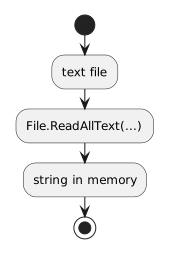
For now, the important movement is:
text file
↓
File.ReadAllText(...)
↓
string in memory
The two basic operations now connect.
memory → WriteAllText → file
file → ReadAllText → memory
The C# methods are small.
The conceptual shift is larger.
You can now distinguish information that exists only during the current execution from information that has been persisted and recovered later.