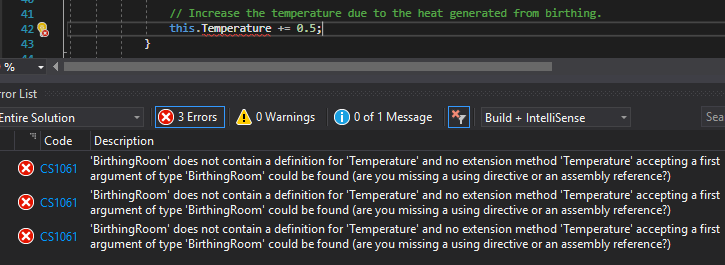
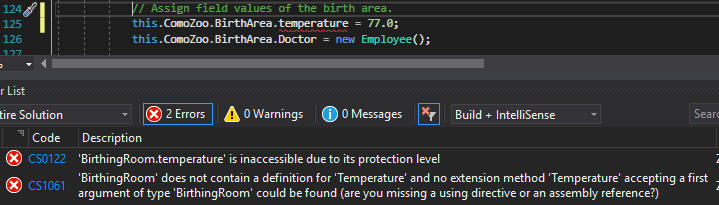
Currently the Temperature field of the BirthingRoom can be manipulated from the MainWindow when really it should only be the BirthingRoom itself that handles the Temperature and any changes.
This page is currently being built. Please check back soon.

Work through the user stories in order. Each story states the goal and acceptance criteria; its nested tasks retain the detailed implementation and verification steps.
Check the result against this instruction: Copy your 2.3 ending code, renaming both the folder and the Visual Studio solution file
Currently the Temperature field of the BirthingRoom can be manipulated from the MainWindow when really it should only be the BirthingRoom itself that handles the Temperature and any changes.
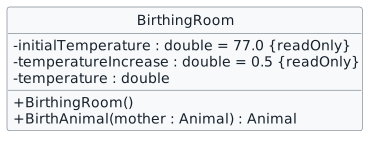
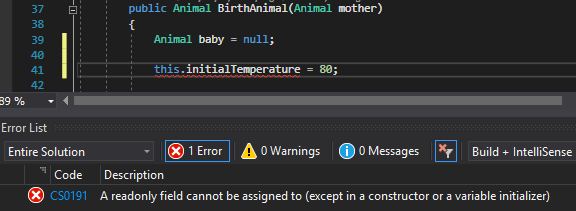
You will make the Temperature field private, define a readonly field for the initial temperature, a readonly field for the temperature change and a constructor that assigns the initial temperature.
This focused design shows the members or flow relevant to this feature. Keep unchanged members from your preceding checkpoint; follow the tasks below for the order of intermediate edits.

private double temperature;
/// <summary>
/// The initial temperature of the BirthingRoom.
/// </summary>
/// <summary>
/// The initial temperature of the BirthingRoom.
/// </summary>
private readonly double initialTemperature = 77.0;
/// <summary>
/// Initializes a new instance of the BirthingRoom class.
/// </summary>
/// <summary>
/// Initializes a new instance of the BirthingRoom class.
/// </summary>
public BirthingRoom()
{
}/// <summary>
/// Initializes a new instance of the BirthingRoom class.
/// </summary>
/// <summary>
/// Initializes a new instance of the BirthingRoom class.
/// </summary>
public BirthingRoom()
{
this.temperature = this.initialTemperature;
}temperatureIncrease field instead of the hardcoded 0.5.
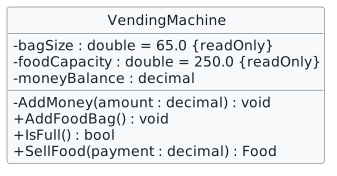
Currently the VendingMachine's money balance can be manipulated outside of the class both through the public MoneyBalance field and the public AddMoney method.
You will make fields and methods in the VendingMachine class private so that other classes do not have access to them.
This focused design shows the members or flow relevant to this feature. Keep unchanged members from your preceding checkpoint; follow the tasks below for the order of intermediate edits.
this.ComoZoo.AnimalSnackMachine.moneyBalance = 3000.00mAnimalSnackMachine. Ensure that you cannot. this.ComoZoo.AnimalSnackMachine.AddMoney(3000.00m);
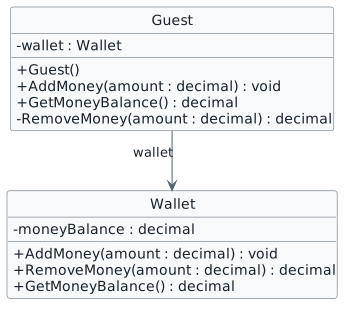
Currently the Guest's money balance can be manipulated outside of the class both through the public Wallet field and the public RemoveMoney method.
You will make the wallet and RemoveMoney method private and give the Guest a way to add money to their wallet.
This focused design shows the members or flow relevant to this feature. Keep unchanged members from your preceding checkpoint; follow the tasks below for the order of intermediate edits.
newSanDiegoZooButton_Click methods, delete the lines of code that instantiate the Wallet and assign the Wallet's MoneyBalance
Check the result against this instruction: In the MainWindow in the newComoZooButton_Click and
This violates encapsulation and will be fixed in the next assignment. For now pretend the Zoo is giving them a gift to start their Zoo journey with.
Review this feature’s design and requirementsEnsure it returns 3.75.
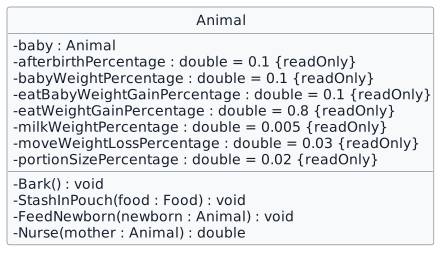
Currently, classes other than the Animal class can make the animal do things that only the animal should have control over.
You will make methods and field in the Animal class private.
This focused design shows the members or flow relevant to this feature. Keep unchanged members from your preceding checkpoint; follow the tasks below for the order of intermediate edits.
| Field | Value |
|---|---|
| afterbirthPercentage | 0.1 |
| babyWeightPercentage | 0.1 |
| eatBabyWeightGainPercentage | 0.1 |
| eatWeightGainPercentage | 0.8 |
| milkWeightPercentage | 0.005 |
| moveWeightLossPercentage | 0.03 |
| portionSizePercentage | 0.02 |
animal.baby.GetIsPregnant();Even though GetIsPregnant method is public, we still cannot access it through the baby field because of its visibility.
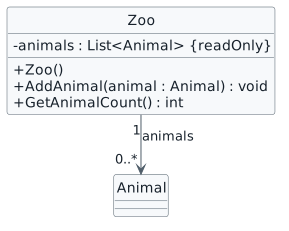
The Zoo class should be the only class with access to the list of animals. Additionally, when adding an animal to the list it is possible to add null to the list which is not something we want to happen.
You will make the Animals list private, refactor the code to use it and make sure animal objects aren't null before adding them to the list.
This focused design shows the members or flow relevant to this feature. Keep unchanged members from your preceding checkpoint; follow the tasks below for the order of intermediate edits.
Check the result against this instruction: Change the visibility of the Animals list from public to private.
Check the result against this instruction: Change all references from Animals to animals.
From now on, we will instantiate list fields with the readonly modifier inside the class' constructor.
newSanDiegoZooButton_Click methods, delete the lines of code that instantiate the Animal list.
There isn't a "Zoo" problem here, but fields should never be public (we will change the rest in future assignments).
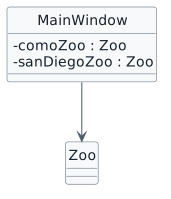
You will make the Zoos private and change their references.
This focused design shows the members or flow relevant to this feature. Keep unchanged members from your preceding checkpoint; follow the tasks below for the order of intermediate edits.
Check the result against this instruction: In the MainWindow, change the visibility of the ComoZoo and SanDiegoZoo from public to private. Do not change them to lowercase just yet.
Using Ctrl+R, Ctrl+R will not always be useful in the future. When using it be very careful about what it might be changing that could alter the functionality of your code.
Check the result against this instruction: Change all references to SanDiegoZoo to sanDiegoZoo
Check the result against this instruction: Ensure that all code is StyleCop compliant.
Check the result against this instruction: Zip the solution and submit to the Feedback System.
Check the result against this instruction: Submit the Feedback System url to the correct assignment in Canvas.
Return to each user story and confirm that you can demonstrate its acceptance criteria. Use the task checkboxes to track completion; a checked box is not a substitute for testing or inspecting the required evidence.
Protect birthing-room temperature Protect the vending-machine balance Let a guest manage a private wallet Keep animal internals inside Animal Protect the animal collection Keep window-owned zoos privateRemove temporary lines used only to demonstrate compile-time errors. Build without errors or warnings, check StyleCop compliance, and rerun the required scenario paths.
Use the submission or attendance instructions in this page. For a Feedback System submission, upload the requested ZIP, review and resolve the feedback, and submit the resulting URL to the matching Canvas activity. For a Canvas quiz, enter only the requested answers; for an oral final, complete the scheduling and attendance steps.