2.3.6 Representing foreach Loops in Activity Diagrams

Representing foreach Loops in Activity Diagrams

A foreach diagram must get the next element before using its value. An inner scoring decision must not accidentally terminate the outer traversal.

Read the Code Before Drawing

This excerpt runs inside a method. It totals positive round scores and counts scoring rounds. The input contains no negative scores.

If the underlying C# feature is unfamiliar, use the lesson below while reading this example.

Source to translate
int[] roundGoals = { 2, 0, 3 };
int totalGoals = 0;
int scoringRounds = 0;

foreach (int goals in roundGoals)
{

    if (goals > 0)
    {
        totalGoals = totalGoals + goals;
        scoringRounds = scoringRounds + 1;
    }
}
Rewrite the Meaning in Ordinary Words
Pseudocode for the same behavior
Initialize the score sequence and both counters
Begin visiting the sequence in order
If another element exists, obtain its value as goals
If that score is positive, add it to totalGoals and increase scoringRounds
Continue to the next element whether or not the score was positive
Finish only when no element remains

Use these words to follow one execution before drawing it. Keep the same order and the same alternatives as the source; simplify the wording without adding work that the code does not perform.

Map the Source to Nodes and Arrows
Build the Diagram in Violet
  1. Create an activity diagram with setup actions roundGoals = [2, 0, 3], totalGoals = 0, scoringRounds = 0, and Begin traversal.
  2. Add the outer diamond Another element?. Its true route reaches Get next value as goals and then the inner diamond goals > 0?.
  3. From the inner true route draw actions totalGoals = totalGoals + goals and scoringRounds = scoringRounds + 1. Its false route bypasses both.
  4. Merge the two inner routes and return to Another element?. Connect only the outer false route to the activity final.
  5. Save and trace 2, then 0, then 3. The zero must return to traversal so the last score is still processed.
Compare the Completed Soccer Diagram

Compare this reference with the diagram you built in Violet. Layout may differ; the source meaning, labels, and relevant connections should agree.
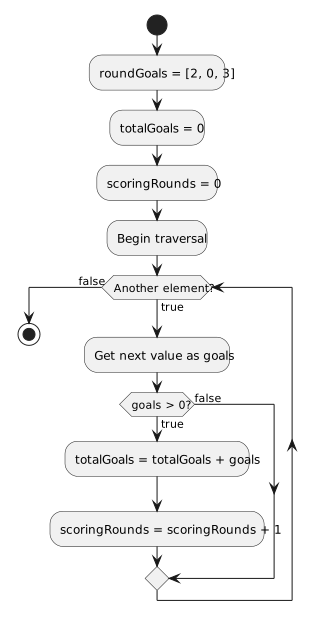
Visit scores 2, 0, and 3. Positive values update total and count; zero skips updates but continues to the next element.
Traversal continues after a non-scoring round
  • New
  • Changed
  • Removed
Trace One Route at a Time

The score 2 makes totalGoals 2 and scoringRounds 1. Zero changes neither. The final 3 makes them 5 and 2 before traversal ends. For an empty input array, the first outer check exits immediately.

Verify the Drawing Against the Source
Predict and Check a Small Change