2.4.2 Representing Lists in Object Diagrams

Representing Lists in Object Diagrams

A Wildcats list can grow while keeping the same list identity. An object snapshot shows its current items and Count at a particular pause.

Read the Code Before Drawing

This excerpt uses System.Collections.Generic inside an existing method. List<int> stores integer values in order; Add appends and indexed assignment replaces an existing value.

Source to translate
List<int> roundGoals = new List<int>();
roundGoals.Add(2);
roundGoals.Add(0);
roundGoals.Add(3);
roundGoals[1] = 1;
Rewrite the Meaning in Ordinary Words
The same snapshot in ordinary words
Create an empty list of integer round scores
Append 2, then 0, then 3
Replace the item at index 1 with 1
Pause with current items 2, 1, and 3
The current item count is 3

These words fix the snapshot moment and separate instances, values, and reference targets. Follow the source to that pause before deciding how many boxes to draw and which current values belong inside them.

Map the Source to Object Boxes and References
Build the Diagram in Violet
  1. Create an object diagram with one object headed roundGoals : List<int>. Use the complete element type in the header.
  2. Add the indexed rows [0], [1], and [2] with current values 2, 1, and 3.
  3. Add a note reading Count = 3; after indexed replacement. Use Count rather than the array-specific Length label.
  4. Keep these integer values inside their rows. Do not draw additional empty elements for capacity or new list boxes for the Add calls.
  5. Save and verify that the correction changed only [1]. The list still has the same identity and three items.
Compare the Completed Soccer Diagram

Compare this reference with the diagram you built in Violet. Layout may differ; the source meaning, labels, and relevant connections should agree.
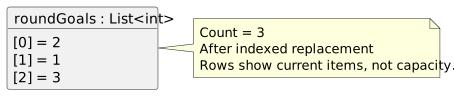
One integer list holds 2, 1, and 3 at indexes 0, 1, and 2 after replacement. Count is 3.
Current list contents after replacement
  • New
  • Changed
  • Removed
Trace the Snapshot One Reference or Value at a Time

The replacement changes one value without changing Count. Appending another score would change Count to 4 and add a new last item to the snapshot.

Verify the Drawing Against the Source
Predict and Check a Small Change