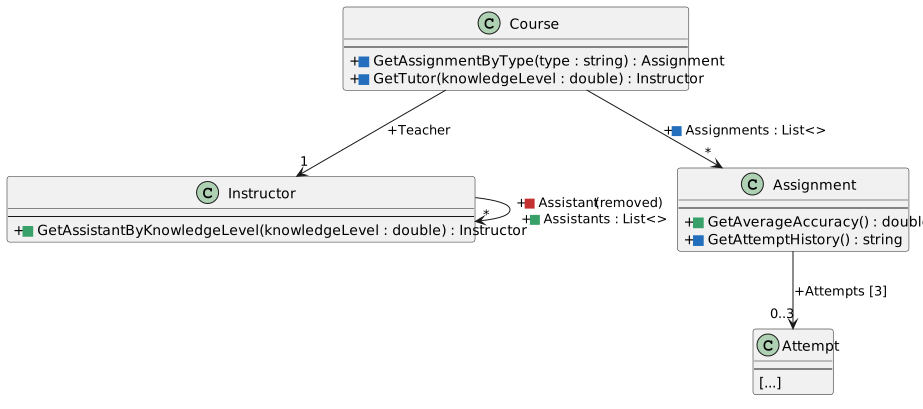
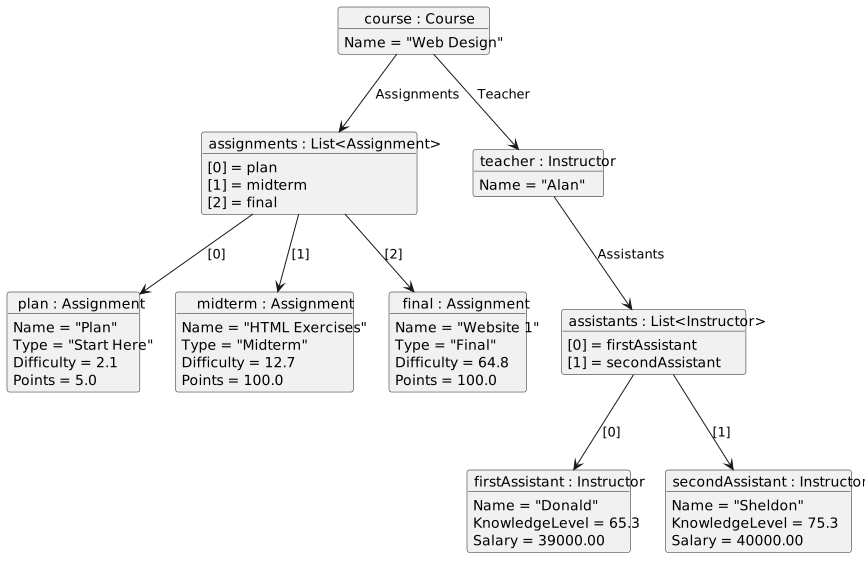
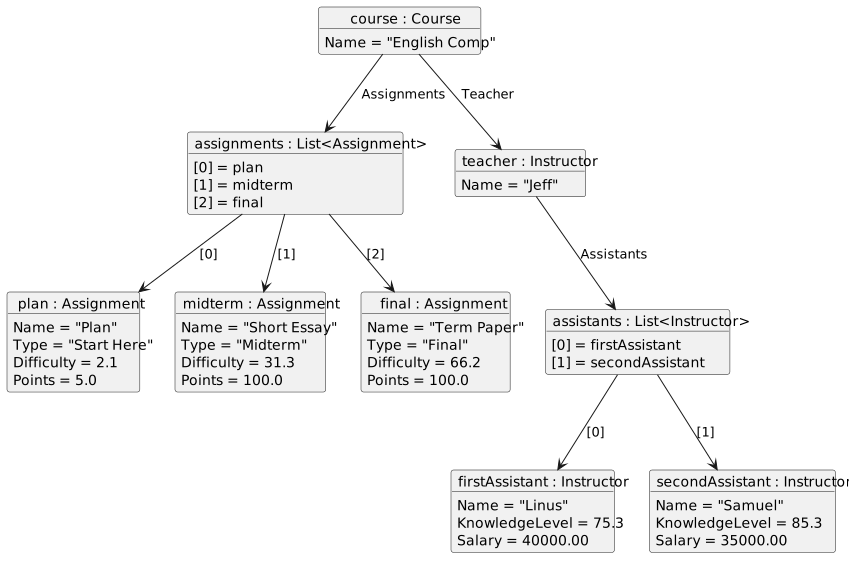
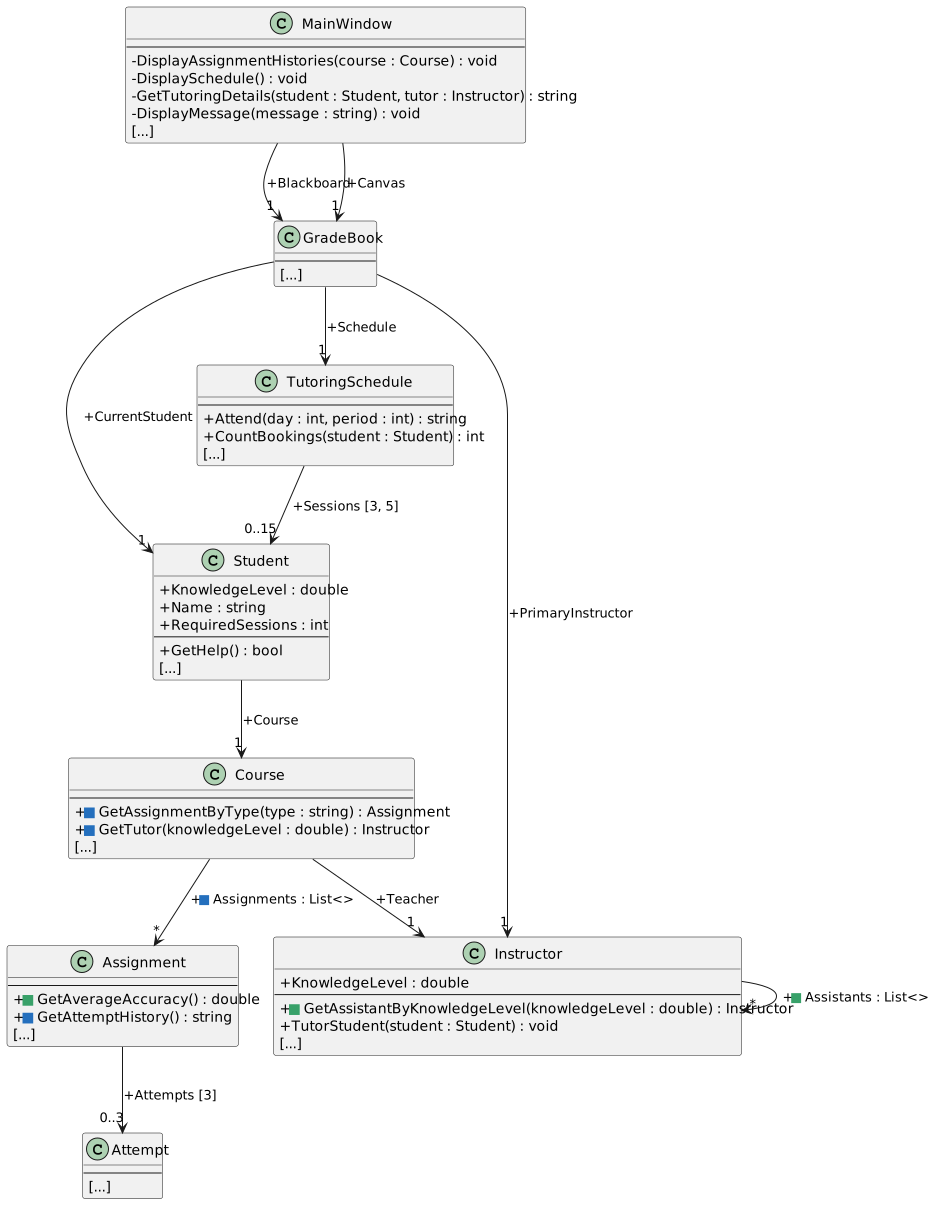
Extend your completed Grade Book 2.3 so a course can hold additional assignments and an instructor can have multiple assistants. Use the diagrams to guide the business-class edits. The weekly schedule and the three-attempt history continue to use arrays.
Update the window Title in MainWindow.xaml for 2.4 and your last name. In Properties/AssemblyInfo.cs, update both assembly version numbers to 2.4.0.0. Keep .NET Framework 4.8.
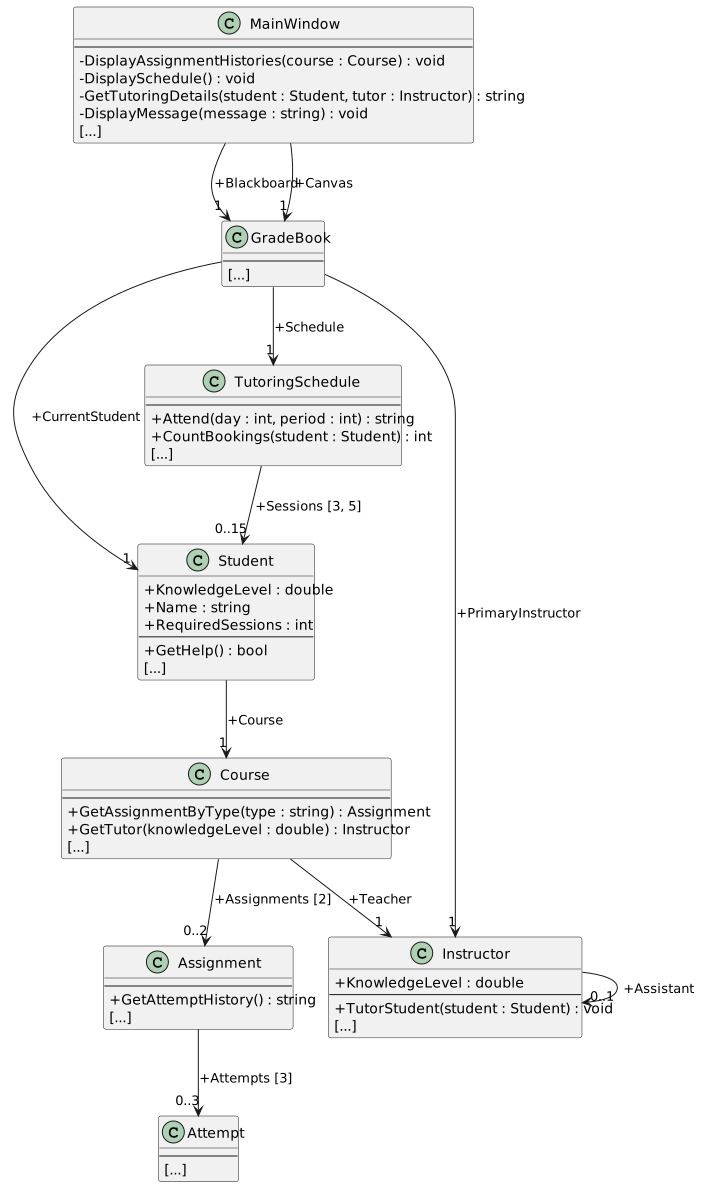
An array has a fixed number of slots. A List<T> stores a sequence of one specified type and grows when you call Add. The T is a type placeholder: replace it inside the angle brackets with Assignment or Instructor to state which kind of object the list can store. A new empty list has Count equal to zero: creating it does not create any Assignment or Instructor objects. List indexes still begin at zero, but use Count as the loop boundary instead of an array's Length.
| Member | Collection type | Purpose |
|---|---|---|
Course.Assignments |
List<Assignment> |
Add assignments without choosing a fixed slot count |
Instructor.Assistants |
List<Instructor> |
Search multiple assistants in list order |
Assignment.Attempts |
Attempt[3] |
Keep the three-attempt limit |
TutoringSchedule.Sessions |
Student[3, 5] |
Keep three periods across five weekdays |
Course.cs, add using System.Collections.Generic; and change Assignments to the public List<Assignment> field shown in the diagramInside Course, use the complete field declaration public List<Assignment> Assignments = new List<Assignment>();. This gives each Course object its own empty list.
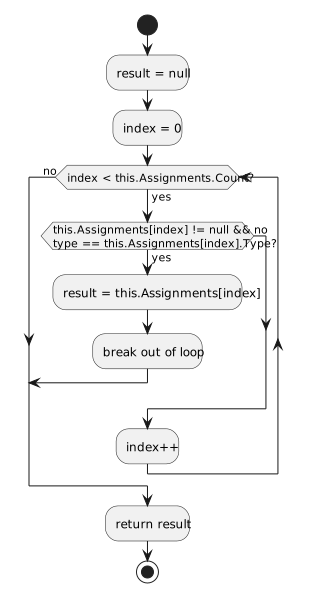
Course.cs, modify GetAssignmentByType using the activity diagramRetain the existing null check and first-match behavior. Replace the array boundary with the list boundary; a type that is not found still returns null.
Instructor.cs, add using System.Collections.Generic; and replace the singular Assistant field with the public Assistants list shown in the focused class diagramInside Instructor, use public List<Instructor> Assistants = new List<Instructor>();. Keep the existing using System; directive.
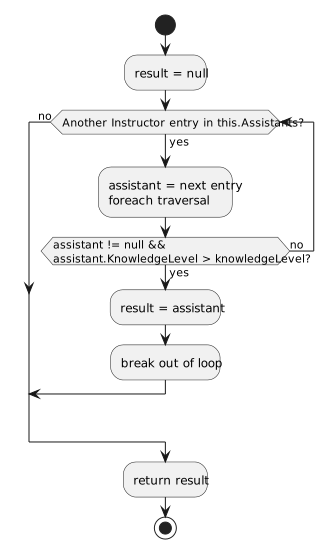
Instructor.cs, add GetAssistantByKnowledgeLevel using the focused signature and activity diagramA foreach loop supplies each Instructor reference in list order. The local result begins as null. When an assistant has strictly greater knowledge, save that reference and break out of the loop. Return result after the loop; do not sort the list or choose the greatest knowledge level.
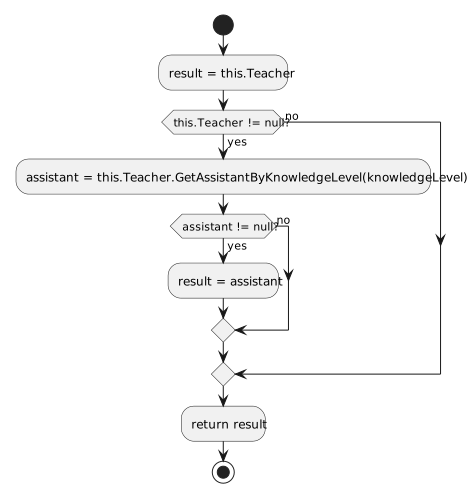
Course.cs, modify GetTutor using the activity diagramKeep Teacher as the fallback. Ask that teacher for a suitable assistant only when the teacher reference is not null. An assistant result replaces the fallback only when a match was found.
MainWindow.xaml.cs, update newBlackboardButton_Click using the diagramsUse the object diagram to configure and add the assignments and assistants in the order shown. Keep the existing setup values, relationships, and creation feedback.
MainWindow.xaml.cs, update newCanvasButton_Click using the diagramsApply the Canvas object diagram while keeping the existing schedule setup, display refresh, and creation feedback.
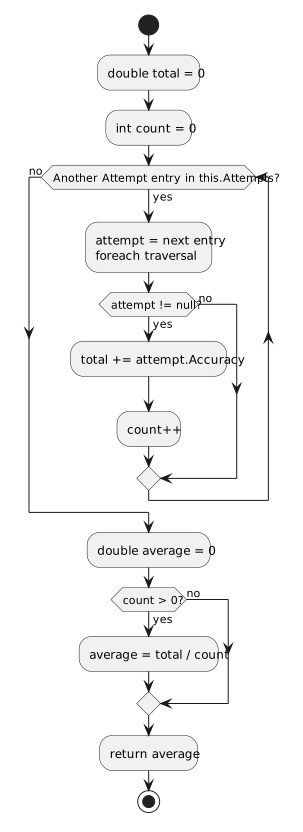
Build > Build Solution. Open View > Error List and resolve compiler errors and applicable StyleCop warnings before running.MainWindow.xaml.cs, set a breakpoint on this.DisplayMessage("Blackboard created."); inside newBlackboardButton_Click.F5 and click New Blackboard. When Visual Studio pauses, open Debug > Windows > Watch > Watch 1.this.Blackboard.CurrentStudent.Course.Assignments.Count to Watch. Confirm 3.this.Blackboard.CurrentStudent.Course.Assignments[0].Name is "Plan".this.Blackboard.CurrentStudent.Course.Assignments[1].Type is "Midterm" and this.Blackboard.CurrentStudent.Course.Assignments[2].Type is "Final".this.Blackboard.PrimaryInstructor.Assistants.Count is 2.this.Blackboard.PrimaryInstructor.Assistants[0].Name is "Donald".this.Blackboard.PrimaryInstructor.Assistants[1].Name is "Sheldon".F5 before clicking another control.newCanvasButton_Click. Click New Canvas.this.Canvas.CurrentStudent.Course.Assignments.Count is 3. Expand indexes 0, 1 and 2 and confirm each holds an Assignment object matching the Canvas object diagram.this.Canvas.PrimaryInstructor.Assistants.Count is 2.this.Canvas.PrimaryInstructor.Assistants[0].Name is "Linus" and this.Canvas.PrimaryInstructor.Assistants[1].Name is "Samuel".this.Canvas.Schedule.Sessions.GetLength(0) is 3 and this.Canvas.Schedule.Sessions.GetLength(1) is 5.F5.Instructor result = this.Teacher; inside Course.GetTutor.New Blackboard. Click Tutor Arthur.this refers to Arthur’s Course. Confirm knowledgeLevel is approximately 65.5.F10 over the fallback assignment and teacher check. Press F11 on the call to GetAssistantByKnowledgeLevel.this.Name is "Alan". Here this refers to the instructor, not the Course.F10 through the first loop iteration. Confirm this.Assistants[0].Name is "Donald" and this.Assistants[0].KnowledgeLevel is approximately 65.3. Donald does not exceed the supplied 65.5.this.Assistants[1].Name is "Sheldon" and this.Assistants[1].KnowledgeLevel is approximately 75.3. This comparison succeeds.result.Name is "Sheldon". The result is the existing list reference, not a new Instructor.Shift+F11. In Course.GetTutor, step past the assistant-result assignment and confirm result.Name is "Sheldon".F5. Confirm the status reports Tutoring session completed. with Sheldon as the tutor.tutorArthurButton_Click. Recreate Blackboard and click Tutor Arthur once. At the breakpoint, confirm this.Blackboard.CurrentStudent.KnowledgeLevel is approximately 70.5 and this.Blackboard.CurrentStudent.RequiredSessions is 2. Continue and remove this breakpoint.Course.GetTutor. Create a fresh Canvas and click Tutor Samantha.knowledgeLevel is approximately 87.8. Step into the assistant search; neither Linus nor Samuel has greater knowledge.result is null. After returning to Course.GetTutor, confirm its fallback result.Name remains "Jeff".tutorSamanthaButton_Click and continue. At that breakpoint, confirm this.Canvas.CurrentStudent.KnowledgeLevel is approximately 92.8 and this.Canvas.CurrentStudent.RequiredSessions is 3. Remove the breakpoint and continue.Instructor.GetAssistantByKnowledgeLevel and its activity diagram. Follow the next two cases on paper; do not edit the project or invoke the method through Watch.0 and Sheldon at index 1. Their KnowledgeLevel values are approximately 65.3 and 75.3.knowledgeLevel of 65.3. Confirm equality does not pass the strictly-greater comparison, so Donald is skipped and result.Name becomes "Sheldon".knowledgeLevel of 60.0. Confirm Donald is the first match, result.Name becomes "Donald" and break prevents examining Sheldon.Assignment.cs, add GetAverageAccuracy using the focused signature and activity diagramAdd the Accuracy of every non-null attempt and count those attempts. Include unsuccessful attempts. Divide by the completed-attempt count only when it is greater than zero. Keep the full double result; formatting belongs in the display method.
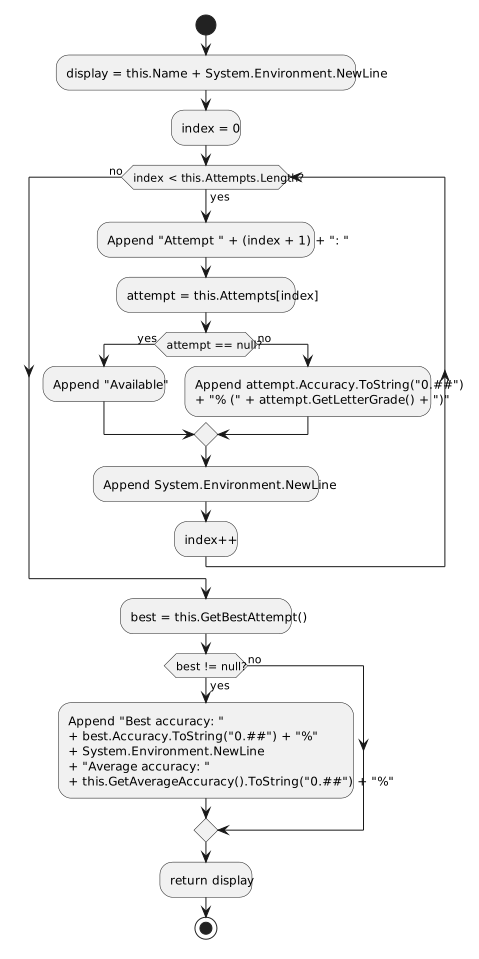
Assignment.GetAverageAccuracy and follow its activity diagram as a source trace. Do not add a temporary caller or call the method through Watch.this.Attempts.Length of 3 with this.Attempts[0], this.Attempts[1] and this.Attempts[2] all null.total is 0.0 and local count is 0.null check, so total and count remain zero.average is 0.0, division is skipped because count is zero, and the method returns 0.0.Assignment.cs, update GetAttemptHistory using the activity diagramKeep the existing slot display and best-attempt lookup. Within the existing best-not-null condition, retain the best accuracy and append a new line followed by Average accuracy: , the returned average formatted with ToString("0.##") and a percent sign. Empty histories continue to show three available slots without a summary.
Build > Build Solution. Open View > Error List and resolve compiler errors and applicable StyleCop warnings before running.DisplayAssignmentHistories. No temporary average-test caller is needed.New Blackboard, then click Take midterm exactly twice. Do not take another assignment yet.blackboardHistoryButton_Click, set a breakpoint on its call to DisplayAssignmentHistories. Click Show Blackboard attempt history.this refers to MainWindow. Confirm this.Blackboard.CurrentStudent.Course.Assignments[1].Attempts.Length is 3.this.Blackboard.CurrentStudent.Course.Assignments[1].Attempts[0].Accuracy is approximately 79.575 and this.Blackboard.CurrentStudent.Course.Assignments[1].Attempts[1].Accuracy is approximately 82.075.this.Blackboard.CurrentStudent.Course.Assignments[1].Attempts[2] is null.double total = 0; inside Assignment.GetAverageAccuracy. Press F5.this.Name is "HTML Exercises". Now this refers to that Assignment.total, count, average, this.Attempts.Length and this.Attempts[2].F10 over the total and count initializers. Confirm total is 0.0 and count is 0.total is approximately 79.575 and count is 1.total is approximately 161.65 and count is 2.null third slot. Confirm neither total nor count changes.average initializer and guarded division. Confirm average is approximately 80.825.F5. Confirm the HTML Exercises history shows two attempts, best accuracy 82.08%, and average accuracy 80.83%.Take midterm a third time; at the pause, record this.Blackboard.CurrentStudent.KnowledgeLevel. Press F5 to continue.Show Blackboard attempt history. Confirm HTML Exercises now has three attempts, best accuracy 84.58% and average accuracy 82.08%.Take midterm a fourth time. Use F10 through the blocked attempt; before the handler returns, compare this.Blackboard.CurrentStudent.KnowledgeLevel with your recorded value and confirm it has not increased. Continue and confirm the message reports that all three attempts have been used.F5 before starting the next independent check.New Blackboard to restore the starting student and assignment state.Take final once, then Show Blackboard attempt history.F and accuracy 66.55%.66.55%.null Attempt, even when that attempt is not retained as the passing Submission.New Canvas. Reserve Monday, period 1, for Samantha using the existing schedule controls.attendButton_Click. Click Attend.this.Canvas.Schedule.Sessions[0, 0] is null.this.Canvas.CurrentStudent.KnowledgeLevel is approximately 92.8 and this.Canvas.CurrentStudent.RequiredSessions is 3.F5. Confirm the Monday-period-1 cell changes from [X] to [ ] and the displayed reservation count returns to 0.New Canvas. Reserve Monday, period 1, for Samantha.Complete Samantha tutoring. Confirm two sessions complete, Samantha’s KnowledgeLevel reaches approximately 95.0 and RequiredSessions remains 2.[X]. Direct tutoring does not consume it.attendButton_Click. Click Attend. Confirm the message begins No tutor has a higher knowledge level. Reservation retained..attendButton_Click. Confirm this.Canvas.Schedule.Sessions[0, 0] still refers to this.Canvas.CurrentStudent.this.Canvas.CurrentStudent.KnowledgeLevel is still approximately 95.0 and this.Canvas.CurrentStudent.RequiredSessions is still 2.newCanvasButton_Click, find the starting assignment to this.Canvas.CurrentStudent.RequiredSessions. Temporarily change only its value from 4 to 1.New Canvas and reserve Monday, period 1, for Samantha.Tutor Samantha once. Confirm one session completes, this.Canvas.CurrentStudent.RequiredSessions becomes 0 and the reservation stays [X].attendButton_Click. Click Attend. Confirm the message begins No tutoring sessions are required. Reservation retained..attendButton_Click, confirm this.Canvas.Schedule.Sessions[0, 0] still refers to Samantha, this.Canvas.CurrentStudent.RequiredSessions remains 0 and her KnowledgeLevel has not increased again.RequiredSessions assignment to 4, remove the test breakpoint, rebuild, and create a fresh Canvas before continuing.Tutor Arthur. Confirm Create Blackboard first. appears without an exception.Attend. Confirm Create Canvas first. appears without an exception.RequiredSessions value in newCanvasButton_Click is restored to 4.Build > Build Solution. Open View > Error List and resolve compiler errors and applicable StyleCop warnings before running.