2.2.21 Choosing and Designing a Loop

Design a Loop to Total Planned Round Scores

The requirement is: return the total goals for every round from 1 through the planned last round. Before writing code, decide what runs once, what repeats, and what ends the repetition.

Plan the Range and Repeated Work

Turn the requirement into a visited range

From 1 through the planned last round means the last round is included. Start round at 1 and use round <= plannedRounds.

For a plan of 3, the body must visit 1, 2, and 3; the next candidate, 4, must fail.

Give the body one clear job

For the current round, obtain its score and add that score to the total. These two statements belong inside the body because they must happen for every visited round.

The header update moves to the next round after that work is complete.

Separate the work that happens once

The total starts at zero before any round is visited. It must not reset inside the body.

The return belongs after the loop because the requirement asks for every planned score, not a partial sum from the first pass.

Choose tests from the plan

For a plan of zero, no round should be visited and the result should be 0. For a plan of one, the result should be 2.

For a plan of three, the result should be 5. Testing these cases examines the empty range, one pass, and several passes.

Use an acceptance example to test the design

For a plan of 3, the result must include the third-round score of 3. A result of 2 is a clue that the last round was omitted, while a result of 3 may suggest the total was reset during traversal.

These clues are starting points for investigation, not proofs of a particular defect. Compare the intermediate totals with the requirement to locate the first wrong step.
Match the Plan to the Requirement
Connect the requirement to the implementation
Requirement Code decision Three-round example
Include the first round Start at 1 Read score 2
Include the planned last round Continue while round <= plannedRounds Read round 3 score
Preserve every score Add to totalGoals in the body Totals 2, 2, 5
Return the complete sum Return after the loop Return 5
Implement the Plan

Place both methods inside the existing Game class. The helper shown here provides the sample scores.

Assume the planned count is nonnegative. The helper returns zero for round numbers other than 1 and 3.

Design a Loop to Total Planned Round Scores
public int GetRoundGoals(int round)
{
    if (round == 1)
    {
        return 2;
    }

    if (round == 3)
    {
        return 3;
    }

    return 0;
}

public int GetPlannedTrainingGoals(int plannedRounds)
{
    int totalGoals = 0;

    for (int round = 1; round <= plannedRounds; round++)
    {
        int roundGoals = this.GetRoundGoals(round);
        totalGoals = totalGoals + roundGoals;
    }

    return totalGoals;
}
Read the Matching Activity Diagram
Design a Loop to Total Planned Round Scores.
Design a Loop to Total Planned Round Scores
  • New
  • Changed
  • Removed

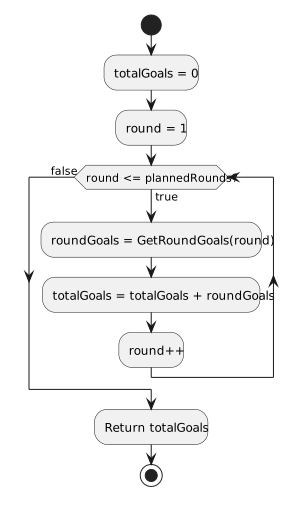
The diagram makes the design choices visible: initialization is before the condition, score processing is on the true route, and the return is after the false route.

For a zero plan, the condition is false on its first visit and execution reaches the return with total 0. For a plan of 3, three additions occur before that return.

Try a Focused Change
Predict and Explain

Check your reasoning

A plan of 4 visits scores 2, 0, 3, and 0, so the total is still 5. The fourth score is zero in this fixed sample helper.

The strict comparison with a plan of 3 skips round 3. Only scores 2 and 0 are included, producing the incorrect total 2.