- New
- Changed
- Removed
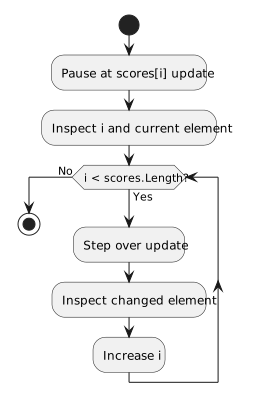
Pause on the assignment and inspect i and scores[i]. Step over, then inspect the updated element and the next index as execution returns to the condition. Autos may not show every value you want on every line; use Locals or Watch for a persistent view.
Autos emphasizes expressions near the paused statement, so the displayed entries can differ at the condition, body, and update. If scores[i] is not present at the condition line, move to the line that reads it or add the expression to Watch. Always check that i is a valid index before evaluating scores[i] manually.
For scores 2, 4, 6, record i and the corresponding value before and after each update. If an expression disappears from Autos, check the current source line rather than assuming the array changed unexpectedly.