1.4.1 Program Flow: From Sequence to Decisions

Last Updated: 9/14/2026
Programs Follow a Path

A program is more than a collection of instructions. It is a sequence of instructions that execute in a particular order.

Earlier, you worked mostly with straight-line flow:
Sequence diagram showing instruction.
Instruction.
  • New
  • Changed
  • Removed

That model is still important. Later instructions can depend on objects, values, or state created by earlier instructions.

Module 1.4 adds an important idea:

A program can evaluate information and decide whether a particular action should happen.
Clear Instructions Need Clear Conditions

People often fill in missing details automatically. Programs cannot safely depend on unstated assumptions.

Consider this requirement:

This instruction contains two parts:

  • an action : add the player to the match list;
  • a condition : the player is available.

The action should not happen every time. It should happen only when the condition is satisfied.

This is the foundation of conditional program flow.

A Decision Changes What Happens Next

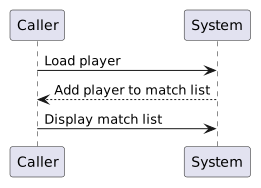
Without a decision, the flow might be:

Sequence diagram showing Load player, then Add player to match list, then Display match list.
LoadPlayer.
  • New
  • Changed
  • Removed

With a condition, the flow changes:

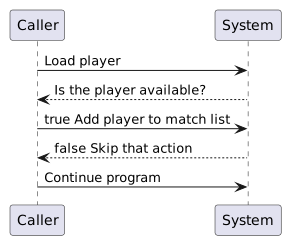
Sequence diagram showing Load player, then Is the player available?, then true Add player to match list, then false Skip that action, then Continue program.
LoadPlayer.
  • New
  • Changed
  • Removed

The program still follows defined instructions. The difference is that one instruction determines which path is followed next.

Boolean Values Make Decisions Possible

A program needs a condition it can evaluate precisely.

A Boolean value gives the program two possible results:

true
false

Suppose a Player object contains:

player1.isAvailable

If the current value is:

true

then the statement “the player is available” is true.

If the current value is:

false

then that statement is false.

The Boolean value does not perform the action by itself. It provides the result that a decision can use.

Separate the Question from the Action

When reading conditional logic, identify these two ideas separately.

Question:

Is the player available?

Action when true:

Add the player to the match list

This separation matters because the program must first determine whether the condition is true before it knows whether the controlled action should execute.

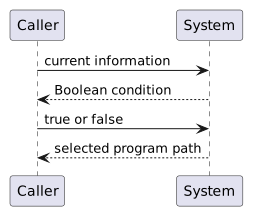
A useful reasoning pattern is:

Sequence diagram showing current information, then Boolean condition, then true or false, then selected program path.
CurrentInformation.
  • New
  • Changed
  • Removed
An if Statement Represents This Decision in C#

In C#, a simple if statement expresses the same idea:

if (player1.isAvailable)
{
    System.Console.WriteLine("Add player to match list.");
}

Read it conceptually before worrying about the punctuation:

The condition is evaluated first.

If the condition is true, the controlled block runs.

If the condition is false, the controlled block is skipped.

False Does Not Mean the Program Stops

A common mistake is to think that a false condition means execution ends.

Consider:

if (player1.isAvailable)
{
    System.Console.WriteLine("Player is available.");
}

System.Console.WriteLine("Roster loaded.");

If player1.isAvailable is false, the first output is skipped.

The program then continues with:

System.Console.WriteLine("Roster loaded.");

The condition controls only the block associated with the if.

Program flow continues afterward.

State Influences Flow, and Flow Can Change State

Program state and program flow are closely connected.

Suppose:

player1.isAvailable = true

That state can cause one path to execute.

An instruction on that path might then change another value in the program.

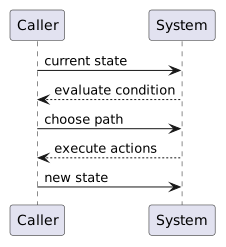
This creates a cycle of reasoning:

Sequence diagram showing current state, then evaluate condition, then choose path, then execute actions, then new state.
CurrentState.
  • New
  • Changed
  • Removed

When you trace a program, ask both:

  • What values exist at this point?
  • Which instruction will execute next because of those values?
Model the Decision Before Focusing on Syntax

The same decision can be represented at different levels.

A requirement might say:

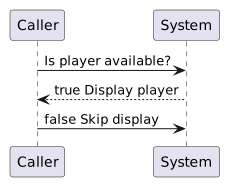
A conceptual flow can show:

Sequence diagram showing Is player available?, then true Display player, then false Skip display.
IsPlayerAvailable.
  • New
  • Changed
  • Removed

An activity diagram can model that behavior visually.

C# can then implement it with an if statement.

These are different representations of the same reasoning:

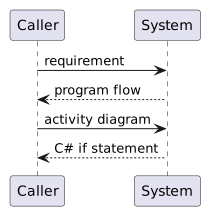
Sequence diagram showing requirement, then program flow, then activity diagram, then C# if statement.
Requirement.
  • New
  • Changed
  • Removed

The syntax matters, but the decision should make sense before you translate it into code.

Predict the Path Before You Run the Program

Before executing an if statement, identify the condition and predict its Boolean result.

For example, if:

player1.isAvailable = false

then for:

if (player1.isAvailable)

predict:

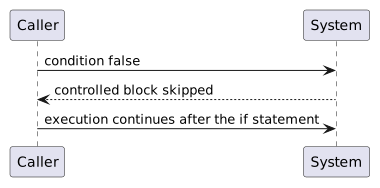
Sequence diagram showing condition false, then controlled block skipped, then execution continues after the if statement.
ConditionFalse.
  • New
  • Changed
  • Removed

This habit connects program flow to debugging. Instead of only observing what the program did, you first state what you expect it to do and then compare the actual path with your prediction.

The Core Idea

Program flow answers:

For a straight sequence, the answer is usually the next instruction in order.

For a decision, the answer depends on a condition.

A simple if statement gives a program one controlled action path:

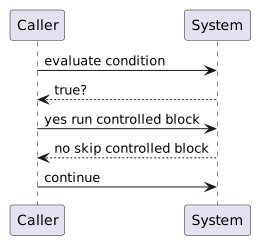
Sequence diagram showing evaluate condition, then true?, then yes run controlled block, then no skip controlled block, then continue.
EvaluateCondition.
  • New
  • Changed
  • Removed

The activity diagrams that follow give you a visual way to design and trace this kind of flow before translating it into C#.