Trace the Value from Caller to Method
A useful mental model is:
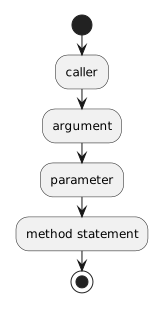 Caller.
For:
player1.SetJerseyNumber(7);
and:
public void SetJerseyNumber(int number)
{
    this.jerseyNumber = number;
}
the flow is:
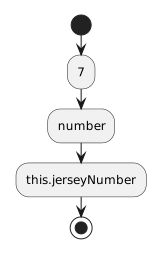 .
.
The caller supplies the value.
The method receives it through the parameter.
The method can then use the parameter in its own logic.
Multiple Parameters Receive Multiple Arguments
Suppose:
public void SetPlayerInfo(string name, int number)
{
this.name = name;
this.jerseyNumber = number;
}
A matching call is:
player1.SetPlayerInfo("Jordan", 7);
The arguments match the parameters by position:
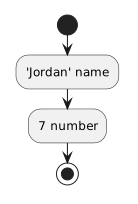 JordanName.
The first argument is used for the first parameter.
The second argument is used for the second parameter.
Type Compatibility Still Matters
If the method expects:
then this call is compatible:
player1.SetJerseyNumber(7);
This call is not:
player1.SetJerseyNumber("seven");
The argument must be compatible with the parameter type.
The same rule applies when parameters use:
or another available type.
Arguments Can Be Literals
A literal is a value written directly in the call.
Examples:
player1.SetJerseyNumber(7);
player1.SetAvailability(true);
player1.SetPosition("Forward");
The literals are:
Each one becomes the value of the matching parameter during the call.
Arguments Can Be Variables
Suppose a method already has:
The local variable can be used as an argument:
player1.SetJerseyNumber(selectedNumber);
The current value stored in:
is supplied to the method parameter.
Conceptually:
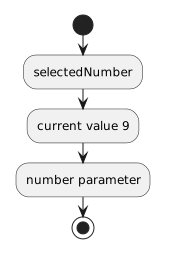 SelectedNumber.
Arguments Can Be Fields
If:
team1.defaultJerseyNumber
is an int, it can be used where an int argument is expected:
player1.SetJerseyNumber(team1.defaultJerseyNumber);
The argument expression reads the current field value.
The method receives that value through its parameter.
A Parameter Gets Its Own Method-Level Value
Consider:
int selectedNumber = 9;
player1.SetJerseyNumber(selectedNumber);
Inside:
public void SetJerseyNumber(int number)
{
    this.jerseyNumber = number;
}
the parameter is named:
The caller's local variable is named:
The names do not have to match.
The value is what moves across the method-call boundary.
Passing an Argument Does Not Automatically Change the Caller Variable
Suppose:
int selectedNumber = 9;
player1.SetJerseyNumber(selectedNumber);
The method receives the value through its parameter.
Changing the Player field does not automatically change:
The local variable and the object field are different storage locations.
A Parameter Can Become an Argument in Another Method Call
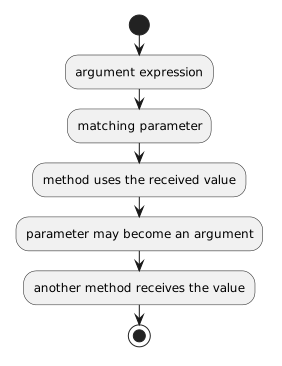
A method can receive a value through a parameter and then use that parameter as the argument in another method call.
This is called forwarding an argument.
Conceptually:
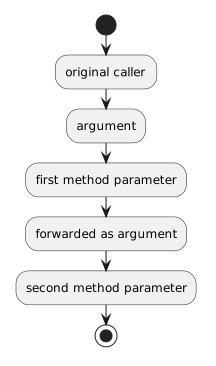 OriginalCaller.
The same information can move through more than one method call.
Forward an Incoming Value to Another Object
Suppose Team has:
public void DisplayMessage(string message)
{
    System.Console.WriteLine(message);
}
Player has a Team reference:
Player can define:
public void SendTeamMessage(string message)
{
    this.team.DisplayMessage(message);
}
The Player method receives message.
Then it passes that value to the Team method.
Trace a Forwarded Argument
Suppose:
player1.SendTeamMessage("Practice starts at 5.");
The first call supplies:
to the Player parameter:
Inside SendTeamMessage, the code calls:
this.team.DisplayMessage(message);
The current value of message becomes the argument for DisplayMessage.
The information flow is:
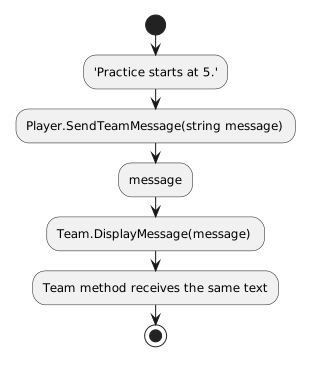 PracticeStartsAt.
The Player method does not need to create a new text value. It can forward the value it already received.
The Same Name Can Have Two Roles Across Call Boundaries
Inside:
public void SendTeamMessage(string message)
message is a parameter.
Inside this call:
this.team.DisplayMessage(message);
that same expression is being used as the argument supplied to another method.
The role depends on which side of the method-call boundary you are looking at.
Keep the Receiver and the Argument Visible
In:
this.team.DisplayMessage(message);
there are two important pieces.
Receiver
Which object receives the call?
Argument
Which value is sent to the receiving method?
Tracing both makes object-to-object method calls easier to follow.
Forwarding Does Not Automatically Store the Value
Suppose:
public void SendTeamMessage(string message)
{
    this.team.DisplayMessage(message);
}
The Player receives the text and passes it onward.
The Player does not automatically keep that text as object state.
If the class needs to remember the value later, the design would need a field assignment that explicitly stores it.
Parameters and fields remain different.
Forwarding Can Cross Object Boundaries
In the example:
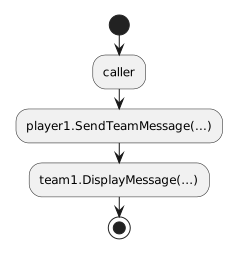 Caller.
the value moves from the caller into Player behavior and then into Team behavior.
This connects parameters with the object-to-object method calls you learned earlier.
Connect the Call to UML
A specific call can be represented conceptually in a sequence diagram as:
controller1 ── SetJerseyNumber(7) ──> player1
A forwarded call can also show the value continuing to another object:
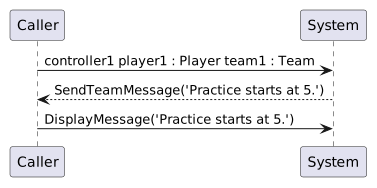 Controller1Player1PlayerTeam1Team.
A class diagram can show the method parameter:
SetJerseyNumber(number : int) : void
C# connects those representations through the actual method calls.
Predict and Trace Parameter Values
When debugging a parameterized method:
- identify the argument;
- predict the parameter value;
- step into the method;
- inspect the parameter;
- if the parameter is forwarded, identify the next call and receiver;
- predict which parameter receives the forwarded value;
- compare the debugger state with your prediction.
That turns method calls into traceable value flow rather than mysterious jumps between source files.
Keep Forwarding to Existing Values for Now
Later modules introduce methods that return values and allow a returned value to become another argument.
That is not needed here.
For now, forward a value that the current method already received as a parameter.
The Main Pattern
Keep this relationship clear:
 ArgumentExpression.