A Browser Is More Than a Window That Shows Pages
When you open a website, the browser does not usually begin with the complete webpage already stored inside it.
The browser acts as a client.
A client requests information or a service from another system.
A server receives that request and provides a response.
For the Web, the browser and web server form a common client/server interaction.
Client and Server Describe Roles
The words client and server describe roles in an interaction.
The client asks for something.
The server provides a response.
A simplified web interaction is:
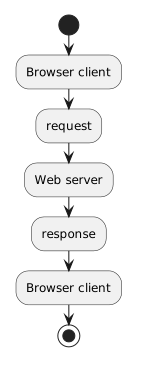 BrowserClient.
The browser then interprets the returned web information and presents it to the user.
The Browser Creates Requests
Suppose you enter a web address for a soccer club website.
The browser uses the address to determine what resource is being requested.
It then creates and sends a web request.
At this stage, you do not need to build that request manually.
Focus on the responsibility:
Browser/client responsibility: request a web resource and process the response for the user.
The Server Receives the Request
The server receives the request and determines how to respond.
Depending on the site, the server might:
- locate a file;
- generate content;
- process information;
- contact another system;
- return an error;
- or return the requested resource.
The internal implementation can be complex.
For this module, the server's role can be kept simple:
Server responsibility: receive the request and send an appropriate response.
The Browser Interprets the Response
A response can contain information such as HTML.
The HTML may then refer to additional resources such as:
- CSS files;
- images;
- other web assets.
The browser interprets those resources and produces the visible page.
That gives a simplified flow:
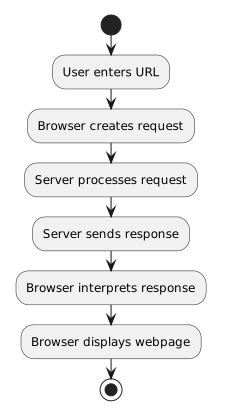 UserEntersURL.
Client Does Not Mean “Less Important”
Client and server are not rankings.
They are roles.
The browser has substantial work to do:
- accepting user navigation;
- constructing requests;
- receiving responses;
- parsing HTML;
- applying CSS;
- displaying content;
- managing further resource requests.
The server also performs important work.
The interaction succeeds because the responsibilities cooperate.
The Server Is Not the Website Screen
A user sees the page inside the browser.
The server usually does not send a picture of the completed browser window.
It sends web resources or data that the browser interprets.
That distinction connects directly to HTML and CSS.
The browser receives representations.
Then it turns those representations into the displayed page.
One Browser Can Communicate With Many Servers
The same browser can visit many different websites.
Its role as a client remains similar.
The destination server changes according to the requested URL.
Likewise, one server can respond to many clients.
This makes client/server a reusable communication model rather than a one-browser-to-one-server pairing.
A Soccer Website Example
Imagine you visit a team page.
The browser might request:
https://example.com/wildcats
The server responds with the resource associated with that request.
The browser may then request additional files referenced by the page, such as:
styles.css
team-photo.jpg
The displayed site can therefore involve several request/response exchanges.
The page feels like one experience to the user, but the underlying web interaction can involve multiple resources.
The Important Responsibility Split
Keep these roles clear:
User
Chooses where to navigate and interacts with the page.
Browser/client
Creates requests, receives responses, interprets web resources, and displays the result.
Server
Receives requests and provides responses.
The next activity follows this interaction as a sequence from entering a URL to seeing the webpage.