When you enter a URL and press Enter, a lot happens quickly.
The page may appear almost immediately, making the process feel like one action.
It is more useful to think of it as a sequence.
At an introductory level:
Each step has a different responsibility.
Suppose you enter:
https://example.com/team
The URL gives the browser information about:
Later in this batch, you will examine URL parts more closely.
For now, treat the URL as the browser's starting description of the desired web resource.
The browser needs to communicate with the system identified by the URL.
The Internet provides the network connectivity for that communication.
Several networking steps happen beneath the visible webpage experience.
You do not need to model all of those steps here.
The important result is:
The browser establishes the communication needed to send a request to the destination server.
The request communicates what the browser wants from the server.
For a simple page visit, the browser may be requesting a web resource at a particular path.
Conceptually:
Browser
|
| request /team
v
Server
The request is a message.
The browser is not physically traveling to the server.
Information is being exchanged through the network.
The server receives the request.
It determines how to respond.
For a simple static resource, the server may locate the requested content.
For another site, software may generate the response dynamically.
You do not need to know the site's internal implementation to understand the web interaction.
The key responsibility is:
The server processes the request and creates an appropriate response.
The response travels back to the client.
Conceptually:
Browser
|
| request
v
Server
|
| response
v
Browser
The response can include:
The next activity focuses more directly on this request/response pair.
If the response contains HTML, the browser parses the HTML structure.
If the HTML references CSS, images, or other resources, the browser may send additional requests for those resources.
This is why one visible webpage can involve several web requests.
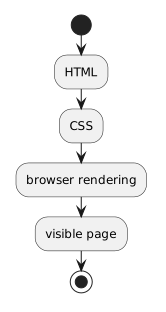
The browser combines the HTML structure with styling information.
Conceptually:
HTML
+
CSS
↓
browser rendering
↓
visible page
The browser is responsible for turning those digital representations into the visual experience the user sees.
The interaction does not necessarily stop when the first page appears.
A page can cause additional requests when:
For this module, keep the focus on one basic request and one response.
The larger idea is that web use is an exchange between systems.
Two different things are happening:
Information moves between client and server.
The browser interprets returned web resources and displays the page.
A networking problem can prevent the response from arriving.
A markup or styling problem can affect how an arrived response is displayed.
Separating those stages helps you reason about where a problem might occur.
Keep this sequence in mind:
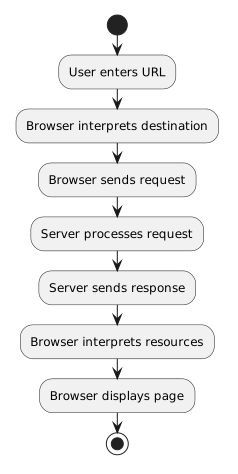
User enters URL
↓
Browser interprets destination
↓
Browser sends request
↓
Server processes request
↓
Server sends response
↓
Browser interprets resources
↓
Browser displays page
That sequence becomes easier to model when client and server responsibilities are placed in separate UML activity partitions.