3.3.2 Representing Enums in Sequence Diagrams

Representing Enums in Sequence Diagrams

A sequence message can carry a named enum value while preserving which object receives it.

Read the Code Before Drawing

Inside a Controller method, selected refers to Player. PlayerRole defines Keeper, Forward, and Defense. SetRole(PlayerRole role) stores the supplied value in the Role field and returns void.

If the underlying C# feature is unfamiliar, use the lesson below while reading this example.

Source to translate
selected.SetRole(PlayerRole.Keeper);
Rewrite the Meaning in Ordinary Words
Pseudocode for the same behavior
The controller calls SetRole on selected
The argument is the enum value PlayerRole.Keeper
The player stores that value in Role
The void operation completes
No role object is created

Use these words to follow one execution before drawing it. Keep the same order and the same alternatives as the source; simplify the wording without adding work that the code does not perform.

Map the Source to Lifelines and Messages
Build the Diagram in Violet
  1. Create existing lifelines controller : Controller and selected : Player.
  2. Draw a solid request to selected labeled SetRole(PlayerRole.Keeper). Activate the Player while it handles the request.
  3. Add a note beside selected: Role now contains PlayerRole.Keeper. This states the relevant effect without adding an object snapshot to the lifeline heading.
  4. End the called activation and show optional completed (void) control return. Do not add a PlayerRole participant or a returned role value.
  5. Save and check the receiver and argument separately. The message goes to selected and carries the named enum value.
Compare the Completed Soccer Diagram

Compare this reference with the diagram you built in Violet. Layout may differ; the source meaning, labels, and relevant connections should agree.
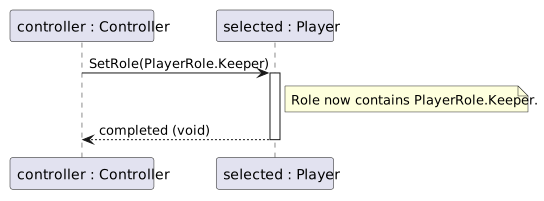
Controller passes PlayerRole.Keeper to selected. SetRole stores that value and returns control without a result.
A named enum value travels as an argument
  • New
  • Changed
  • Removed
Trace One Interaction from Top to Bottom

After completion, an object snapshot would show Role = PlayerRole.Keeper for selected. This sequence instead explains the request that led to the state.

Verify the Drawing Against the Source
Predict and Check a Small Change