Overview
An if statement lets a method run an action only when a condition is true. A condition is a Boolean expression: it evaluates to either true or false. For example, an airline application can check whether a flight still has seats:
if (availableSeats > 0)
{
    MessageBox.Show("Seats are available.");
}
When availableSeats is 4, the message appears. When it is 0, the program skips the braces and continues after the if statement. A single if has no action reserved for the false result.
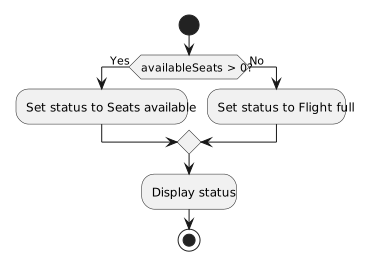
If the application needs to display one of two messages, add else:
if (availableSeats > 0)
{
    MessageBox.Show("Seats are available.");
}
else
{
    MessageBox.Show("This flight is full.");
}
For one evaluation of the condition, exactly one branch runs. The else branch has no separate condition: it runs when the if condition is false. Execution then continues after the entire statement.
- New
- Changed
- Removed
availableSeats |
availableSeats > 0 |
Message shown |
|---|---|---|
| 4 | true |
Seats are available. |
| 0 | false |
This flight is full. |