Overview
A local variable is declared inside a method or block.
It exists to support the work being performed in that scope.
For example:
public void DisplayScoreDifference()
{
    int homeScore = 3;
    int awayScore = 1;
    int difference = homeScore - awayScore;

    System.Console.WriteLine(difference);
}
The variables:
homeScore
awayScore
difference
are local to this method.
Local Variables Are Not Object Fields
Compare:
inside a class with:
int difference = homeScore - awayScore;
inside a method.
The field is part of an object's state.
The local variable supports the current method execution.
That distinction affects:
- lifetime;
- scope;
- access;
- purpose.
A Local Variable Can Hold a Boolean Result
For example:
bool isGoalkeeper = player1.position == "Goalkeeper";
Now:
contains the result of the comparison.
That value can be used by an if statement:
if (isGoalkeeper)
{
    System.Console.WriteLine("Goalkeeper selected.");
}
The local variable stores method-level decision information.
A Local Variable Can Hold an Object Reference
Suppose:
Team currentTeam = player1.team;
The local variable:
now holds a Team reference.
This does not create another Team object.
It stores a reference to the object already reached through player1.team.
More detailed shared-reference behavior is taught later.
For now, recognize that local variables can hold class-type references as well as simple values.
Local Variables Must Be Declared Before Use
The method must establish a local variable before later statements can use its name.
For example:
int difference = homeScore - awayScore;
System.Console.WriteLine(difference);
The declaration comes before the use.
Scope Limits Where the Local Name Exists
Consider:
public void DisplayDifference()
{
    int difference = 2;
}
Another method cannot simply write:
System.Console.WriteLine(difference);
and expect to use that local variable.
The name belongs to the scope where it was declared.
Local Variables Can Change During Method Execution
For example:
int score = 1;
score = 2;
The local variable is still the same local variable.
Its current value changed.
This is similar to field assignment, but the storage belongs to the method scope rather than object state.
Use Fields for Lasting Object State
Suppose a Player needs to remember its jersey number after a method finishes.
That information belongs naturally in a field such as:
A temporary local variable alone would not represent the Player's continuing state.
Ask:
That question often helps distinguish field from local variable.
Debugger Windows Can Show Local Variables
When execution pauses inside a method, Visual Studio can display local variables and their current values.
That helps you trace:
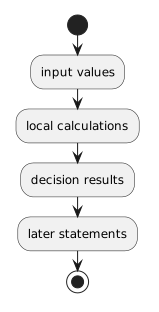 InputValues.
CO-042 adds more focused debugging of parameter values and Boolean expressions.
The Main Distinction
Keep this relationship clear:
Fields
All three can have names and values.
Their roles and scopes are different.