A Program Can Make a Decision Based on Text
A string field can hold text such as:
player1.position = "Goalkeeper";
Sometimes a method needs to make a decision based on that text.
For example:
A string comparison can produce the Boolean value needed by an if statement.
Use a Comparison to Produce true or false
Consider:
if (player1.position == "Goalkeeper")
{
    System.Console.WriteLine("Goalkeeper selected.");
}
The Boolean expression is:
player1.position == "Goalkeeper"
It asks:
The result is either:
or:
The Text Must Match the Intended Value
Suppose:
player1.position = "Goalkeeper"
Then:
player1.position == "Goalkeeper"
evaluates to true.
If:
player1.position = "Forward"
the same expression evaluates to false.
The condition depends on the current string value.
Quotation Marks Mark the String Literal
In:
player1.position == "Goalkeeper"
the value:
is a string literal.
The quotation marks are part of the C# representation of text.
They are not part of the player's visible position name.
String Comparisons Should Use the Exact Expected Text for the Current Requirement
These values are visibly similar but not identical text:
Goalkeeper
goalkeeper
Goal Keeper
If the course requirement expects one exact representation, use that representation consistently.
Do not silently change capitalization or spacing to make a comparison easier.
A String Comparison Is a Boolean Expression
You previously learned that a Boolean field can act as a condition:
A string comparison also produces a Boolean result:
if (player1.position == "Goalkeeper")
So both can drive a decision.
Conceptually:
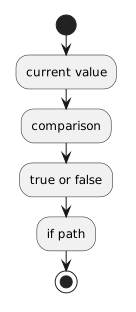 CurrentValue.
Keep the Condition Separate from the Action
In:
if (player1.position == "Goalkeeper")
{
    System.Console.WriteLine("Goalkeeper selected.");
}
the condition answers:
The block answers:
Separating those ideas makes conditional logic easier to read.
Compare a Parameter the Same Way
Suppose a method accepts a string parameter:
public void DisplayPositionMessage(string position)
{
    if (position == "Goalkeeper")
    {
        System.Console.WriteLine("Goalkeeper selected.");
    }
}
The parameter:
contains the argument supplied by the caller for that method call.
The comparison asks whether that incoming text matches the expected string.
Do Not Turn Every String Value into a Boolean Field
If the method truly needs to know the player's position text, compare the string required by the design.
Do not add an unrelated Boolean field such as:
merely to avoid reading the string.
The class and method design should reflect the information the program actually needs.
More Comparison Detail Comes Later
A later Learning Activity focuses specifically on equality versus assignment.
Other later activities introduce relational operators and additional Boolean operators.
For this activity, keep one idea clear: