1.3.17 Using the Call Stack

The Call Stack Shows the Chain of Active Method Calls

When the debugger pauses inside a method, that method may have been called by another method, which may have been called by another method.

The Call Stack shows that active chain.

It helps answer:

How did execution get here?

Consider a Nested Call

Suppose:

C#
player1.ShowTeamName();

calls:

C#
this.team.DisplayName();

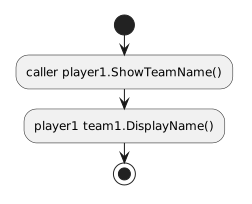
While execution is paused inside DisplayName(), the active method chain is conceptually:
Plain text
DisplayName()
ShowTeamName()
original caller

The current method is at the top of the active chain.

The earlier callers are below it.

Read from the Current Method Backward

If the debugger pauses inside:

C#
DisplayName()

the Call Stack can help you see:

  1. the current method;
  2. the method that called it;
  3. the earlier caller.

This lets you reconstruct the path execution followed.

The Call Stack Explains Nested Calls Better than Source Location Alone

A highlighted source line tells you:

Where am I now?

The Call Stack adds:

How did I arrive here?

That difference becomes important when the same method can be called from more than one location.

Connect Stack Entries to Object Interactions

The stack primarily identifies method-call locations.

Combine it with current object information.

For example:

Plain text
current method: DisplayName()
current object: team1
caller method: ShowTeamName()
caller object: player1

Now you can explain both:

Use the Stack to Return to Earlier Context

Visual Studio lets you inspect stack frames.

When you select an earlier frame, you can examine the source context for that caller.

The exact interface can vary.

Remember that inspecting an earlier frame does not mean program execution has automatically moved backward.

You are viewing the context of an active caller.

The Call Stack Changes as Methods Finish

While inside DisplayName():

Plain text
DisplayName()
ShowTeamName()
caller

After DisplayName() finishes:

Plain text
ShowTeamName()
caller

After ShowTeamName() finishes:

Plain text
caller

Method completion removes that call from the active stack.

Sequence Diagrams and the Call Stack Show Related Information

A sequence diagram shows the designed order of messages.

The Call Stack shows the runtime nesting that currently exists.

For a nested interaction:

Plain text
caller → player1.ShowTeamName()
player1 → team1.DisplayName()

the stack observed inside the Team method provides evidence that the nested call occurred.

Do Not Treat the Call Stack as a Complete History

The Call Stack shows active calls.

A method that already finished is no longer an active stack frame.

It is not a permanent log of every method the program has ever executed.

The Main Debugging Use

When you pause inside an unfamiliar method, ask:

Which method called this one?

Then use the Call Stack to move outward through the active call chain.

That makes nested execution much easier to explain than guessing from the current source file alone.