1.3.13 Tracing Nested Method Calls

A Method Call Can Lead to Another Method Call

Consider:

C#
team1.ShowTeam();

The ShowTeam method contains:

C#
public void ShowTeam()
{
    this.DisplayName();
}

Then DisplayName contains:

C#
public void DisplayName()
{
    System.Console.WriteLine(this.name);
}

Execution does not stay on one source line.

It moves through a sequence of method calls.

Trace from the Original Call

Start with:

C#
team1.ShowTeam();

The first receiver is:

Plain text
team1

The first method is:

Plain text
ShowTeam()

Now move into the method body.

Inside ShowTeam, the program reaches:

C#
this.DisplayName();

Because this is still team1, the second call is:

Plain text
team1.DisplayName()

Build the Call Chain

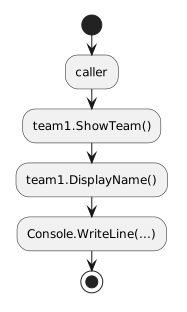
The nested call path is:

Plain text
caller
  ↓
team1.ShowTeam()
  ↓
team1.DisplayName()
  ↓
Console.WriteLine(...)

Each new method call temporarily moves execution into another method.

When the called method finishes, execution returns to the statement after the call in the previous method.

Method Calls Form a Stack of Active Work

Conceptually, while DisplayName() is running:

Plain text
DisplayName()   ← current method
ShowTeam()      ← waiting for DisplayName to finish
original caller ← waiting for ShowTeam to finish

When DisplayName() finishes, it leaves the active call chain.

Execution returns to ShowTeam().

When ShowTeam() finishes, execution returns to its caller.

The Visual Studio Call Stack makes this structure visible in CO-037.

Follow the Receiver at Every Call

Now consider an object-to-object call:

C#
player1.ShowTeamName();

Inside:

C#
public void ShowTeamName()
{
    this.team.DisplayName();
}

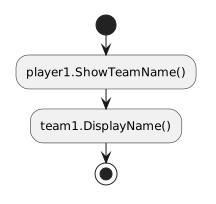
The call chain includes different current objects:

Plain text
player1.ShowTeamName()
      ↓
team1.DisplayName()

Inside ShowTeamName, this refers to player1.

Inside DisplayName, this refers to team1.

Tracing requires both:

Use a Trace Table

A small trace can be organized as:

Step Current object Current method Next call
1 player1 ShowTeamName() team1.DisplayName()
2 team1 DisplayName() display statement
3 team1 DisplayName() finishes return to Player method
4 player1 ShowTeamName() finishes return to caller

This helps prevent the common mistake of assuming this always refers to the same object through the entire call chain.

Sequence Diagrams Visualize the Same Trace

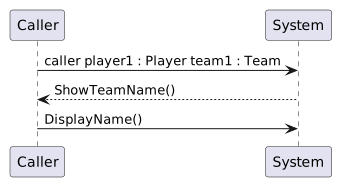
A conceptual sequence diagram may show:
Plain text
caller      player1 : Player      team1 : Team

  |              |                    |
  | ShowTeamName()                    |
  |------------->|                    |
  |              | DisplayName()      |
  |              |------------------->|
  |              |                    |

The vertical order shows call order.

The horizontal direction shows which object receives each message.

Return Values Are Not Part of This Trace Yet

Every method in the current examples is void.

Methods still finish and return execution to their caller.

They simply do not return a data value.

Methods that return values are taught later.

Do Not Skip Calls When Explaining Execution

A weak trace might say:

The program displays Wildcats.

That may be the visible result, but it hides how execution reached that result.

A stronger trace explains:

The caller invokes ShowTeamName() on player1. That method follows the Player's Team reference and calls DisplayName() on team1. The Team method displays its name, then execution returns to the Player method and finally to the original caller.

That explanation connects source structure to runtime flow.

The Main Tracing Questions

At every method call, ask:

  1. Which object receives the call?
  2. Which method begins?
  3. What does this refer to inside that method?
  4. Does that method call another method?
  5. Where will execution return when the method finishes?

Those questions prepare you to use debugger stepping and the Call Stack in CO-037.