1.3.6 Creating a Sequence Diagram in Violet

A Sequence Diagram Shows Interactions Over Time

A UML sequence diagram focuses on:

Which object communicates with which object, and in what order?

That is different from:

A sequence diagram emphasizes object-to-object calls.

Plan the Interaction First

Imagine this soccer interaction:
Plain text
controller1 asks team1 to DisplayName()
team1 performs the method

Before opening Violet, identify:

Add the Participants

A simple sequence diagram can include lifelines for:

Plain text
controller1 : Controller
team1 : Team

Use object identity and type consistently with the current model.

Add the Method-Call Message

The call:

C#
team1.DisplayName();

can be represented as a message from the calling object to team1.

Conceptually:

Plain text
controller1  ── DisplayName() ──>  team1

The diagram communicates that one object asks another object to perform behavior.

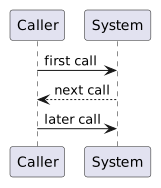
Keep Time Ordered from Top to Bottom

Earlier messages appear above later messages.

A reader should be able to trace:

Plain text
first call
   ↓
next call
   ↓
later call

Do not place messages based only on visual convenience.

Save the Editable Violet Diagram

Use the exact required filename and location.

The Violet source should remain editable because later feedback may require revision.

Read the Diagram as a Story

A useful plain-language reading is:

controller1 calls DisplayName() on team1.

If the diagram cannot be explained clearly in a sentence, revise its participants or messages.