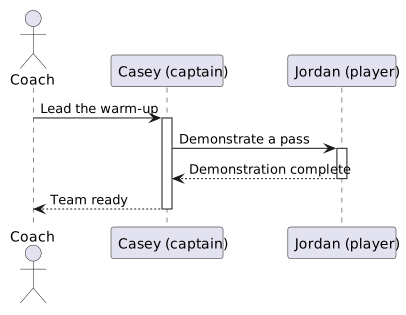
Imagine a short exchange at soccer practice. The coach asks Casey to lead the warm-up. Casey asks Jordan to demonstrate a pass. Jordan demonstrates, Casey reports readiness, and the coach starts training. Who communicates with whom, and in what order, matters as much as the tasks themselves.
A sequence diagram explains interaction: participants exchange messages, and vertical position records their order. In software, participants often represent particular objects and messages often represent method calls. In a conceptual model, participants can instead be people or systems, with ordinary-language requests.
This view answers a different question from an activity diagram. An activity diagram follows the route through work. A sequence diagram emphasizes the sender, receiver, and order of each exchange. A class diagram describes what kinds of participants can exist; an object diagram captures their state at a pause.
The headings identify participants. The vertical dashed lines beneath them are lifelines, showing where each participant takes part in the interaction. Read messages from top to bottom; read an arrow's direction to identify its sender and receiver.
Solid arrows here carry requests. Dashed arrows carry responses. Thin activation rectangles mark periods when a participant is handling a request. Vertical distance is not a measured time scale unless the author explicitly supplies timing information.
Casey's nested request happens while Casey is responding to the coach. Jordan's response goes to Casey, not directly to the coach. The diagram would tell a different story if those arrow endpoints changed.
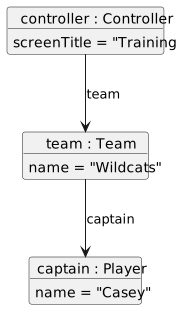
Start with three connected objects in a snapshot just before the training request. The fields and links record what is currently stored. The links say which participant can reach another object; they do not say a message has already been sent.
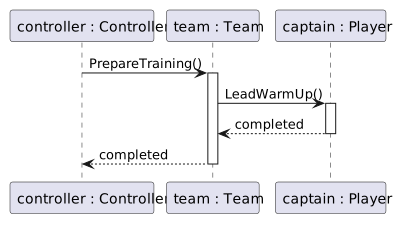
In the sequence diagram below, controller : Controller, team : Team, and captain : Player become the three participant headings. Each heading extends downward into a lifeline: the column belonging to that same object during the exchange. We have changed the view, not created three replacement objects.
The object diagram's team link becomes neither a lifeline nor a message: controller and team each get their own lifeline because each is a participant. The later PrepareTraining message is a new arrow from the controller's column to the team's column. Likewise, the captain link can support the later call to LeadWarmUp, but the snapshot alone does not prove that call happened.
A soccer application can represent a related interaction using existing objects. In this conceptual example, controller is coordinating the screen, team handles a request to prepare training, and captain handles the warm-up. The method names are labels for the responsibilities; you are not asked to implement them here.