A C# Application Can Ask the System to Open a URL
The FIT weather activity uses a supplied C# application.
The application does not need to become a web browser.
Instead, it can construct the required URL and ask the computer to open that URL using the normal browser behavior provided by the environment.
Conceptually:
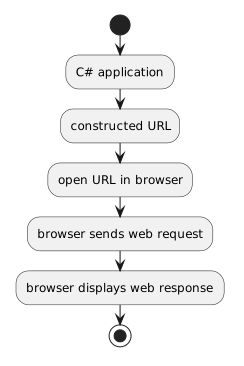 CApplication.
The browser remains the web client.
The C# application supplies the destination.
Building the URL and Opening It Are Separate Steps
First, the program creates the URL string.
Conceptually:
string url = constructedUrl;
At this point, url is still only text.
The application then uses the supplied browser-opening code.
That second step asks the operating environment to open the URL.
The exact launch statement belongs to the supplied course project.
You do not need to replace it with code from an unrelated tutorial.
The Browser Takes Over the Web Interaction
After the URL is opened, the browser performs the web-client role you learned earlier.
The browser:
- interprets the URL;
- sends a request;
- receives a response;
- interprets the returned resources;
- displays the page.
The C# program does not automatically receive all of the webpage's contents merely because it caused the browser to open.
That distinction is important.
Opening a Page Is Not the Same as Calling a Web API
At this stage, the program is not downloading structured weather data and parsing it automatically.
It is opening a webpage for a person to observe.
The human remains part of the process.
That keeps the technical scope introductory.
A later system could use a web API to retrieve machine-readable data, but that is not what this activity is teaching.
Opening a Page Is Not the Same as Embedding the Browser
The supplied application does not need to contain a full browser inside its own window.
It can hand the URL to the normal browser environment.
This is a simpler responsibility:
C# application: determine which page should be opened.
Browser: request, receive, and render the page.
The URL Is the Connection Between the Applications
The C# program and browser do not need to share the entire internal state of the application.
The URL carries the information needed for this handoff.
For example:
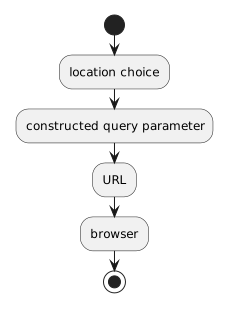 LocationChoice.
That makes the URL an observable bridge between program input and web behavior.
A Successful Browser Launch Does Not Guarantee the Web Result
Several stages can produce different outcomes.
The application might successfully create a URL.
The browser might successfully open.
The server might still return:
- a missing-resource response;
- a service error;
- an unexpected result;
- or content that does not match what the learner intended to request.
Technical reasoning improves when you identify which stage produced the problem instead of saying only:
Keep the Responsibility Boundary Clear
The flow is:
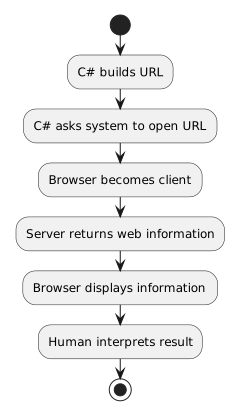 CBuildsURL.
Each participant has a distinct responsibility.
That boundary helps explain why the course does not need an automated weather API to connect a C# program to useful web information.