0.4.13 Where Is the Information Now? Memory vs. Storage

A Running Program Needs Working Information

When an application runs, it works with information such as:

This working state exists while the program is executing.

For a soccer application, the running program might currently know:
Plain text
playerName = "Jordan"
isAvailable = true
lineupNote = "Start at forward"

That information can affect what the application displays and does.

Closing the Program Can End That Runtime State

Suppose you type:

Plain text
Jordan starts at forward.

into the application.

The running program may hold that text in memory.

If the program closes before the value is saved, the information may be lost.

The program had the value while it was running.

It did not persist the value for a future run.

This creates an important distinction.

Memory Supports Current Execution

At this level, memory means the working information the application is using while it runs.

Examples include:

The exact hardware details are outside the current scope.

The useful question is:

Does the running program currently have this information?

Persistent Storage Keeps Information Beyond the Current Run

Persistent storage is used when information should remain available after the application stops.

A text file is one simple example.

If the program writes:

Plain text
Jordan starts at forward.

to a file, that file can still exist after the application closes.

A later run can read the saved text back into memory.

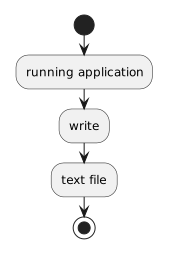
Saving Moves Information From Runtime State to Persistent Storage

Conceptually:

Plain text
running application
        ↓
write
        ↓
text file

The information begins as part of the current running state.

The program performs a write operation.

The file stores a persistent representation.
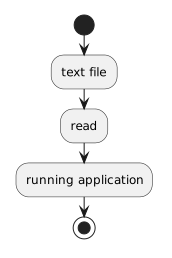
Loading Moves Information Back Into the Running Program

The reverse process is:

Plain text
text file
    ↓
read
    ↓
running application

The saved information exists in the file.

The program reads it.

The value becomes available to the running application again.

Memory and Storage Are Not the Same Thing

A common beginner misconception is:

If I can see the value in the application, it has been saved.

That is not necessarily true.

The value may exist only in the current runtime state.

Another misconception is:

If a file exists, the program automatically knows what is in it.

Also not true.

The running program needs to read the file before it can work with the saved contents.

A Soccer Example

Imagine an application lets a coach enter:

Plain text
Saturday lineup: Jordan, Casey, Morgan

Before saving

The text exists in the running application.

If the program closes, the value may disappear.

After writing to a text file

The text also exists in persistent storage.

The program can close, and the file can remain.

During a later run

The application reads the file.

The saved text becomes runtime information again.

Persistence Is About Surviving the Current Session

A value is persistent when it remains available beyond the current program execution.

A text file is a simple way to demonstrate that idea.

Later systems may use:

Those details can differ dramatically.

The underlying idea is the same:

runtime memory is temporary working state; persistent storage preserves information for later use.

Keep Asking the Location Question

As information moves through a program, ask:

Where is the information now?

Possible answers include:

That question is often more useful than trying to memorize file commands without understanding why they exist.