3.2 Zoo Learning Activity

Under Construction

This page is currently being built. Please check back soon.
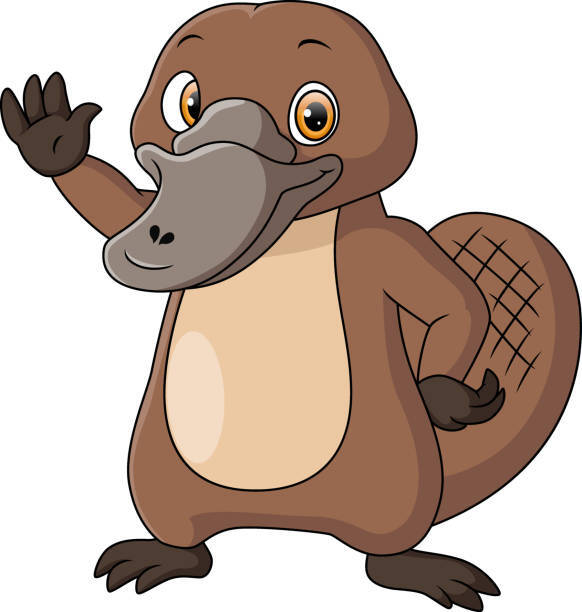
A platypus
3.2 Zoo Learning Activity — overview

Work through the user stories in order. Each story states the goal and acceptance criteria; its nested tasks retain the detailed implementation and verification steps.

1.Gather your resources
A Open the assignment resources
Set up the checkpoint
2.Copy your 3.1 ending code, renaming both the folder and the Visual Studio solution file
A Verify the required change or observation

Check the result against this instruction: Copy your 3.1 ending code, renaming both the folder and the Visual Studio solution file

3.Build your solution and ensure it compiles without warnings or errors
A Verify the required change or observation

Check the result against this instruction: Build your solution and ensure it compiles without warnings or errors.

Represent dingoes with a derived class
Problem

With as many animals and possible animals that the zoo has/can have, the Animal class will become unwieldy.

Solution

You will define a class that represents a Dingo and have it inherit from the Animal class so that it has access to the Animal class, but also can have its own functionality.

4.Review the feature design
A Identify the contracts and expected behavior

This focused design shows the members or flow relevant to this feature. Keep unchanged members from your preceding checkpoint; follow the tasks below for the order of intermediate edits.
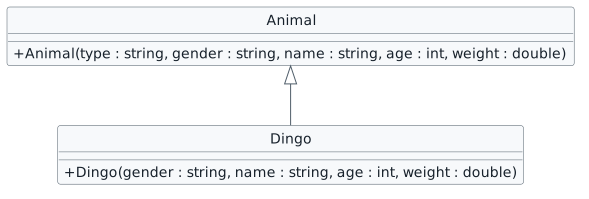
Dingo constructor inheritance. class Animal { + Animal(type : string, gender : string, name : string, age : int, weight : double) } class Dingo { + Dingo(gender : string, name : string, age : int, weight : double) } Animal <|-- Dingo
Dingo constructor inheritance
  • New
  • Changed
  • Removed
5.Define the Dingo class
3.2.4 How to Utilize the Inheritance Hierarchy 3.2.5 How to Define Inheritance at the Class Definition Review this feature’s design and requirements
A Use the code below to define the Dingo class
public class Dingo : Animal
{
    public Dingo(string gender, string name, int age, double weight)
    {
    }
}
B In the constructor, add a call to base that uses the Animal class to instantiate the Dingo
3.2.6 How to Use a Constructor with Inheritance
public Dingo(string gender, string name, int age, double weight)
    : : base("Dingo", gender, name, age, weight)
{
}

Passing in "Dingo" here is necessary because the Animal constructor requires a string for the type of Animal.

C Build your solution and ensure that it compiles without errors or warnings
6.In the MainWindow, modify the lines of code that instantiate Dolly and Dixie by replacing Animal with Dingo and deleting the type argument
// Create Dolly
Animal animal = new Dingo("Female", "Dolly", 4, 35.3);
animal.MakePregnant();
this.comoZoo.AddAnimal(animal);
// Create Dixie.
animal = new Dingo("Female", "Dixie", 3, 33.8);
animal.MakePregnant();
this.comoZoo.AddAnimal(animal);
A Verify the required change or observation

Check the result against this instruction: In the MainWindow, modify the lines of code that instantiate Dolly and Dixie by replacing Animal with Dingo and deleting the type argument.

7.Check Your Work (Como Zoo):
3.2.7 How to Debug Inheritance
A Set a breakpoint on the line of code that instantiates Dolly
B Start the application. Click the New Como Zoo button
C Press F11. Ensure that the debugger steps into the Dingo constructor's call to base. Ensure that the values of the Dingo constructor match those below

The Autos window does not handle inheritance constructors well so use the Locals window or hover over values to check them.
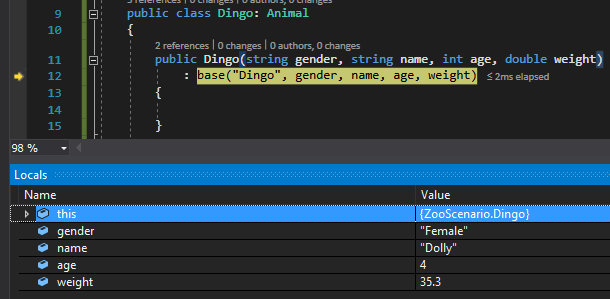
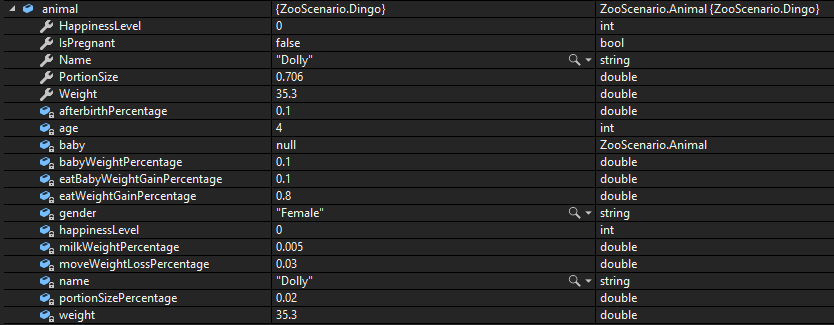
Check Your Work: Dingo Constructor; compare object identities, field values, and execution position with your debugger.
Check Your Work: Dingo Constructor
D Press F11 and step through the readonly fields in the Animal class
E Press F11 to step through the Animal constructor and the Dingo constructor and return to the MainWindow
F Press F11. Ensure that the animal's values match those below
Check Your Work: Instantiate Dingo; compare object identities, field values, and execution position with your debugger.
Check Your Work: Instantiate Dingo
Represent platypuses and hummingbirds with derived classes
Problem

The zoo still has platypodes (that's right...that's the plural for platypus) and hummingbirds that need their own functionality.

Solution

You will define classes and instantiate animals using inherited classes.

8.Review the feature design
A Identify the contracts and expected behavior

This focused design shows the members or flow relevant to this feature. Keep unchanged members from your preceding checkpoint; follow the tasks below for the order of intermediate edits.

Species constructor inheritance. class Animal { + Animal(type : string, gender : string, name : string, age : int, weight : double) } class Dingo { + Dingo(gender : string, name : string, age : int, weight : double) } Animal <|-- Dingo class Platypus { + Platypus(gender : string, name : string, age : int, weight : double) } Animal <|-- Platypus class Hummingbird { + Hummingbird(gender : string, name : string, age : int, weight : double) } Animal <|-- Hummingbird
Species constructor inheritance
  • New
  • Changed
  • Removed
9.Add and define classes for Platypus and Hummingbird and have them inherit from the Animal class
Review this feature’s design and requirements
A Verify the required change or observation

Check the result against this instruction: Add and define classes for Platypus and Hummingbird and have them inherit from the Animal class.

10.Build your solution and ensure it compiles without errors or warnings
A Verify the required change or observation

Check the result against this instruction: Build your solution and ensure it compiles without errors or warnings.

11.In the Platypus and Hummingbird constructors, call the base constructor and pass in the type string and the proper arguments
A Verify the required change or observation

Check the result against this instruction: In the Platypus and Hummingbird constructors, call the base constructor and pass in the type string and the proper arguments.

12.In the MainWindow, refactor the instantiation of the animals to call their respective classes and remove the type argument
A Verify the required change or observation

Check the result against this instruction: In the MainWindow, refactor the instantiation of the animals to call their respective classes and remove the type argument.
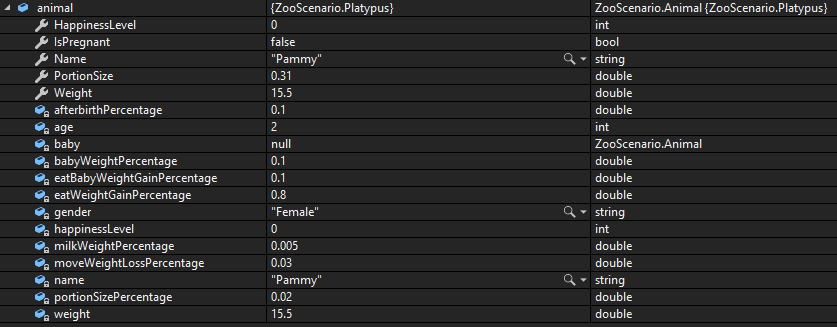
13.Check Your Work (Como Zoo):
A Set a breakpoint on the line of code that instantiates Pammy
B Start the application. Click the New Como Zoo button
C Press F11. Ensure the debugger steps into the Platypus constructor on the line that calls base
D Press F11 and step through all of the readonly fields
E Step through the Animal constructor and the Platypus constructor and back to the MainWindow
F Press F11. Ensure that the values match those below
Check Your Work: Instantiate Platypus; compare object identities, field values, and execution position with your debugger.
Check Your Work: Instantiate Platypus
14.Check Your Work (San Diego Zoo):
A Set a breakpoint on the line of code that instantiates Harold
B Start the application. Click New San Diego Zoo
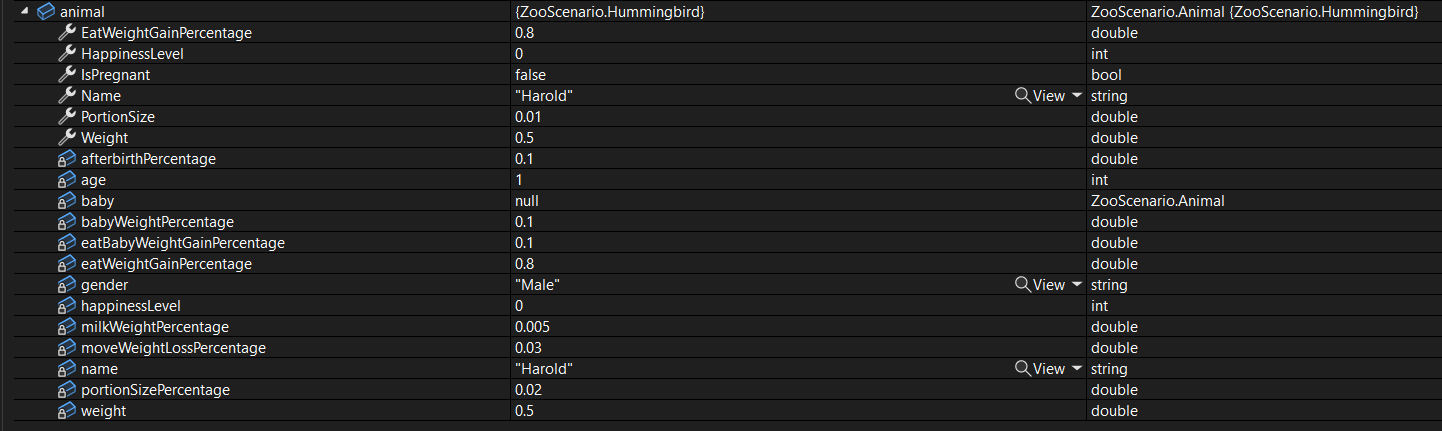
C Press F10. Ensure the animal variable is assigned the values below
Check Your Work - Instantiate Hummingbird.png; compare object identities, field values, and execution position with your debugger.
Check Your Work - Instantiate Hummingbird.png
Find animals using runtime types
Problem

Currently we are relying heavily on using the "type" of animal as a string to perform many of the procedures in the code, but doing that is prone to error.

Solution

Now that we have animals being instantiated through their own classes, we can use those classes as a "type" instead of strings.

15.Review the feature design
A Identify the contracts and expected behavior

This focused design shows the members or flow relevant to this feature. Keep unchanged members from your preceding checkpoint; follow the tasks below for the order of intermediate edits.

Lookup by runtime Type. class Zoo { + FindAnimal(type : Type) : Animal + FindPregnantAnimal(type : Type) : Animal } note right of Zoo Compare a.GetType() == type Call with typeof(Dingo), typeof(Platypus), etc. end note
Lookup by runtime Type
  • New
  • Changed
  • Removed
16.Modify the Animal class
A Remove the type field, the type parameter and the Type property from the Animal class
B In the Eat method, change the switch statement to get the type of object and then it's Name field
3.2.9 How to Use GetType
switch (this.GetType().Name)
C In the MakePregnant method, when instantiating a baby, delete the argument for Type
D In the Reproduce method, change the type reference to GetType and the Name field
if (this.GetType().Name != "Platypus")
Review this feature’s design and requirements
17.In the Dingo, Hummingbird, and Platypus classes, remove the string argument from base that assigns the type of Animal it is
A Verify the required change or observation

Check the result against this instruction: In the Dingo, Hummingbird, and Platypus classes, remove the string argument from base that assigns the type of Animal it is.

18.Modify the Zoo class
A Modify the parameter of the FindAnimal and FindPregnantAnimal methods to require an argument of type Type
B In the FindAnimal and FindPregnantAnimal methods, replace the if statement with a statement that checks if the current animal's type is the same as the type passed in
19.In the MainWindow, replace the strings that are passed in to the FindAnimal and FindPregnantAnimal methods to the typeof whatever animal type needs to be found
this.comoZoo.Visitor.FeedAnimal(this.comoZoo.FindAnimal(typeof(Dingo)), this.comoZoo.AnimalSnackMachine);
this.sanDiegoZoo.BirthAnimal(this.sanDiegoZoo.FindPregnantAnimal(typeof(Platypus)));
A Verify the required change or observation

Check the result against this instruction: In the MainWindow, replace the strings that are passed in to the FindAnimal and FindPregnantAnimal methods to the typeof whatever animal type needs to be found.

20.Build your solution and ensure that there are no errors or warnings
A Verify the required change or observation

Check the result against this instruction: Build your solution and ensure that there are no errors or warnings.
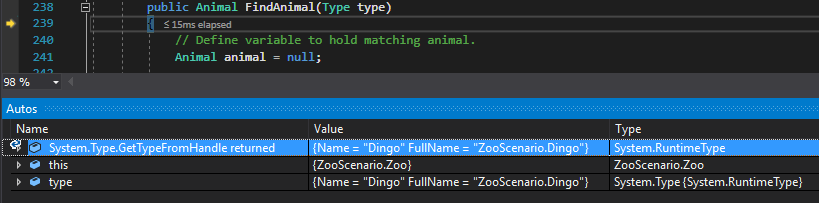
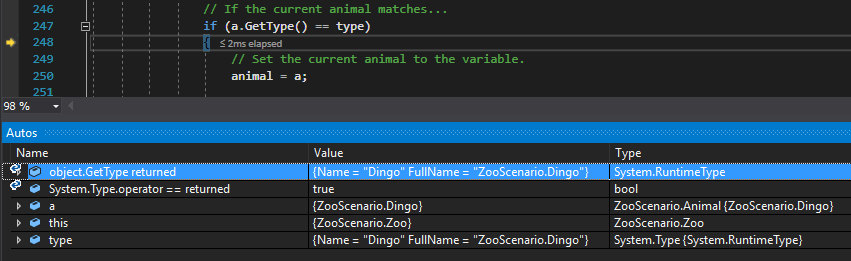
21.Check Your Work (ComoZoo):
A Set a breakpoint in the darlaFeedDingoButton_Click on the line of code that calls FeedAnimal
B Start the application. Click the New Como Zoo button. Click the Darla, feed dingo button
C Press F11. Step through the Visitor property and into the FindAnimal method. Ensure that the type parameter matches the one below
Check Your Work: Type Parameter; compare object identities, field values, and execution position with your debugger.
Check Your Work: Type Parameter
D Step through logic check. Ensure the GetType method return matches the one below
Check Your Work: GetType Return; compare object identities, field values, and execution position with your debugger.
Check Your Work: GetType Return
22.Check Your Work (San Diego Zoo):
A Set a breakpoint in the birthPlatypusButton_Click on the line that calls BirthAnimal
B Set a breakpoint in the Animal class in the Reproduce method on the line that checks if the animal is a Platypus
C Start the application. Click the New San Diego Zoo button. Click the Birth platypus button
D Step into the FindPregnantAnimal method. Ensure that the type parameter is a Platypus
E Step through the FindPregnantAnimal method and ensure the logic check passes for the first animal
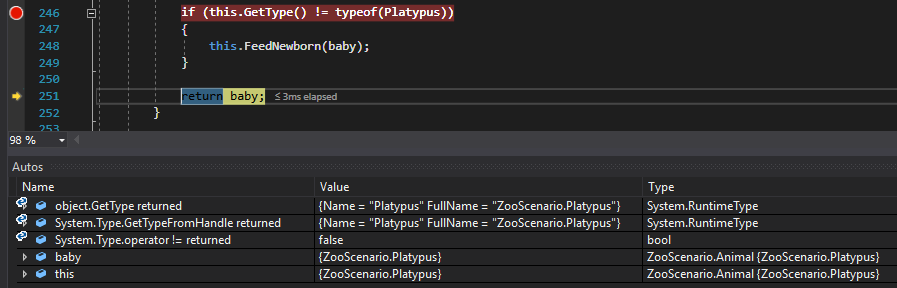
F Click Continue. Press F11. Ensure that the logic check fails and the values match those below
Check Your Work: GetType Check; compare object identities, field values, and execution position with your debugger.
Check Your Work: GetType Check
Construct a newborn of the correct species
Problem

Now that we don't have a type field anymore, the baby being instantiated will be a generic Animal type and if it's born will look like an abomination.

Solution

You will use a switch statement to determine the type of the animal giving birth and then instantiate a baby animal based on that.

23.Review the feature design
A Identify the contracts and expected behavior

This focused design shows the members or flow relevant to this feature. Keep unchanged members from your preceding checkpoint; follow the tasks below for the order of intermediate edits.
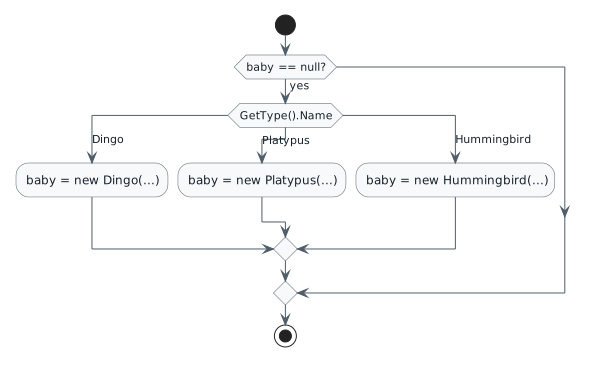
Create a species-specific baby. start if (baby == null?) then (yes) switch (GetType().Name) case (Dingo) :baby = new Dingo(...); case (Platypus) :baby = new Platypus(...); case (Hummingbird) :baby = new Hummingbird(...); endswitch endif stop
Create a species-specific baby
  • New
  • Changed
  • Removed
24.In the MakePregnant method in the Animal class, inside of the existing if statement, replace the line currently instantiating the baby with a switch statement that uses GetType to get the Name of the type
switch (this.GetType().Name)
A Verify the required change or observation

Check the result against this instruction: In the MakePregnant method in the Animal class, inside of the existing if statement, replace the line currently instantiating the baby with a switch statement that uses GetType to get the Name of the type.

25.In the switch statement, if the Name is Dingo, instantiate a type of Dingo. If it is a Platypus, instanti Platypus. If it is a Hummingbird, instantiate a Hummingbird
case "Dingo":
    this.baby = new Dingo("Male", string.Empty, 0, this.Weight * this.babyWeightPercentage);
    break;
A Verify the required change or observation

Check the result against this instruction: In the switch statement, if the Name is Dingo, instantiate a type of Dingo. If it is a Platypus, instanti Platypus. If it is a Hummingbird, instantiate a Hummingbird.

26.Check Your Work (Como Zoo):
A Set a breakpoint in the MakePregnant method in the Animal class on the switch statement
B Click the New Como Zoo button
C Press F11. Ensure that the "Dingo" case is hit
D Press F10 twice. Ensure that this.baby is now an instance of a Dingo
27.Check Your Work (San Diego Zoo):
A Set a breakpoint in the MakePregnant method in the Animal class on the switch statement
B Click the New San Diego Zoo button
C Press F11. Ensure that the "Platypus" case is hit
D Press F10 twice. Ensure that this.baby is now an instance of a Platypus
Let a dingo extend the shared eating behavior
Problem

Currently there is an if statement that determines how a Dingo eats, but the Bark method only relates to the Dingo and is cluttering up the class. In addition, the if statement can get unwieldy as more animals are added.

Solution

You will move the Bark method into the Dingo class, but still have it Eat like a normal animal would.

28.Review the feature design
A Identify the contracts and expected behavior

This focused design shows the members or flow relevant to this feature. Keep unchanged members from your preceding checkpoint; follow the tasks below for the order of intermediate edits.
Dingo eating call order. participant Guest participant "animal : Dingo" as d Guest -> d : Eat(food) activate d d -> d : base.Eat(food) [Animal] d -> d : Bark() deactivate d
Dingo eating call order
  • New
  • Changed
  • Removed
29.Modify the Animal class
Review this feature’s design and requirements
A Remove the Bark method from the Animal class and put it inside the Dingo class
B Define a property that gets and sets the happinessLevel field
C Make the Eat method virtual by modifying the method header
D In the Eat method, remove the entire switch statement that determines how an animal eats
30.Modify the Dingo class
A In the Dingo class, define a method named Eat and make it an override
public override void Eat(Food food)
{
}
B Inside the Eat method, call the Eat method on base and pass in the food parameter. Call the Bark method
3.2.11 How to Call Base
public override void Eat(Food food)
{
    base.Eat(food);
    this.Bark();
}
Review this feature’s design and requirements
31.Check Your Work (Como Zoo):
A Set a breakpoint in the FeedAnimal method in the Guest class on the line that calls Eat on the animal object
B Start the application. Click New Como Zoo. Click Darla, feed dingo
C Press F11. Ensure that the debugger steps into the Eat method in the Dingo class
D Step into the call to Eat on the base. Ensure that the debugger steps into the Eat method in the Animal class and that the food weight is 0.3975
E Step through the Eat method in the Animal class and back to the Eat method in the Dingo class
F Step into the Bark method
G Step through the Bark method and back to the Guest class
Let a platypus stash food before eating
Problem

We defined the way a Dingo eats but don't have any definition for how a Platypus eats.

Solution

You will define how a Platypus eats using inheritance.

32.Review the feature design
A Identify the contracts and expected behavior

This focused design shows the members or flow relevant to this feature. Keep unchanged members from your preceding checkpoint; follow the tasks below for the order of intermediate edits.

Platypus eating call order. participant Guest participant "animal : Platypus" as p Guest -> p : Eat(food) activate p p -> p : StashInPouch(food) p -> p : base.Eat(food) [Animal] deactivate p
Platypus eating call order
  • New
  • Changed
  • Removed
33.Remove the StashInPouch method from the Animal class and put it inside the Platypus class and add an Eat method that is an override
Review this feature’s design and requirements
A Verify the required change or observation

Check the result against this instruction: Remove the StashInPouch method from the Animal class and put it inside the Platypus class and add an Eat method that is an override.

34.Inside the Eat method in the Platypus class, call the StashInPouch method and pass in the food parameter and then call the Eat method on base and pass in the food parameter
Review this feature’s design and requirements
A Verify the required change or observation

Check the result against this instruction: Inside the Eat method in the Platypus class, call the StashInPouch method and pass in the food parameter and then call the Eat method on base and pass in the food parameter.

35.Check Your Work (San Diego Zoo):
A Set a breakpoint in the FeedAnimal method in the Guest class on the line that calls Eat on the animal object
B Start the application. Click New San Diego Zoo. Click Dave, feed platypus
C Press F11. Ensure the debugger steps into the Eat method in the Platypus class
D Step through the Eat method. Ensure that the debugger steps into the StashInPouch method in the Platypus class and then the Eat method in the Animal class
Use mammal and bird weight-gain rules
Problem

Currently when all animals eat their weight gain percentage goes up the same amount, but different type of animals gain weight at different rates.

Solution

You will define additional classes that inherit from the Animal class so that Mammals and Birds gain weight differently.

36.Review the feature design
A Identify the contracts and expected behavior

This focused design shows the members or flow relevant to this feature. Keep unchanged members from your preceding checkpoint; follow the tasks below for the order of intermediate edits.

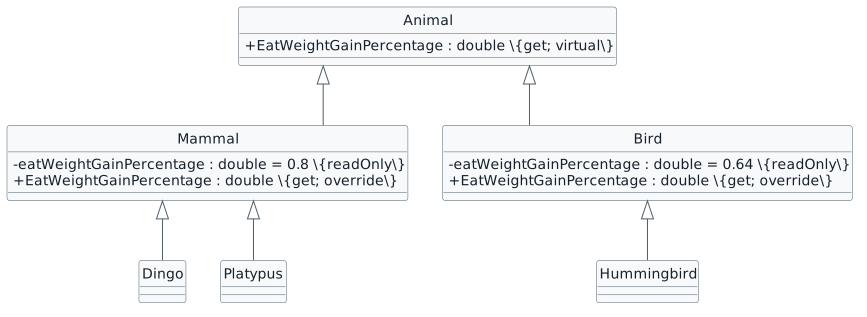
Shared weight-gain rules. class Animal { + EatWeightGainPercentage : double {get; virtual} } class Mammal { - eatWeightGainPercentage : double = 0.8 {readOnly} + EatWeightGainPercentage : double {get; override} } class Bird { - eatWeightGainPercentage : double = 0.64 {readOnly} + EatWeightGainPercentage : double {get; override} } Animal <|-- Mammal Animal <|-- Bird Mammal <|-- Dingo Mammal <|-- Platypus Bird <|-- Hummingbird
Shared weight-gain rules
  • New
  • Changed
  • Removed
Eating gain by category
Category Percentage How to verify
Mammal 0.8 Food weight multiplied by 0.8
Bird 0.64 Food weight multiplied by 0.64
37.Define the Mammal and Bird classes
Review this feature’s design and requirements
A Define the Mammal and Bird classes and have them inherit from the Animal class
B Define constructors for both classes. Model them after the Dingo class
38.Change the Dingo and Platypus classes to inherit from Mammal and the Hummingbird class to inherit from Bird
Review this feature’s design and requirements
Dingo : Mammal
A Verify the required change or observation

Check the result against this instruction: Change the Dingo and Platypus classes to inherit from Mammal and the Hummingbird class to inherit from Bird.

39.Modify the Mammal class
Review this feature’s design and requirements
A Define a readonly field of type double named eatWeightGainPercentage and assign it the value 0.8
B Define an override property to return the eatWeightGainPercentage
public override double EatWeightGainPercentage
{
    get
    {
        return this.eatWeightGainPercentage;
    }
}
40.Modify the Bird class
Review this feature’s design and requirements
A Define a readonly field of type double named eatWeightGainPercentage and assign it the value 0.64
B Define an override property to return the eatWeightGainPercentage
41.Modify the Animal class
Review this feature’s design and requirements
A Remove the eatWeightGainPercentage field and define a virtual

EatWeightGainPercentage property that returns 0.0

B Ensure any references to eatWeightGainPercentage now target the

EatWeightGainPercentage property.

42.Move Animals to a different folder

This will be done purely for organizational purposes. Moving cs files to other folders in the project will not effect anything.
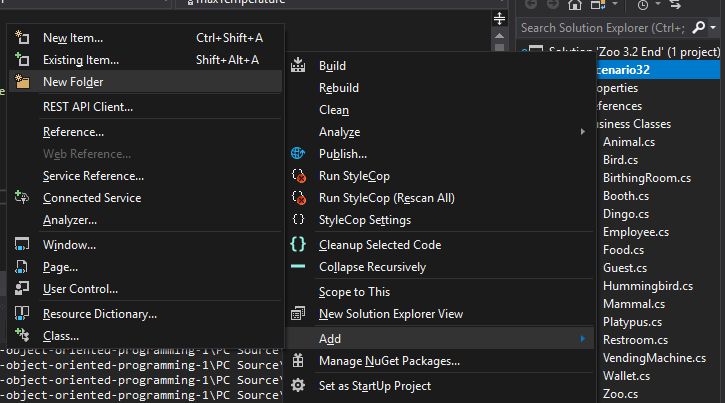
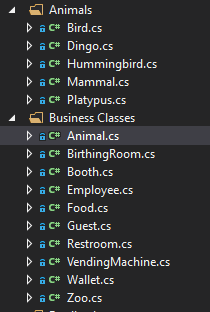
A Right click your project file and go to Add --> New Folder
Snip: Add Folder; compare object identities, field values, and execution position with your debugger.
Snip: Add Folder
B Name the folder 'Animals'
C Drag Bird, Dingo, Hummingbird, Mammal, and Platypus into the Animals folder
Snip: Move cs Files; compare object identities, field values, and execution position with your debugger.
Snip: Move cs Files
43.Check Your Work (Como Zoo):
A Set a breakpoint in the Eat method in the Animal class on the line that assigns the weightGain
B Start the application. Click New Como Zoo. Click Darla, feed dingo
C Press F11. Step through the Weight property. Step into the the EatWeightGainPercentage property in the Mammal class
D Step through the property and back to the Eat method and press F11. Ensure that the weightGain is assigned 0.318
44.Check Your Work (San Diego Zoo):
A Set a breakpoint in the Eat method in the Animal class on the line that assigns the weightGain
B Start the application. Click the New SanDiego Zoo button. Click the Dave, feed platypus button
C Press F11. Step through the Weight property. Step into the the EatWeightGainPercentage property in the Mammal class
D Step through the property and back to the Eat method and press F11. Ensure that the weightGain is assigned 0.0768
Submit your work
45.Ensure that all code is StyleCop compliant
A Verify the required change or observation

Check the result against this instruction: Ensure that all code is StyleCop compliant.

46.Zip the solution and submit to the Feedback System
A Verify the required change or observation

Check the result against this instruction: Zip the solution and submit to the Feedback System

47.Submit the Feedback System url to the correct assignment in Canvas
A Verify the required change or observation

Check the result against this instruction: Submit the Feedback System url to the correct assignment in Canvas.

Completion checklist
48.Review the required evidence
A Check every acceptance criterion

Return to each user story and confirm that you can demonstrate its acceptance criteria. Use the task checkboxes to track completion; a checked box is not a substitute for testing or inspecting the required evidence.

Represent dingoes with a derived class Represent platypuses and hummingbirds with derived classes Find animals using runtime types Construct a newborn of the correct species Let a dingo extend the shared eating behavior Let a platypus stash food before eating Use mammal and bird weight-gain rules
B Build and inspect the final solution

Remove temporary lines used only to demonstrate compile-time errors. Build without errors or warnings, check StyleCop compliance, and rerun the required scenario paths.

C Follow this activity’s submission instructions

Use the submission or attendance instructions in this page. For a Feedback System submission, upload the requested ZIP, review and resolve the feedback, and submit the resulting URL to the matching Canvas activity. For a Canvas quiz, enter only the requested answers; for an oral final, complete the scheduling and attendance steps.