Under Construction
This page is currently being built. Please check back soon.
This page is currently being built. Please check back soon.
Use the goals, acceptance criteria, and nested tasks below to prepare and complete this activity. Follow the stated scope carefully.
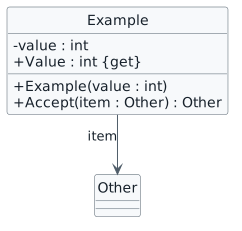
Check the result against this instruction: Open your 2.2 Class Diagram in Violet
Check the result against this instruction: Modify the Terminal class so it has a readonly list of Gates instead of two fields named GateA and GateB.
Open or render your diagram, inspect every label and relationship, and compare it with the code or debugger state. Resolve syntax errors, clipped labels and unreadable crossings before submission.
![Object identity and list order example. object "items : List<Example>" as items object "first : Example" as first { value = 7 } object "second : Example" as second { value = 9 } items --> first : [0] items --> second : [1]](Diagrams/DiagramObjectNotation.light.svg)
Check the result against this instruction: Open a new Object Diagram in Violet
Open or render your diagram, inspect every label and relationship, and compare it with the code or debugger state. Resolve syntax errors, clipped labels and unreadable crossings before submission.
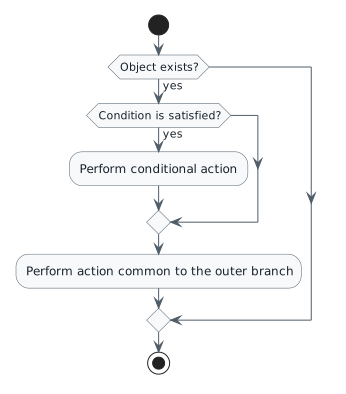
Check the result against this instruction: Open a new Activity Diagram in Violet
There is no need to represent the return statement.
double totalTickets = 0;
foreach (Gate g in this.Gates)
{
    totalTickets += g.NumberOfTickets;
}
return totalTickets;Check the result against this instruction: Represent the following code in an Activity Diagram.
Open or render your diagram, inspect every label and relationship, and compare it with the code or debugger state. Resolve syntax errors, clipped labels and unreadable crossings before submission.
Zip up the diagrams and submit to the Feedback System. Copy and paste the resulting URL into the correct Canvas assignment.
Return to each user story and confirm that you can demonstrate its acceptance criteria. Use the task checkboxes to track completion; a checked box is not a substitute for testing or inspecting the required evidence.
Represent the class view Represent the object view Represent the activity viewUse the submission or attendance instructions in this page. For a Feedback System submission, upload the requested ZIP, review and resolve the feedback, and submit the resulting URL to the matching Canvas activity. For a Canvas quiz, enter only the requested answers; for an oral final, complete the scheduling and attendance steps.