0.2.2 How to Read an Object Diagram
An Object Diagram represents a particular point in time when the application is running. Object Diagrams are shown as object nodes connected to other object nodes using references (arrows).
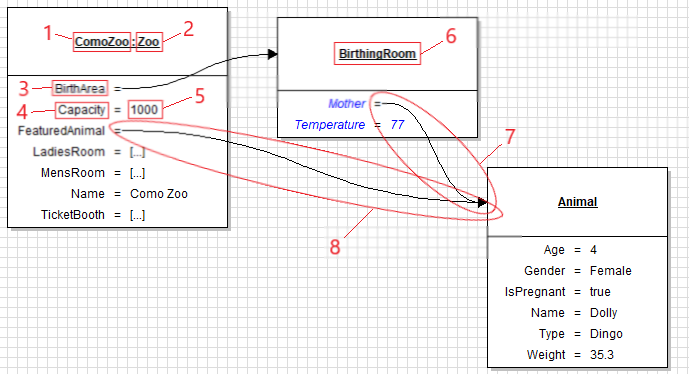
- The name of a field.
- The name of a Class/Type.
- The name of a field.
- The name of a field.
- The value assigned to a field.
- The name of a Class/Type.
- An object reference.
- An object reference.
- The relationship between 1 and 2 is in the notation Field : Type, going from the specific to the general. This relationship should be read as: Como Zoo is a Zoo.
- The relationship between 3 and 6 is the same as 1 and 2, but since BirthArea is its own object it needs its own object node. This relationship should be read as: BirthArea is a BirthingRoom.
- The relationship between 4 and 5 is in the notation Field : Value. This relationship should be read as: Capacity has a value of 1000.
- 7 and 8 are both references. 7 is read as: Mother is an Animal. 8 is read as: FeaturedAnimal is an Animal. However, both 7 and 8 reference the same object node, making both the Mother field and the FeaturedAnimal the same thing.