2.1.7 while Loops in Activity Diagrams

Draw the Return to the Condition

An airline baggage counter has several bags left to label. It labels one bag at a time until no bags remain. A while-loop activity diagram shows the condition before the body and a return path from the body to that same condition.

Plan the Four Parts
Parts of the model
Part Baggage example Location
Initialization bagsRemaining = 3 Before the condition
Condition bagsRemaining > 0 Decision before the repeated work
Body and update Label one bag; decrease bagsRemaining On the Yes path
Continuation Display completion On the No path

The initialization runs once. The body may run many times or zero times. The continuation runs after the condition becomes false. Drawing these in different places would change the process represented by the model.

Connect the Loop
Follow Both Outgoing Paths
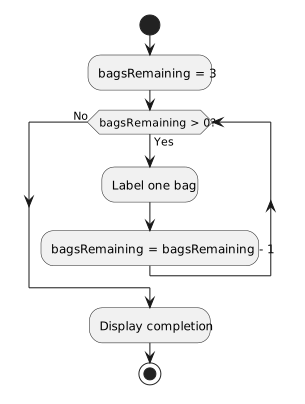
Set bagsRemaining to three. The decision asks whether bagsRemaining is above zero. Yes labels one bag, decreases bagsRemaining, and returns to the decision. No displays completion and reaches the end.
Baggage labeling loop
  • New
  • Changed
  • Removed

The Yes path reaches Label one bag and then the update. Its return edge reaches the decision without repeating the initialization. If the return edge went back before bagsRemaining = 3, every pass would reset the count and prevent completion.

The No path bypasses the body and reaches Display completion. A false condition is the normal exit; it is not an error path. Both outcomes must be labeled so a reader can tell when the body runs.

Match the Diagram to Source
A console model of the baggage task
int bagsRemaining = 3;
while (bagsRemaining > 0)
{
    Console.WriteLine("Label one bag");
    bagsRemaining--;
}

Console.WriteLine("Labeling complete");

The first display models the labeling action in this short example. The second display belongs after the loop. The opening brace groups the repeated action and decrement together, just as the diagram places both on the return path.

Compare a Choice with Repetition

An if activity diagram chooses a route and then continues forward. A while diagram also chooses a route, but one route eventually returns to the same condition. Without that return edge, the picture would describe checking and labeling at most one bag.

An end node inside the repeated body would end the activity on its first visit. Keep the final node after completion when the requirement is to label all remaining bags before finishing.

Inspect the First and Last Visit
Trace Three Bags and No Bags

Trace the decision with counts 3, 2, 1, and 0. Identify the edge taken at each visit and count the labeling actions. Then change only the initialization to zero and trace again; the labeling action and decrement should both be skipped.