2.1.11 Writing Switch Statements

Build Complete Soccer Cases

Translate an exact-value rule into a selector, cases, actions, and a fallback. The coach uses station numbers: 1 means passing, 2 means shooting, and any other number means waiting for instructions.

The method returns text rather than performing the drill.

Start with the Soccer Example

Read the example once before trying to explain every line. Then use the short explanations below to connect each part of the code with the soccer task.

Build Complete Soccer Cases
public string GetStationInstruction(int station)
{
    string instruction;

    switch (station)
    {
        case 1:
            instruction = "Practice passing";
            break;
        case 2:
            instruction = "Practice shooting";
            break;
        default:
            instruction = "Wait for the coach";
            break;
    }

    return instruction;
}
Understand One Part at a Time
Follow the Worked Trace

Read the table one row at a time. Check when each value is observed: a value before a statement may differ from the value after that statement runs. Cover the result column and predict an answer before checking it.

Worked soccer trace
Requirement C# location Test
Station 1 selects passing case 1 Argument 1
Station 2 selects shooting case 2 Argument 2
Other numbers wait default Arguments 0 and 7
Follow the Same Idea Visually

Use the diagram to follow the same soccer example in a different form. Start at the beginning and follow one execution at a time. Compare the labeled actions with the source code; do not assume every action in the picture runs.
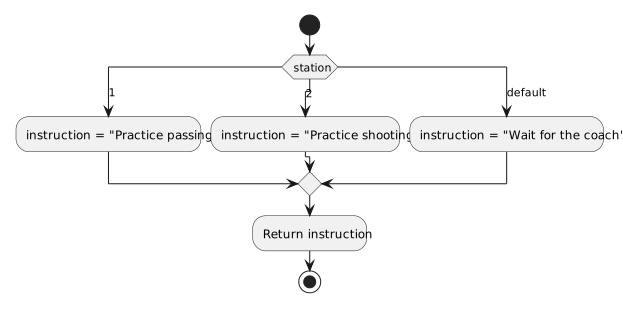
Build Complete Soccer Cases in the Wildcats soccer training model.
Build Complete Soccer Cases
  • New
  • Changed
  • Removed
Try a Small Change
Predict Before You Run

Write your prediction and a short reason first. If you test the change, compare the observed values with that prediction. When they differ, find the first statement or decision where your explanation stops matching the code.