- New
- Changed
- Removed
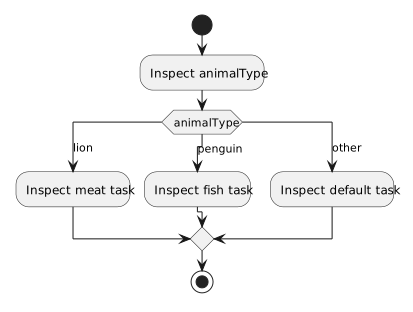
For penguin, execution enters only the penguin case and then exits at break. For otter, it reaches default. A string with unexpected capitalization also reaches default. The debugger reveals the actual input value, which is more reliable than assuming what the UI supplied.
Place one breakpoint on the switch and another on the statement after it. At the first, record animalType. At the second, record task and check that the selected assignment ran. If execution stops at default unexpectedly, compare whitespace and capitalization in the actual value with the case label before changing program logic.
Run penguin, otter, and Penguin. For each, write down the case reached and the final task. If an expected case is skipped, compare the input text with the exact case label.