2.1.17 The Visual Studio Watch Window

Watch Chosen Soccer Expressions

The Watch window keeps a chosen set of expressions available while you step. Unlike the automatic selection in Autos, you decide what to add.

Watch is useful for comparing the current player's turn count with the threshold used by a condition.

Start with the Soccer Example

Read the example once before trying to explain every line. Then use the short explanations below to connect each part of the code with the soccer task.

Watch Chosen Soccer Expressions
Player selected = new Player();
selected.NumberOfTurns = 2;
bool canTakeTurn = selected.NumberOfTurns < 3;
selected.NumberOfTurns = selected.NumberOfTurns + 1;
Understand One Part at a Time
Follow the Worked Trace

Read the table one row at a time. Check when each value is observed: a value before a statement may differ from the value after that statement runs. Cover the result column and predict an answer before checking it.

Worked soccer trace
Observation Turn count Watched comparison Stored canTakeTurn
After bool assignment 2 True True
After count update 3 False True
Follow the Same Idea Visually

Use the diagram to follow the same soccer example in a different form. Start at the beginning and follow one execution at a time. Compare the labeled actions with the source code; do not assume every action in the picture runs.
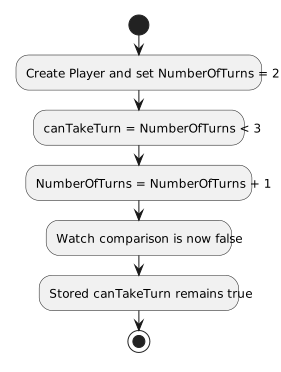
Watch Chosen Soccer Expressions in the Wildcats soccer training model.
Watch Chosen Soccer Expressions
  • New
  • Changed
  • Removed
Try a Small Change
Predict Before You Run

Write your prediction and a short reason first. If you test the change, compare the observed values with that prediction. When they differ, find the first statement or decision where your explanation stops matching the code.