- New
- Changed
- Removed
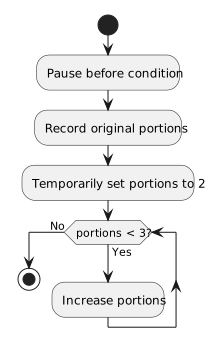
Pause before the while condition. If you change portions from 0 to 3 in Locals or Watch, the next condition check is false and the loop body is skipped. If you change it to 2, the body runs once before the next false check. Editing at a later line may not re-evaluate a condition already tested.
Treat the modified value as an experiment. It can quickly show what the program would do if a condition were true or false, but it does not prove that the real application can reach that state. After exploring, restart the run and test with a normal input. This separates a useful debugger experiment from an actual fix.
Repeat the test from a fresh run after changing your source or input normally. A debug-time edit is useful for exploration, but it is not a permanent repair and may differ from a path that the real program can reach.