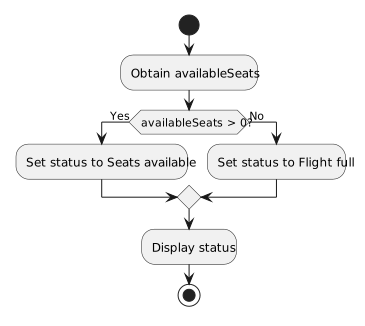
A C# decision can be represented visually with a UML activity diagram.
The purpose is not to copy C# punctuation into boxes.
The purpose is to show:
Consider:
if (player1.isAvailable)
{
System.Console.WriteLine("Player is available.");
}A conceptual activity flow is:
Start
↓
Is player available?
◇
/ \
[true] [false]
| |
Display |
available |
\ /
\ /
↓ ↓
Continue
↓
EndThe true path contains the action controlled by the if.
The false path skips that action.
Both paths can continue with the rest of the activity.
In C#:
if (player1.isAvailable)
{
System.Console.WriteLine("Player is available.");
}
System.Console.WriteLine("Roster reviewed.");when availability is false, the program simply skips the controlled block.
The activity diagram should communicate that the false path bypasses the conditional action and rejoins the continuing flow.
Do not invent an extra false-path action when the source does not have one.
Consider:
if (player1.isAvailable)
{
System.Console.WriteLine("Player is available.");
}
else
{
System.Console.WriteLine("Player is unavailable.");
}A conceptual activity diagram is:
Is player available?
◇
/ \
[true] [false]
| |
v v
Display available Display unavailable
| |
+-----+-----+
|
v
EndThe decision has two outcomes.
Each outcome has its own action.
The decision node should communicate the question that controls the branch.
For example:
Is player available?This corresponds to the Boolean expression:
player1.isAvailableThe diagram does not need to reproduce:
if (player1.isAvailable)as C# syntax.
The UML should communicate the behavior.
For an introductory Boolean decision, useful labels are:
[true]
[false]The label tells the reader which condition result follows that path.
For:
Is player available?the true path means:
The false path means:
Suppose the C# is:
if (player1.position == "Goalkeeper")
{
System.Console.WriteLine("Goalkeeper instructions.");
}
else
{
System.Console.WriteLine("Field-player instructions.");
}The activity decision can be phrased:
Is the player's position "Goalkeeper"?Then the branches can be:
[true] → Display goalkeeper instructions
[false] → Display field-player instructionsThe diagram captures the meaning of the comparison rather than its exact source syntax.
C#:
if (team1.score >= 3)
{
System.Console.WriteLine("Three or more goals.");
}
else
{
System.Console.WriteLine("Fewer than three goals.");
}Activity decision:
Is the score at least 3?Branches:
[true] → Display three-or-more message
[false] → Display fewer-than-three messageThe diagram and the C# ask the same logical question.
C#:
if (player1.team == null)
{
System.Console.WriteLine("No team assigned.");
}
else
{
System.Console.WriteLine("Team assigned.");
}Activity decision:
Is the team reference null?Branches:
[true] → Display no-team message
[false] → Display team-assigned messageAgain, the diagram communicates the runtime decision.
After an if/else finishes, later statements may run regardless of which branch was selected.
Conceptually:
decision
/ \
true path false path
\ /
\ /
continueThe visual should make that continuation clear.
The two branches do not represent separate programs.
They are alternate paths through one activity.
For one evaluation of a basic if/else, the program does not execute both branch actions.
The decision selects one path.
If a diagram visually suggests that both paths run sequentially, it misrepresents the C# behavior.
At this point, model:
if;if/else.Do not add:
else if decisions.The next Learning Activities expand the model to multiple decisions.
For every branch, ask:
If the answers match the source logic, the activity diagram and C# are describing the same decision.