1.3.16 Continuing Program Execution With F5

F5 Lets the Debugger Continue Running

When Visual Studio pauses at a breakpoint or during step-by-step debugging, you do not always need to inspect every remaining statement.

The Continue command resumes execution.

A common Visual Studio shortcut is:
Plain text
F5

Continue runs until the program:

Continue Is Different from F10

You already used:

Plain text
F10

for Step Over.

Step Over advances one current statement at a time from your debugging perspective.

F5 does not stop after each ordinary statement.

It tells the program:

Keep running until there is another reason to pause.

Use F5 When the Next Observation Point Is Already Planned

Suppose you have:

You can start at the first breakpoint, inspect the current state, then press F5.

The debugger runs until it reaches the next breakpoint.

This is more efficient than pressing F10 through unrelated code.

F5 Does Not Skip the Code

Continue still executes the statements between breakpoints.

It simply does not pause after each one.

This distinction matters.

If a field changes between the two breakpoints, that change still happened.

The debugger just did not stop at every intermediate statement.

Use Breakpoints to Control Where F5 Stops

F5 is most useful when breakpoints answer specific questions.

For example:

What object receives the first call?

and later:

Which object is current inside DisplayName()?

Place breakpoints at those moments.

Then use Continue to move between them.

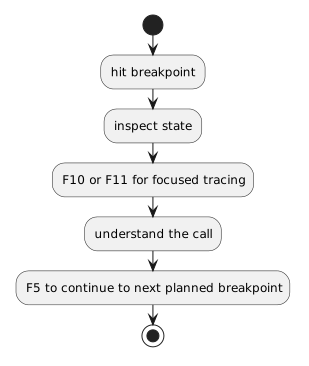
F5 Can Resume after Stepping

A common workflow is:

Plain text
hit breakpoint
   ↓
inspect state
   ↓
F10 or F11 for focused tracing
   ↓
understand the call
   ↓
F5 to continue to next planned breakpoint

You do not need to choose only one debugger command for the entire session.

Different commands answer different questions.

Be Aware of Unexpected Breakpoints

If old breakpoints remain active, F5 may stop somewhere you did not intend.

Use the Breakpoints window when needed to identify which breakpoints are active.

A surprising pause is often a breakpoint-management issue rather than a new program failure.

Continue After an Exception Only When the Situation Supports It

If the program has paused because of a runtime exception, do not reflexively press F5.

First read the exception and inspect the current state.

The program may not be able to continue normally from that failure.

The Main Question

Use F5 when you know:

I do not need to observe every statement between here and my next meaningful pause.

Continue is a navigation tool for runtime execution.

It becomes especially useful when combined with the Call Stack and Step Into.