1.2.1 Classes

Last Updated: 9/14/2026
From Individual Objects to a Shared Blueprint

In Module 1.1, you worked with individual objects in memory.

You saw that two objects can represent two different things even when they contain similar kinds of information.

For example, imagine two soccer players:

player1
name = "Jordan"
jerseyNumber = 7

player2
name = "Casey"
jerseyNumber = 12

The two objects have different values, but they share the same general structure:

  • each player has a name;
  • each player has a jersey number.

A class describes that shared structure.

A Class Describes What Its Objects Have in Common

Think of a class as a blueprint for a kind of object.

A Player class might say that Player objects have:

Player
----------------
name
jerseyNumber

The class does not describe one particular player such as Jordan or Casey.

Instead, it describes the information that Player objects are expected to contain.

An Object Is One Specific Instance

A class describes the general design.

An object represents one specific instance that follows that design.

Conceptually:
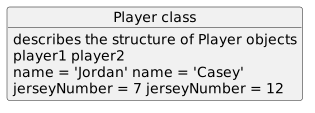
Object diagram showing Player class, then describes the structure of Player objects, then player1 player2, then name = "Jordan" name = "Casey", then jerseyNumber = 7 jerseyNumber = 12.
PlayerClass.
  • New
  • Changed
  • Removed

Both objects follow the same class structure.

Each object still has its own values and its own identity.
The Class Is Not the Same Thing as an Object

This distinction is important:

Class

For example:

Player

describes the general kind of thing.

But:

player1

identifies one particular Player object.

One Class Can Describe Many Objects

A program does not need a completely different design for every player.

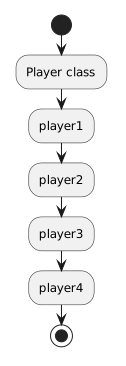
One Player class can describe the structure used by many Player objects:

Activity diagram showing Player class, then player1, then player2, then player3, then player4.
PlayerClass.
  • New
  • Changed
  • Removed

The objects can contain different values even though they share the same structure.

This gives a program a consistent way to represent many things of the same kind.

Shared Structure Does Not Mean Shared Values

Suppose Player objects have a field named:

jerseyNumber

That does not mean every Player object has the same jersey number.

Instead, each Player object has its own value for that field.

player1.jerseyNumber = 7
player2.jerseyNumber = 12

The class describes that the field exists.

The individual object holds the value for that particular instance.

A Class Helps Keep Object Structure Consistent

Imagine a program that represents several soccer players.

Without a shared design, it would be easy for the program to represent similar objects inconsistently.

A class gives those objects a common structure.

Conceptually:

Player class
----------------
name
jerseyNumber
isAvailable

Each Player object can then have its own values for those same pieces of information.

This makes the relationship between the model and the objects easier to understand.

Classes Describe Structure Before Values

When you look at a class, focus first on questions such as:

  • What kind of object does this class represent?
  • What information should objects of this class contain?
  • Which pieces of information belong to every object of this kind?

Do not start by asking what value one particular object has.

That question belongs to an object instance.

The class is about the shared design.

Compare a Class View with an Object View

A class-level view might be:

Player
----------------
name
jerseyNumber

An object-level view might be:

player1
----------------
name = "Jordan"
jerseyNumber = 7

The first view tells you what Player objects are structured to contain.

The second view tells you the current state of one specific Player object.

Why This Matters for Programming

Object-oriented programs often need to represent many related objects.

Classes provide a way to define the common structure those objects follow.

That lets you reason about the design at two levels:

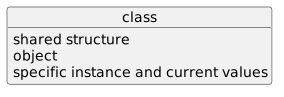
Object diagram showing class, then shared structure, then object, then specific instance and current values.
Class.
  • New
  • Changed
  • Removed

This distinction becomes especially important as programs contain more objects and more relationships between them.

What Comes Next

The next pages show how classes are represented in UML class diagrams and how fields appear inside those diagrams.

Later in the module, you will connect that model to C# by defining classes and fields in source code.

For now, keep one idea clear: