Object State Is the Current Information Stored by an Object
An object's state is the collection of relevant values it holds at a particular moment.
A Player object's state might be:
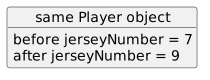
- New
- Changed
- Removed
An object's state is the collection of relevant values it holds at a particular moment.
A Player object's state might be:
Consider:
Player player1 = new Player();
player1.name = "Jordan";
player1.jerseyNumber = 7;
Immediately after new, the fields may still contain default values.
After the first assignment, the name changes.
After the second assignment, the jersey number changes.
The final state is built through execution.
A useful debugger workflow is:
For:
player1.jerseyNumber = 7;you may observe:
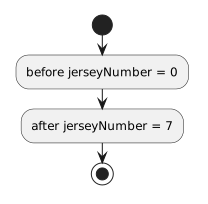
This turns an assignment from a line of syntax into an observable state transition.
State is not limited to text, numbers, and Booleans.
A Player object may contain:
team = reference to a Team objectBefore the relationship is assigned:
team = nullAfter:
player1.team = team1;the state changes:
team → team1The object now participates in a relationship.
A UML object diagram might show:
player1 : Player
-------------------------
name = "Jordan"
jerseyNumber = 7
That is one modeled snapshot.
The code may pass through several earlier states before reaching it.
The debugger lets you compare the current runtime state with the intended UML snapshot.
If a program behaves unexpectedly, ask:
This is often more precise than saying:
A debugger value is evidence from a particular moment.
If the program later executes another assignment, the state can change again.
Always connect an observed value to the current execution point.
Object-oriented programs do not work only with class definitions.
They work with specific objects whose state changes over time.
Understanding that changing state is essential for explaining what the program is doing.