When C# executes:
Player player1 = new Player();
the variable player1 stores a reference that lets the code reach the new Player object.
Conceptually:
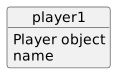
player1 ──→ Player object
The reference is not the entire object.
It identifies which object the code should work with.
When you write:
player1.name
C# uses the reference in player1 to reach the Player object and then access its name member.
The path is:
player1
↓
Player object
↓
name
If the reference is null, there is no Player object to continue through.
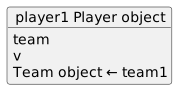
Suppose a Player can refer to a Team:
player1.team = team1;
Now the Player object contains a reference to another object.
Conceptually:
player1 → Player object
|
| team
v
Team object ← team1
This is how object relationships can exist in runtime state.
nullA reference field may initially be:
null
That means:
This reference does not currently identify an object.
For example:
player1.team = null
does not mean the Player object is null.
It means the Player's Team reference is currently empty.
After:
player1.team = team1;
the expression:
player1.team.name
can be read as:
player1 to reach the Player;team reference to reach the Team;name.Every reference step must lead to an object before the next member access can succeed.
UML may show:
player1 : Player -------- team1 : Team
C# may establish the connection with:
player1.team = team1;
The debugger can then show the nested Team object through player1.
Three views describe one relationship:
UML line
C# reference assignment
runtime object reference
At this point, when you see:
player1.team = team1;
understand it as assigning an object reference.
Do not picture all of the Team fields being copied into the Player.
The Player keeps a way to reach the Team object.
More detailed shared-reference behavior is taught later in PC1.
They explain:
null can cause runtime exceptions.When an object relationship behaves incorrectly, tracing references is often the most useful place to begin.