A Compiler Error Can Stop a Successful Build
Consider:
player1.jerseyNumber = "seven";
If jerseyNumber is an int, the string:
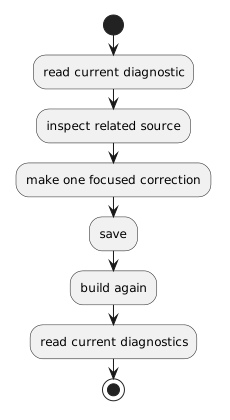 ReadCurrentDiagnostic.
The new build result replaces the old one as the current evidence.
Do not keep correcting an old error message after the source has changed.
Multiple Errors Can Share One Cause
One missing symbol can cause several later messages.
If ten errors appear, do not assume ten independent mistakes exist.
Begin with the earliest clear problem you understand.
Correct it.
Build again.
Some later diagnostics may disappear because they were consequences of the first problem.
Preserve the Supplied Project Structure
Do not respond to an error by:
- renaming the project;
- creating duplicate source files;
- changing field types without a requirement;
- deleting analyzer configuration;
- replacing the supplied code with an unrelated tutorial.
Use the diagnostic to investigate the current source within the current teaching boundary.
The Errors View Is Evidence, Not a Solution Generator
The diagnostic can tell you something like:
or:
It cannot decide what the correct requirement is.
Use the requirement, UML, and supplied source to determine what the code should mean.
The Main Distinction
Use the errors view to answer:
Use the debugger to answer:
The next activity introduces runtime exceptions, which belong to that second category.