1.1.13 How to Assign Field Values

Assignment Changes the State Stored in a Field

A field belongs to an object.

An assignment gives that field a value.

For example:

C#
player1.jerseyNumber = 7;

Read it as:

Set the jerseyNumber field on the object referenced by player1 to 7.

The assignment changes one part of the object's current state.

Read Assignment From Right to Left

Consider:

C#
player1.name = "Jordan";

The left side identifies where the value will be stored:

C#
player1.name

The right side supplies the value:

C#
"Jordan"

A helpful reading is:

Take "Jordan" and assign it to player1.name.

Assignment Uses One Equals Sign

In this context:

C#
=

means assignment.

For example:

C#
player1.isAvailable = true;

means:

Store true in the isAvailable field on player1.

Do not read the statement as a mathematical equation.

The source is telling the program to change state.

The Field Type Controls Which Values Fit

Suppose the supplied Player class contains:

C#
string name;
int jerseyNumber;
bool isAvailable;

Appropriate assignments include:

C#
player1.name = "Jordan";
player1.jerseyNumber = 7;
player1.isAvailable = true;

The values match the field types:
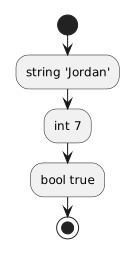
Plain text
string → "Jordan"
int    → 7
bool   → true

If a value does not match the expected type, the compiler can report a problem.

Map Assignments Back to UML

Suppose the UML object is:

Plain text
player1 : Player
-------------------------
name = "Jordan"
jerseyNumber = 7
isAvailable = true

A matching C# sequence can be:

C#
Player player1 = new Player();

player1.name = "Jordan";
player1.jerseyNumber = 7;
player1.isAvailable = true;

The UML shows the desired snapshot.

The assignments create that state during execution.

Order Can Matter When a Field Is Assigned More Than Once

Consider:

C#
player1.jerseyNumber = 7;
player1.jerseyNumber = 9;

After both statements execute, the field contains the later assigned value:

Plain text
9

The second assignment replaces the earlier field value.

This does not create another Player object.

It changes the state of the same object.

Assignment Does Not Change the Field's Type

If:

C#
int jerseyNumber;

then changing:

C#
player1.jerseyNumber = 7;

to:

C#
player1.jerseyNumber = 9;

changes the value.

The field is still an int.

Type and value are different parts of the object's structure.

Use the Correct Object Identity

Suppose the UML says:

Plain text
player1 : Player
name = "Jordan"

player2 : Player
name = "Casey"

Then:

C#
player1.name = "Jordan";
player2.name = "Casey";

preserves the intended mapping.

This code:

C#
player1.name = "Casey";
player2.name = "Jordan";

uses valid strings and valid fields.

It still represents the wrong model.

Correct assignment includes:

Assign Only What the Current Requirement Calls For

A supplied class may contain more fields than the current object diagram displays.

If the current model does not specify a value for one of those fields, do not invent a value merely to fill the object.

The current requirement and UML control the intended state.

Use the Debugger to Observe the Change

Place execution before a field assignment.

Inspect the object.

Then use F10 to execute the statement.

Inspect the field again.

Conceptually:

Plain text
before assignment
jerseyNumber = current value

execute:
player1.jerseyNumber = 7;

after assignment
jerseyNumber = 7

This makes field assignment visible as a runtime state change.

Assignment Is the Basic State-Changing Pattern

Keep this structure in mind:

C#
objectReference.field = value;

Read it as:

On this object, store this value in this field.

That pattern will remain useful as objects become connected to other objects in CO-029.