0.5.15 Module 5 Quiz Study Guide

Hexadecimal Appears in Web Colors

A six-digit hexadecimal web color commonly has the form:
Plain text
#RRGGBB

The three pairs represent:

Each pair ranges from:

Plain text
00

through:

Plain text
FF

Examples:

Plain text
#FF0000

strong red

Plain text
#00FF00

strong green

Plain text
#0000FF

strong blue

The hexadecimal representation is a compact way to express digital color values.

HTML Provides Webpage Structure

HTML identifies the structure and meaning of page content.

Examples include:

HTML
<h1>Page Title</h1>
<p>A paragraph of information.</p>

HTML can represent:

A basic page separates document information in the head from visible page content in the body.

CSS Controls Presentation

CSS controls visual presentation such as:

A simple rule is:

CSS
h1 {
    color: #3366CC;
}

The selector identifies what is being styled.

The declaration supplies a property and value.

HTML and CSS have different jobs:

HTML: structure and meaning.

CSS: presentation.

The Internet and the Web Are Different Concepts

The Internet is the connected network infrastructure.

The Web is a system of resources and communication that uses that network.

A browser uses Internet connectivity to participate in Web request/response interactions.

Not every Internet-based communication is a webpage.

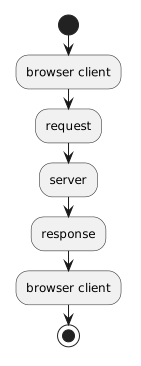
The Browser Acts as a Client

In a simple web interaction:

Plain text
browser/client
      ↓ request
server
      ↓ response
browser/client

The browser:

The server:

Visiting a Website Is a Sequence

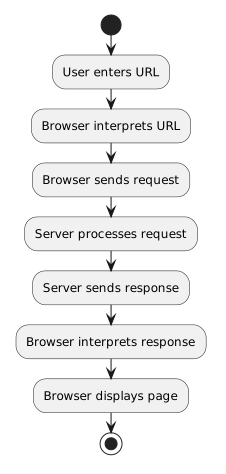
A simplified flow is:

Plain text
User enters URL
      ↓
Browser interprets URL
      ↓
Browser sends request
      ↓
Server processes request
      ↓
Server sends response
      ↓
Browser interprets response
      ↓
Browser displays page

A visible page may require several additional requests for CSS, images, or other resources.

Requests and Responses Travel in Opposite Directions

The client sends the request.

The server sends the response.

A response can include:

A successful response can include HTML that the browser renders.

Activity Partitions Show Responsibility

A UML activity diagram can use partitions or swimlanes to show who performs each action.

For a web interaction, useful lanes are:

Plain text
Browser / Client
Server

The request crosses from the Browser lane to the Server lane.

The response crosses back.

Partitions add responsibility information to the normal activity-diagram flow.

A Web-Request Activity Diagram Models the Round Trip

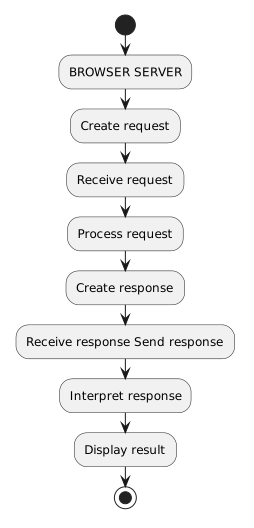
A conceptual partitioned flow is:

Plain text
BROWSER                    SERVER

Create request
      --------------------> Receive request
                            Process request
                            Create response
Receive response <--------- Send response
Interpret response
Display result

The diagram should communicate both:

A URL Has Structured Parts

Consider:

Plain text
https://example.com/teams/wildcats

The main introductory parts are:

Scheme

Plain text
https

Host

Plain text
example.com

Path

Plain text
/teams/wildcats

The URL gives the browser structured information about how and where to request a resource.

Query Parameters Add Information

Consider:

Plain text
https://example.com/search?team=wildcats

The query parameter is:

Plain text
team=wildcats

The name is:

Plain text
team

The value is:

Plain text
wildcats

Multiple parameters can be separated with:

Plain text
&

User input may need URL-safe encoding before it becomes query data.

C# Can Build a URL String

A supplied C# application can combine:

Conceptually:

Plain text
base URL
   +
query structure
   +
safe user value
   =
constructed URL

The URL is still text until the program asks the environment to open it.

The Browser Still Performs the Web Request

When C# opens a URL, the C# application does not become the browser.

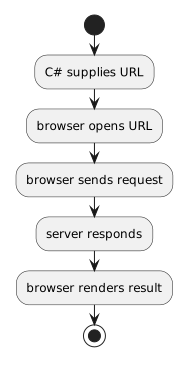
The responsibility flow remains:

Plain text
C# supplies URL
      ↓
browser opens URL
      ↓
browser sends request
      ↓
server responds
      ↓
browser renders result

This course activity does not require an automated web API.

Human Observation Can Become Program Input

The learner can observe information displayed on the webpage and make a true/false judgment.

For example:

Plain text
Is it raining?

can become:

Plain text
isRaining = true

or:

Plain text
isRaining = false

That Boolean can feed simple if or if/else logic.

Trace the Entire Information Path

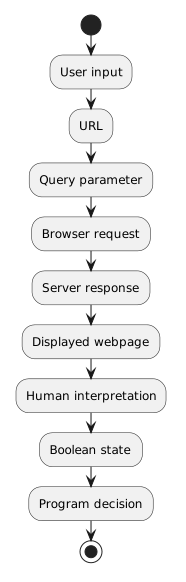
Module 5 connects several representations and systems:

Plain text
User input
      ↓
URL
      ↓
Query parameter
      ↓
Browser request
      ↓
Server response
      ↓
Displayed webpage
      ↓
Human interpretation
      ↓
Boolean state
      ↓
Program decision

The important skill is understanding which participant or representation is responsible at each stage.