0.5.14 Manual Interpretation of Web Page

A Program Does Not Automatically Understand What a Webpage Means

In the supplied FIT weather activity, the C# application can open a weather-related webpage.

The browser displays information.

A person can look at the result and answer a question such as:

Is it raining?

That answer can then become a Boolean value used by the program.

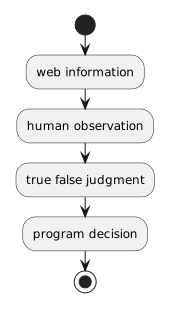
The important flow is:
Plain text
web information
      ↓
human observation
      ↓
true/false judgment
      ↓
program decision

The human is deliberately part of the system.
Observation Comes Before the Boolean Value

Suppose the browser displays current weather information.

The learner reviews the page and concludes:

Plain text
It is raining.

That observation can be represented in the supplied application as:

Plain text
isRaining = true

If the learner concludes that it is not raining:

Plain text
isRaining = false

The program can now use a Boolean value it already knows how to evaluate.

This Is Human Interpretation, Not Automated Parsing

The program is not reading the webpage and discovering the weather by itself.

The person is interpreting the web information.

That distinction matters.

The workflow is not:

Plain text
website → C# automatically understands weather

It is:

Plain text
website → person observes result → person supplies decision state → C# uses Boolean

This keeps the program logic simple while still connecting web information to software behavior.

The Boolean Can Reuse Earlier Decision Logic

You have already read C# decisions such as:

C#
if (isRaining)
{
    System.Console.WriteLine("Choose rain gear.");
}

The new part is not the if.

The new part is where the Boolean state came from.

Earlier, isRaining may have been supplied directly by the program.

Now the value can represent a human judgment based on information observed on the Web.

An if/else Can Represent Two Outcomes

A simple example is:

C#
if (isRaining)
{
    System.Console.WriteLine("Choose a rain jacket.");
}
else
{
    System.Console.WriteLine("Choose a hoodie.");
}

Read the code using the Boolean value.

If:

Plain text
isRaining = true

the first branch runs.

If:

Plain text
isRaining = false

the else branch runs.

The conditional reasoning is the same as Module 0.3.

The information source is different.

Separate Evidence From the Decision

The webpage provides information.

The learner interprets that information.

The learner's true/false judgment becomes the input to the decision.

Those are three different stages.

For example:

Evidence

The webpage reports rain at the selected location.

Human interpretation

I judge that the answer to “Is it raining?” is yes.

Program state

Plain text
isRaining = true

Program behavior

Follow the true branch.

Keeping those stages separate makes it easier to explain why the program behaved as it did.

Human Judgment Can Be Wrong

A person can misread the page.

The page can show information for the wrong location.

The URL can contain the wrong query value.

The displayed information can also change over time.

That is why the complete evidence chain matters.

If the program chooses an unexpected clothing result, inspect the process:

  1. Was the user input correct?
  2. Was the constructed URL correct?
  3. Did the browser display the intended page?
  4. Did the learner interpret the information correctly?
  5. Was the correct Boolean state supplied?
  6. Did the if or if/else logic follow the expected branch?

The final program output is only the end of the chain.

Web Information Does Not Become Truth Just Because It Is Displayed

A browser can display incorrect, outdated, incomplete, or misunderstood information.

This module does not yet focus on evaluating source credibility in depth.

It does establish an important habit:

Observe what the source actually says before turning it into a program decision.

Later course work will place more emphasis on evaluating digital information and evidence.

The Full Module Connection

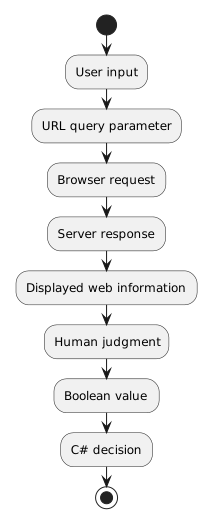
This one activity brings several Module 0.5 ideas together:

Plain text
User input
   ↓
URL + query parameter
   ↓
Browser request
   ↓
Server response
   ↓
Displayed web information
   ↓
Human judgment
   ↓
Boolean value
   ↓
C# decision

You have moved from understanding the Web as a client/server system to using web information as part of a simple software decision.