HTML describes the structure of webpage content.
CSS, or Cascading Style Sheets, controls much of the page's visual presentation.
CSS can influence things such as:
A useful separation is:
HTML: What is this content?
CSS: How should this content be presented?
Suppose the HTML contains:
<h1>Wildcats Soccer Club</h1>
<p>Welcome to our team page.</p>
The browser can display that page without custom CSS.
CSS can then change its appearance.
For example:
h1 {
color: #3366CC;
}
This rule applies a hexadecimal color to h1 elements.
Consider:
h1 {
color: #3366CC;
font-size: 2rem;
}
The selector is:
h1
It identifies which elements the rule applies to.
Inside the braces are declarations.
Each declaration contains:
property: value;
For example:
color: #3366CC;
The property is color.
The value is #3366CC.
The previous Learning Activity showed that:
#3366CC
contains red, green, and blue hexadecimal components.
CSS gives that representation a visible use:
h1 {
color: #3366CC;
}
The browser interprets the CSS and renders the heading using that color.
Suppose the HTML contains:
<p class="important">Practice has moved to North Field.</p>
CSS can target the class:
.important {
font-weight: bold;
}
The period before:
important
indicates a CSS class selector.
This makes it possible to apply the same presentation rule to several elements that share the same class.
CSS can make a page attractive, but visual design should support the information rather than hide it.
Useful goals include:
Avoid using styling only to make a page look complicated.
A simple, readable page is a stronger result than a visually busy page whose structure is difficult to understand.
Imagine a list where:
If color is the only clue, some readers may not be able to distinguish the states.
A stronger design includes text:
<p class="available">Available</p>
<p class="unavailable">Unavailable</p>
Color can reinforce the state, but the text communicates the meaning directly.
Suppose this HTML is a heading:
<h1>Wildcats Soccer Club</h1>
CSS could make it blue, centered, or larger.
It remains an h1 heading.
Likewise, making a paragraph visually large does not turn that paragraph into a true HTML heading.
Use HTML for semantic structure.
Use CSS for presentation.
A page can link to an external stylesheet.
For example:
<link rel="stylesheet" href="styles.css">
The HTML document contains the structure.
The .css file contains style rules.
This can keep content and presentation easier to organize.
A small styles.css file might contain:
body {
font-family: Arial, sans-serif;
}
h1 {
color: #3366CC;
}
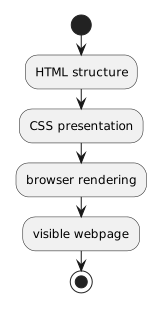
The browser receives the HTML structure and the CSS styling information.
It then renders the visible page.
Conceptually:
HTML structure
+
CSS presentation
↓
browser rendering
↓
visible webpage
That does not mean HTML and CSS are the same artifact.
They contribute different information to the result.
A useful workflow for a small webpage is:
The browser becomes the place where both representations come together.