0.4.15 Writing Information to a Text File

Writing Makes Runtime Information Persistent

Suppose a soccer application contains a lineup note:

C#
string lineupNote = "Jordan starts at forward.";

At this moment, the value belongs to the running program.

To preserve it after the program closes, the application can write the text to a file.

A simple C# API for this purpose is:

C#
System.IO.File.WriteAllText

A Simple Write

An instructional example is:

C#
string lineupNote = "Jordan starts at forward.";

System.IO.File.WriteAllText("lineup.txt", lineupNote);

Read the second statement as:

Write all of the text stored in lineupNote to the file named lineup.txt.

The first argument identifies the file.

The second argument provides the text to write.

The File Receives a Text Representation

After the write, the file contains:
Plain text
Jordan starts at forward.

The file does not contain the C# variable itself.

It contains the text value the program chose to write.

This distinction matters.

The runtime variable and the persistent file are different representations in different locations.

Writing Can Create or Replace the File Content

WriteAllText writes the supplied text as the file's complete content.

If the file does not exist, the operation can create it.

If it already exists, this operation replaces its previous text with the newly supplied text.

That makes the method convenient for a simple introductory example where the application wants one current saved value.

Appending additional content is a different operation and is outside the current focus.

Use the Course-Provided File Location

A filename such as:

C#
"lineup.txt"

is simple for explanation, but an actual application may need a specific course-provided path or location.

Use the path supplied by the current project.

Do not move storage to another folder or hardcode a new system location simply because it works on one computer.

Build the Text Before Writing It

The program can prepare the text first.

For example:

C#
string playerName = "Jordan";
string position = "Forward";

string lineupNote = playerName + " starts at " + position + ".";

Then:

C#
System.IO.File.WriteAllText("lineup.txt", lineupNote);

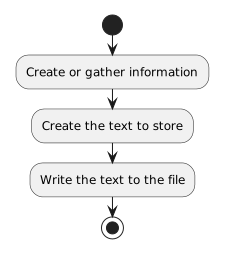
The important sequence is:

Plain text
Create or gather information
        ↓
Create the text to store
        ↓
Write the text to the file

Writing Is an Action, Not a Permanent Connection

After writing:

C#
System.IO.File.WriteAllText("lineup.txt", lineupNote);

the file does not remain automatically synchronized with the variable.

If the program later changes:

C#
lineupNote = "Casey starts at goalkeeper.";

the file still contains the earlier text until another write occurs.

A write captures the text supplied at the time of the operation.

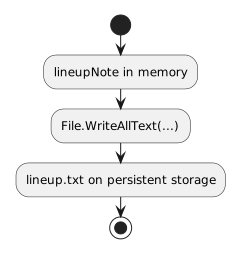
A Useful Storage Flow

Conceptually:

Plain text
lineupNote in memory
        ↓
File.WriteAllText(...)
        ↓
lineup.txt on persistent storage

The code implements the write action you previously modeled with an activity diagram.

Saving Is Different From Displaying

A program can display:

Plain text
Jordan starts at forward.

without writing a file.

It can also write that text to a file without showing the text on screen.

Display and persistence are different responsibilities.

Do not assume visible output has automatically been saved.

Keep File Writing Introductory

For this module, focus on one simple idea:

C#
System.IO.File.WriteAllText(path, text);

The program has text in memory.

The method writes that text to persistent storage.

Later courses can add:

Those are not needed to understand the basic movement of information from memory to a text file.