0.4.14 Files and Persistent Storage

A File Can Preserve Information After a Program Ends

A file is one way to store information persistently.

When a program writes information to a file, that information can remain available after the program closes.

The next time the program runs, it can read the file and recover the saved information.

This gives the application continuity across separate runs.

Text Files Store Textual Information

A text file contains characters that can be read as text.

For example, a file might contain:
Plain text
Jordan starts at forward.

or:

Plain text
Wildcats vs Rangers
North Field
Saturday

A person can often open a text file in a simple text editor and read its contents.

That makes text files a useful introductory storage format.

A File Has a Location and a Name

To work with a file, the program needs to identify it.

A file is located somewhere in the computer's file system.

It also has a filename.

For example:

Plain text
lineup.txt

The .txt extension commonly indicates a text file.

The actual location used in your course application should come from the supplied project and instructions.

Do not invent file locations or move supplied files unless directed.

Writing and Reading Are Different Operations

Two core operations are:

write

Plain text
running program → file

and:

read

Plain text
file → running program

Writing creates or updates persistent information.

Reading brings saved information into the current runtime state.

A program may do one, the other, or both.

Saving Does Not Mean Saving Every Program Object Automatically

Suppose the running program has a Player object with:

Plain text
name = "Jordan"
jerseyNumber = 7
isAvailable = true

Writing a text file does not automatically save the entire object exactly as it exists in memory.

The code decides what text to write.

For example, it might write only:

Plain text
Jordan

or:

Plain text
Jordan,7,true

or a longer human-readable sentence.

The stored representation depends on the program.

This module focuses on simple text rather than full object serialization.

Files Can Outlive the Program

Imagine this sequence:

  1. Start the soccer application.
  2. Enter a lineup note.
  3. Write the note to lineup.txt.
  4. Close the application.
  5. Open the file in a text editor.

The application is no longer running.

The file can still exist.

That is persistence.

A Later Run Can Read the Same Information

Now imagine:

  1. Start the application again.
  2. Read lineup.txt.
  3. Display the saved note.

The program recovered information created during an earlier run.

That is the practical value of persistent storage.

Files Need to Be Treated as External Resources

A file exists outside the current variables and objects in the running program.

That means file work can fail for reasons that ordinary in-memory assignments do not.

Examples can include:

Detailed exception handling is outside the current FIT scope.

For now, use the supplied file paths and heavily guided code so the focus stays on information movement.

Text Files Are Simple, Not Universal

Text files are excellent for seeing persistence because they are easy to inspect.

They are not the best storage format for every application.

Later technologies may use more structured approaches.

Do not generalize:

Programs should always save data in text files.

The correct conclusion is:

A text file is one understandable example of persistent storage.

The Storage Model

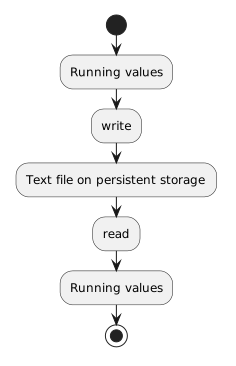
Keep this high-level model:

Plain text
Running values
      ↓ write
Text file on persistent storage
      ↓ read
Running values

The file acts as the persistent bridge between different executions of the program.

The next two activities show how simple C# code can perform those write and read operations.